Index: frontend/node_modules/postcss-image-set-function/README.md
===================================================================
--- frontend/node_modules/postcss-image-set-function/README.md (revision 9af201e94b5a79beb92a30858fc54de4bc3b9449)
+++ frontend/node_modules/postcss-image-set-function/README.md (revision 9af201e94b5a79beb92a30858fc54de4bc3b9449)
@@ -0,0 +1,162 @@
+# PostCSS image-set() Function [ ][postcss]
+
+[![NPM Version][npm-img]][npm-url]
+[![CSS Standard Status][css-img]][css-url]
+[![Build Status][cli-img]][cli-url]
+[
][postcss]
+
+[![NPM Version][npm-img]][npm-url]
+[![CSS Standard Status][css-img]][css-url]
+[![Build Status][cli-img]][cli-url]
+[ ][discord]
+
+[PostCSS image-set() Function] lets you display resolution-dependent images
+using the `image-set()` function in CSS, following the [CSS Images]
+specification.
+
+[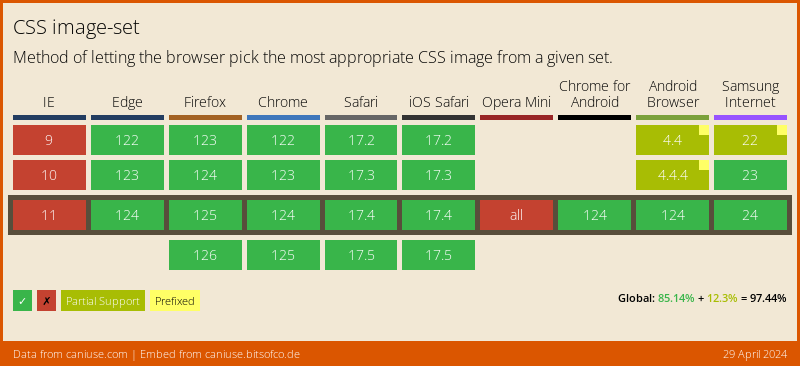](https://caniuse.com/#feat=css-image-set)
+
+```pcss
+.example {
+ background-image: image-set(
+ url(img.png) 1x,
+ url(img@2x.png) 2x,
+ url(img@print.png) 600dpi
+ );
+}
+
+/* becomes */
+
+.example {
+ background-image: url(img.png);
+}
+
+@media (-webkit-min-device-pixel-ratio: 2), (min-resolution: 192dpi) {
+ .example {
+ background-image: url(img@2x.png);
+ }
+}
+
+
+@media (-webkit-min-device-pixel-ratio: 6.25), (min-resolution: 600dpi) {
+ .example {
+ background-image: url(my@print.png);
+ }
+}
+
+.example {
+ background-image: image-set(
+ url(img.png) 1x,
+ url(img@2x.png) 2x,
+ url(img@print.png) 600dpi
+ );
+}
+```
+
+## Usage
+
+Add [PostCSS image-set() Function] to your project:
+
+```bash
+npm install postcss-image-set-function --save-dev
+```
+
+Use [PostCSS image-set() Function] as a [PostCSS] plugin:
+
+```js
+const postcss = require('postcss');
+const postcssImageSetFunction = require('postcss-image-set-function');
+
+postcss([
+ postcssImageSetFunction(/* pluginOptions */)
+]).process(YOUR_CSS /*, processOptions */);
+```
+
+[PostCSS image-set() Function] runs in all Node environments, with special
+instructions for:
+
+| [Node](INSTALL.md#node) | [PostCSS CLI](INSTALL.md#postcss-cli) | [Webpack](INSTALL.md#webpack) | [Create React App](INSTALL.md#create-react-app) | [Gulp](INSTALL.md#gulp) | [Grunt](INSTALL.md#grunt) |
+| --- | --- | --- | --- | --- | --- |
+
+## Options
+
+### preserve
+
+The `preserve` option determines whether the original declaration using
+`image-set()` is preserved. By default, it is preserved.
+
+```js
+postcssImageSetFunction({ preserve: false })
+```
+
+```pcss
+.example {
+ background-image: image-set(
+ url(img.png) 1x,
+ url(img@2x.png) 2x,
+ url(img@print.png) 600dpi
+ );
+}
+
+/* becomes */
+
+@media (-webkit-min-device-pixel-ratio: 1), (min-resolution: 96dpi) {
+ .example {
+ background-image: url(img.png);
+ }
+}
+
+@media (-webkit-min-device-pixel-ratio: 2), (min-resolution: 192dpi) {
+ .example {
+ background-image: url(img@2x.png);
+ }
+}
+
+
+@media (-webkit-min-device-pixel-ratio: 6.25), (min-resolution: 600dpi) {
+ .example {
+ background-image: url(my@print.png);
+ }
+}
+```
+
+### onvalid
+
+The `oninvalid` option determines how invalid usage of `image-set()` should be
+handled. By default, invalid usages of `image-set()` are ignored. They can be
+configured to display a `warning` or `throw` an error.
+
+```js
+postcssImageSetFunction({ oninvalid: 'warning' }) // warn on invalid usages
+```
+
+```js
+postcssImageSetFunction({ oninvalid: 'throw' }) // throw on invalid usages
+```
+
+## Image Resolution
+
+The `image-set()` function allows an author to provide multiple resolutions of
+an image and let the browser decide which is most appropriate in a given
+situation. The `image-set()` also never fails to choose an image; the
+`` just helps determine which of the images is chosen.
+
+Since this plugin is not a browser, the image options are sorted by device
+pixel ratio and the lowest ratio is used as the default, while the remaining
+images are pushed behind media queries.
+
+Therefore, this plugin can only approximate native browser behavior. While
+images should typically match the resolution as the device they’re being viewed
+in, other factors can affect the chosen image. For example, if the user is on a
+slow mobile connection, the browser may prefer to select a lower-res image
+rather than wait for a larger, resolution-matching image to load.
+
+[cli-img]: https://github.com/csstools/postcss-plugins/workflows/test/badge.svg
+[cli-url]: https://github.com/csstools/postcss-plugins/actions/workflows/test.yml?query=workflow/test
+[css-img]: https://cssdb.org/images/badges/image-set-function.svg
+[css-url]: https://cssdb.org/#image-set-function
+[discord]: https://discord.gg/bUadyRwkJS
+[npm-img]: https://img.shields.io/npm/v/postcss-image-set-function.svg
+[npm-url]: https://www.npmjs.com/package/postcss-image-set-function
+
+[CSS Images]: https://drafts.csswg.org/css-images-4/#image-set-notation
+[Gulp PostCSS]: https://github.com/postcss/gulp-postcss
+[Grunt PostCSS]: https://github.com/nDmitry/grunt-postcss
+[PostCSS]: https://github.com/postcss/postcss
+[PostCSS Loader]: https://github.com/postcss/postcss-loader
+[PostCSS image-set() Function]: https://github.com/csstools/postcss-plugins/tree/main/plugins/postcss-image-set-function
][discord]
+
+[PostCSS image-set() Function] lets you display resolution-dependent images
+using the `image-set()` function in CSS, following the [CSS Images]
+specification.
+
+[](https://caniuse.com/#feat=css-image-set)
+
+```pcss
+.example {
+ background-image: image-set(
+ url(img.png) 1x,
+ url(img@2x.png) 2x,
+ url(img@print.png) 600dpi
+ );
+}
+
+/* becomes */
+
+.example {
+ background-image: url(img.png);
+}
+
+@media (-webkit-min-device-pixel-ratio: 2), (min-resolution: 192dpi) {
+ .example {
+ background-image: url(img@2x.png);
+ }
+}
+
+
+@media (-webkit-min-device-pixel-ratio: 6.25), (min-resolution: 600dpi) {
+ .example {
+ background-image: url(my@print.png);
+ }
+}
+
+.example {
+ background-image: image-set(
+ url(img.png) 1x,
+ url(img@2x.png) 2x,
+ url(img@print.png) 600dpi
+ );
+}
+```
+
+## Usage
+
+Add [PostCSS image-set() Function] to your project:
+
+```bash
+npm install postcss-image-set-function --save-dev
+```
+
+Use [PostCSS image-set() Function] as a [PostCSS] plugin:
+
+```js
+const postcss = require('postcss');
+const postcssImageSetFunction = require('postcss-image-set-function');
+
+postcss([
+ postcssImageSetFunction(/* pluginOptions */)
+]).process(YOUR_CSS /*, processOptions */);
+```
+
+[PostCSS image-set() Function] runs in all Node environments, with special
+instructions for:
+
+| [Node](INSTALL.md#node) | [PostCSS CLI](INSTALL.md#postcss-cli) | [Webpack](INSTALL.md#webpack) | [Create React App](INSTALL.md#create-react-app) | [Gulp](INSTALL.md#gulp) | [Grunt](INSTALL.md#grunt) |
+| --- | --- | --- | --- | --- | --- |
+
+## Options
+
+### preserve
+
+The `preserve` option determines whether the original declaration using
+`image-set()` is preserved. By default, it is preserved.
+
+```js
+postcssImageSetFunction({ preserve: false })
+```
+
+```pcss
+.example {
+ background-image: image-set(
+ url(img.png) 1x,
+ url(img@2x.png) 2x,
+ url(img@print.png) 600dpi
+ );
+}
+
+/* becomes */
+
+@media (-webkit-min-device-pixel-ratio: 1), (min-resolution: 96dpi) {
+ .example {
+ background-image: url(img.png);
+ }
+}
+
+@media (-webkit-min-device-pixel-ratio: 2), (min-resolution: 192dpi) {
+ .example {
+ background-image: url(img@2x.png);
+ }
+}
+
+
+@media (-webkit-min-device-pixel-ratio: 6.25), (min-resolution: 600dpi) {
+ .example {
+ background-image: url(my@print.png);
+ }
+}
+```
+
+### onvalid
+
+The `oninvalid` option determines how invalid usage of `image-set()` should be
+handled. By default, invalid usages of `image-set()` are ignored. They can be
+configured to display a `warning` or `throw` an error.
+
+```js
+postcssImageSetFunction({ oninvalid: 'warning' }) // warn on invalid usages
+```
+
+```js
+postcssImageSetFunction({ oninvalid: 'throw' }) // throw on invalid usages
+```
+
+## Image Resolution
+
+The `image-set()` function allows an author to provide multiple resolutions of
+an image and let the browser decide which is most appropriate in a given
+situation. The `image-set()` also never fails to choose an image; the
+`` just helps determine which of the images is chosen.
+
+Since this plugin is not a browser, the image options are sorted by device
+pixel ratio and the lowest ratio is used as the default, while the remaining
+images are pushed behind media queries.
+
+Therefore, this plugin can only approximate native browser behavior. While
+images should typically match the resolution as the device they’re being viewed
+in, other factors can affect the chosen image. For example, if the user is on a
+slow mobile connection, the browser may prefer to select a lower-res image
+rather than wait for a larger, resolution-matching image to load.
+
+[cli-img]: https://github.com/csstools/postcss-plugins/workflows/test/badge.svg
+[cli-url]: https://github.com/csstools/postcss-plugins/actions/workflows/test.yml?query=workflow/test
+[css-img]: https://cssdb.org/images/badges/image-set-function.svg
+[css-url]: https://cssdb.org/#image-set-function
+[discord]: https://discord.gg/bUadyRwkJS
+[npm-img]: https://img.shields.io/npm/v/postcss-image-set-function.svg
+[npm-url]: https://www.npmjs.com/package/postcss-image-set-function
+
+[CSS Images]: https://drafts.csswg.org/css-images-4/#image-set-notation
+[Gulp PostCSS]: https://github.com/postcss/gulp-postcss
+[Grunt PostCSS]: https://github.com/nDmitry/grunt-postcss
+[PostCSS]: https://github.com/postcss/postcss
+[PostCSS Loader]: https://github.com/postcss/postcss-loader
+[PostCSS image-set() Function]: https://github.com/csstools/postcss-plugins/tree/main/plugins/postcss-image-set-function