Index: frontend/node_modules/postcss-logical/README.md
===================================================================
--- frontend/node_modules/postcss-logical/README.md (revision 9af201e94b5a79beb92a30858fc54de4bc3b9449)
+++ frontend/node_modules/postcss-logical/README.md (revision 9af201e94b5a79beb92a30858fc54de4bc3b9449)
@@ -0,0 +1,211 @@
+# PostCSS Logical Properties and Values [ ][postcss]
+
+[![NPM Version][npm-img]][npm-url]
+[![CSS Standard Status][css-img]][css-url]
+[![Build Status][cli-img]][cli-url]
+[
][postcss]
+
+[![NPM Version][npm-img]][npm-url]
+[![CSS Standard Status][css-img]][css-url]
+[![Build Status][cli-img]][cli-url]
+[ ][discord]
+
+[PostCSS Logical Properties and Values] lets you use logical, rather than
+physical, direction and dimension mappings in CSS, following the
+[CSS Logical Properties and Values] specification.
+
+[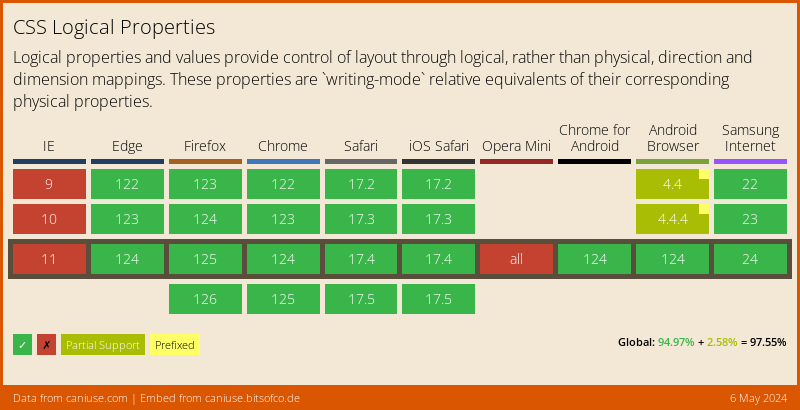](https://caniuse.com/#feat=css-logical-props)
+
+```pcss
+.banner {
+ color: #222222;
+ inset: logical 0 5px 10px;
+ padding-inline: 20px 40px;
+ resize: block;
+ transition: color 200ms;
+}
+
+/* becomes */
+
+.banner:dir(ltr) {
+ padding-left: 20px;
+ padding-right: 40px;
+}
+.banner:dir(rtl) {
+ padding-right: 20px;
+ padding-left: 40px;
+}
+.banner {
+ color: #222222;
+ top: 0;
+ left: 5px;
+ bottom: 10px;
+ right: 5px;
+ resize: vertical;
+ transition: color 200ms;
+}
+
+/* or, when used with { dir: 'ltr' } */
+
+.banner {
+ color: #222222;
+ top: 0;
+ left: 5px;
+ bottom: 10px;
+ right: 5px;
+ padding-left: 20px;
+ padding-right: 40px;
+ resize: vertical;
+ transition: color 200ms;
+}
+
+/* or, when used with { preserve: true } */
+
+.banner:dir(ltr) {
+ padding-left: 20px;
+ padding-right: 40px;
+}
+.banner:dir(rtl) {
+ padding-right: 20px;
+ padding-left: 40px;
+}
+.banner {
+ color: #222222;
+ top: 0;
+ left: 5px;
+ bottom: 10px;
+ right: 5px;
+ inset: logical 0 5px 10px;
+ padding-inline: 20px 40px;
+ resize: vertical;
+ resize: block;
+ transition: color 200ms;
+}
+```
+
+These shorthand properties set values for physical properties by default.
+Specifying the `logical` keyboard at the beginning of the property value will
+transform the flow-relative values afterward into both physical LTR and RTL
+properties:
+
+#### Logical Borders
+
+- `border`, `border-block`, `border-block-start`, `border-block-end`,
+ `border-inline`, `border-inline-start`, `border-inline-end`, `border-start`,
+ `border-end`, `border-color`, `border-block-color`,
+ `border-block-start-color`, `border-block-end-color`, `border-inline-color`,
+ `border-inline-start-color`, `border-inline-end-color`, `border-start-color`,
+ `border-end-color`, `border-style`, `border-block-style`,
+ `border-block-start-style`, `border-block-end-style`, `border-inline-style`,
+ `border-inline-start-style`, `border-inline-end-style`, `border-start-style`,
+ `border-end-style`, `border-width`, `border-block-width`,
+ `border-block-start-width`, `border-block-end-width`, `border-inline-width`,
+ `border-inline-start-width`, `border-inline-end-width`, `border-start-width`,
+ `border-end-width`, `border-start-start-radius`, `border-start-end-radius`,
+ `border-end-start-radius`, `border-end-end-radius`
+
+#### Logical Offsets
+
+- `inset`, `inset-block`, `inset-block-start`, `inset-block-end`,
+ `inset-inline`, `inset-inline-start`, `inset-inline-end`, `inset-start`,
+ `inset-end`
+
+#### Logical Margins
+
+- `margin`, `margin-block`, `margin-block-start`, `margin-block-end`,
+ `margin-inline`, `margin-inline-start`, `margin-inline-end`, `margin-start`,
+ `margin-end`
+
+#### Logical Paddings
+
+- `padding`, `padding-block`, `padding-block-start`, `padding-block-end`,
+ `padding-inline`, `padding-inline-start`, `padding-inline-end`,
+ `padding-start`, `padding-end`
+
+#### Logical Sizes
+
+- `block-size`, `max-block-size`, `min-block-size`, `inline-size`, `max-inline-size`, `min-inline-size`
+
+#### Flow-Relative Values
+
+- `clear: inline-start`, `clear: inline-end`, `float: inline-start`,
+ `float: inline-end`, `text-align: start`, `text-align: end`
+
+---
+
+By default, [PostCSS Logical Properties and Values] creates fallback selectors
+which require at least one `[dir]` attribute in your HTML. If you don’t have
+any `[dir]` attributes, consider using the following JavaScript:
+
+```js
+// force at least one dir attribute (this can run at any time)
+document.documentElement.dir = document.documentElement.dir || 'ltr';
+```
+
+Otherwise, consider using the `dir` option to transform all logical properties
+and values to a specific direction.
+
+```js
+require('postcss-logical')({
+ dir: 'ltr'
+});
+```
+
+## Usage
+
+Add [PostCSS Logical Properties and Values] to your project:
+
+```bash
+npm install postcss-logical --save-dev
+```
+
+Use [PostCSS Logical Properties and Values] as a [PostCSS] plugin:
+
+```js
+const postcss = require('postcss');
+const postcssLogical = require('postcss-logical');
+
+postcss([
+ postcssLogical(/* pluginOptions */)
+]).process(YOUR_CSS /*, processOptions */);
+```
+
+[PostCSS Logical Properties and Values] runs in all Node environments, with
+special instructions for:
+
+| [Node](INSTALL.md#node) | [PostCSS CLI](INSTALL.md#postcss-cli) | [Webpack](INSTALL.md#webpack) | [Create React App](INSTALL.md#create-react-app) | [Gulp](INSTALL.md#gulp) | [Grunt](INSTALL.md#grunt) |
+| --- | --- | --- | --- | --- | --- |
+
+## Options
+
+### dir
+
+The `dir` option determines how directional fallbacks should be added to CSS.
+By default, fallbacks replace the logical declaration with nested `:dir`
+pseudo-classes. If `dir` is defined as `ltr` or `rtl` then only the left or
+right directional fallbacks will replace the logical declarations. If
+`preserve` is defined as `true`, then the `dir` option will be ignored.
+
+### preserve
+
+The `preserve` option determines whether directional fallbacks should be added
+before logical declarations without replacing them. By default, directional
+fallbacks replace logical declaration. If `preserve` is defined as `true`, then
+the `dir` option will be ignored.
+
+## :dir() pseudo class
+
+This plugin transforms using the `:dir(ltr)` pseudo class.
+Use [postcss-dir-pseudo-class](https://github.com/csstools/postcss-plugins/tree/main/plugins/postcss-dir-pseudo-class#readme) to further transform to `[dir="ltr"]`.
+
+Currently `:dir(ltr)` doesn't have great browser support but this will improve over time.
+
+[css-img]: https://cssdb.org/images/badges/logical-properties-and-values.svg
+[css-url]: https://cssdb.org/#logical-properties-and-values
+[cli-img]: https://github.com/csstools/postcss-plugins/workflows/test/badge.svg
+[cli-url]: https://github.com/csstools/postcss-plugins/actions/workflows/test.yml?query=workflow/test
+[discord]: https://discord.gg/bUadyRwkJS
+[npm-img]: https://img.shields.io/npm/v/postcss-logical.svg
+[npm-url]: https://www.npmjs.com/package/postcss-logical
+
+[CSS Logical Properties and Values]: https://drafts.csswg.org/css-logical/
+[Gulp PostCSS]: https://github.com/postcss/gulp-postcss
+[Grunt PostCSS]: https://github.com/nDmitry/grunt-postcss
+[PostCSS]: https://github.com/postcss/postcss
+[PostCSS Loader]: https://github.com/postcss/postcss-loader
+[PostCSS Logical Properties and Values]: https://github.com/csstools/postcss-plugins/tree/main/plugins/postcss-logical
][discord]
+
+[PostCSS Logical Properties and Values] lets you use logical, rather than
+physical, direction and dimension mappings in CSS, following the
+[CSS Logical Properties and Values] specification.
+
+[](https://caniuse.com/#feat=css-logical-props)
+
+```pcss
+.banner {
+ color: #222222;
+ inset: logical 0 5px 10px;
+ padding-inline: 20px 40px;
+ resize: block;
+ transition: color 200ms;
+}
+
+/* becomes */
+
+.banner:dir(ltr) {
+ padding-left: 20px;
+ padding-right: 40px;
+}
+.banner:dir(rtl) {
+ padding-right: 20px;
+ padding-left: 40px;
+}
+.banner {
+ color: #222222;
+ top: 0;
+ left: 5px;
+ bottom: 10px;
+ right: 5px;
+ resize: vertical;
+ transition: color 200ms;
+}
+
+/* or, when used with { dir: 'ltr' } */
+
+.banner {
+ color: #222222;
+ top: 0;
+ left: 5px;
+ bottom: 10px;
+ right: 5px;
+ padding-left: 20px;
+ padding-right: 40px;
+ resize: vertical;
+ transition: color 200ms;
+}
+
+/* or, when used with { preserve: true } */
+
+.banner:dir(ltr) {
+ padding-left: 20px;
+ padding-right: 40px;
+}
+.banner:dir(rtl) {
+ padding-right: 20px;
+ padding-left: 40px;
+}
+.banner {
+ color: #222222;
+ top: 0;
+ left: 5px;
+ bottom: 10px;
+ right: 5px;
+ inset: logical 0 5px 10px;
+ padding-inline: 20px 40px;
+ resize: vertical;
+ resize: block;
+ transition: color 200ms;
+}
+```
+
+These shorthand properties set values for physical properties by default.
+Specifying the `logical` keyboard at the beginning of the property value will
+transform the flow-relative values afterward into both physical LTR and RTL
+properties:
+
+#### Logical Borders
+
+- `border`, `border-block`, `border-block-start`, `border-block-end`,
+ `border-inline`, `border-inline-start`, `border-inline-end`, `border-start`,
+ `border-end`, `border-color`, `border-block-color`,
+ `border-block-start-color`, `border-block-end-color`, `border-inline-color`,
+ `border-inline-start-color`, `border-inline-end-color`, `border-start-color`,
+ `border-end-color`, `border-style`, `border-block-style`,
+ `border-block-start-style`, `border-block-end-style`, `border-inline-style`,
+ `border-inline-start-style`, `border-inline-end-style`, `border-start-style`,
+ `border-end-style`, `border-width`, `border-block-width`,
+ `border-block-start-width`, `border-block-end-width`, `border-inline-width`,
+ `border-inline-start-width`, `border-inline-end-width`, `border-start-width`,
+ `border-end-width`, `border-start-start-radius`, `border-start-end-radius`,
+ `border-end-start-radius`, `border-end-end-radius`
+
+#### Logical Offsets
+
+- `inset`, `inset-block`, `inset-block-start`, `inset-block-end`,
+ `inset-inline`, `inset-inline-start`, `inset-inline-end`, `inset-start`,
+ `inset-end`
+
+#### Logical Margins
+
+- `margin`, `margin-block`, `margin-block-start`, `margin-block-end`,
+ `margin-inline`, `margin-inline-start`, `margin-inline-end`, `margin-start`,
+ `margin-end`
+
+#### Logical Paddings
+
+- `padding`, `padding-block`, `padding-block-start`, `padding-block-end`,
+ `padding-inline`, `padding-inline-start`, `padding-inline-end`,
+ `padding-start`, `padding-end`
+
+#### Logical Sizes
+
+- `block-size`, `max-block-size`, `min-block-size`, `inline-size`, `max-inline-size`, `min-inline-size`
+
+#### Flow-Relative Values
+
+- `clear: inline-start`, `clear: inline-end`, `float: inline-start`,
+ `float: inline-end`, `text-align: start`, `text-align: end`
+
+---
+
+By default, [PostCSS Logical Properties and Values] creates fallback selectors
+which require at least one `[dir]` attribute in your HTML. If you don’t have
+any `[dir]` attributes, consider using the following JavaScript:
+
+```js
+// force at least one dir attribute (this can run at any time)
+document.documentElement.dir = document.documentElement.dir || 'ltr';
+```
+
+Otherwise, consider using the `dir` option to transform all logical properties
+and values to a specific direction.
+
+```js
+require('postcss-logical')({
+ dir: 'ltr'
+});
+```
+
+## Usage
+
+Add [PostCSS Logical Properties and Values] to your project:
+
+```bash
+npm install postcss-logical --save-dev
+```
+
+Use [PostCSS Logical Properties and Values] as a [PostCSS] plugin:
+
+```js
+const postcss = require('postcss');
+const postcssLogical = require('postcss-logical');
+
+postcss([
+ postcssLogical(/* pluginOptions */)
+]).process(YOUR_CSS /*, processOptions */);
+```
+
+[PostCSS Logical Properties and Values] runs in all Node environments, with
+special instructions for:
+
+| [Node](INSTALL.md#node) | [PostCSS CLI](INSTALL.md#postcss-cli) | [Webpack](INSTALL.md#webpack) | [Create React App](INSTALL.md#create-react-app) | [Gulp](INSTALL.md#gulp) | [Grunt](INSTALL.md#grunt) |
+| --- | --- | --- | --- | --- | --- |
+
+## Options
+
+### dir
+
+The `dir` option determines how directional fallbacks should be added to CSS.
+By default, fallbacks replace the logical declaration with nested `:dir`
+pseudo-classes. If `dir` is defined as `ltr` or `rtl` then only the left or
+right directional fallbacks will replace the logical declarations. If
+`preserve` is defined as `true`, then the `dir` option will be ignored.
+
+### preserve
+
+The `preserve` option determines whether directional fallbacks should be added
+before logical declarations without replacing them. By default, directional
+fallbacks replace logical declaration. If `preserve` is defined as `true`, then
+the `dir` option will be ignored.
+
+## :dir() pseudo class
+
+This plugin transforms using the `:dir(ltr)` pseudo class.
+Use [postcss-dir-pseudo-class](https://github.com/csstools/postcss-plugins/tree/main/plugins/postcss-dir-pseudo-class#readme) to further transform to `[dir="ltr"]`.
+
+Currently `:dir(ltr)` doesn't have great browser support but this will improve over time.
+
+[css-img]: https://cssdb.org/images/badges/logical-properties-and-values.svg
+[css-url]: https://cssdb.org/#logical-properties-and-values
+[cli-img]: https://github.com/csstools/postcss-plugins/workflows/test/badge.svg
+[cli-url]: https://github.com/csstools/postcss-plugins/actions/workflows/test.yml?query=workflow/test
+[discord]: https://discord.gg/bUadyRwkJS
+[npm-img]: https://img.shields.io/npm/v/postcss-logical.svg
+[npm-url]: https://www.npmjs.com/package/postcss-logical
+
+[CSS Logical Properties and Values]: https://drafts.csswg.org/css-logical/
+[Gulp PostCSS]: https://github.com/postcss/gulp-postcss
+[Grunt PostCSS]: https://github.com/nDmitry/grunt-postcss
+[PostCSS]: https://github.com/postcss/postcss
+[PostCSS Loader]: https://github.com/postcss/postcss-loader
+[PostCSS Logical Properties and Values]: https://github.com/csstools/postcss-plugins/tree/main/plugins/postcss-logical