| Version 2 (modified by , 4 months ago) ( diff ) |
|---|
Advanced Application Development
This page documents the advanced application development implemented for Phase P8 of the Room Reservation System project. The goal of this phase is to extend the Java prototype application with transaction handling and database connection pooling.
The prototype was extended in two main directions:
- multi-operation database transactions were added for scenarios where several related database changes must be executed as one unit of work;
- database connection pooling was added using HikariCP, so the application does not create a new database connection manually for every operation.
The implementation affects the following source files:
- src/main/java/mk/finki/roomreservation/App.java
- src/main/java/mk/finki/roomreservation/DatabasePool.java
- pom.xml
The application still connects to the same PostgreSQL database schema named project through the SSH tunnel on localhost:9999.
Database Connection Pooling
Description
In the previous prototype version, the application used a direct JDBC connection. In Phase P8, the application was changed to use a database connection pool.
Connection pooling is useful because database connections are expensive to create and close repeatedly. Instead of creating a new physical connection for every database operation, the application initializes a pool of reusable connections. The application then requests a connection from the pool, uses it for the current operation, and returns it to the pool automatically when the operation finishes.
The connection pool is implemented in the class:
src/main/java/mk/finki/roomreservation/DatabasePool.java
The application initializes the pool after the user enters the database URL, database username, and database password. The pool is then used by the main application class when executing the implemented use-cases.
Implementation
The application uses HikariCP as the connection pooling library. The dependency is included in the Maven configuration file pom.xml.
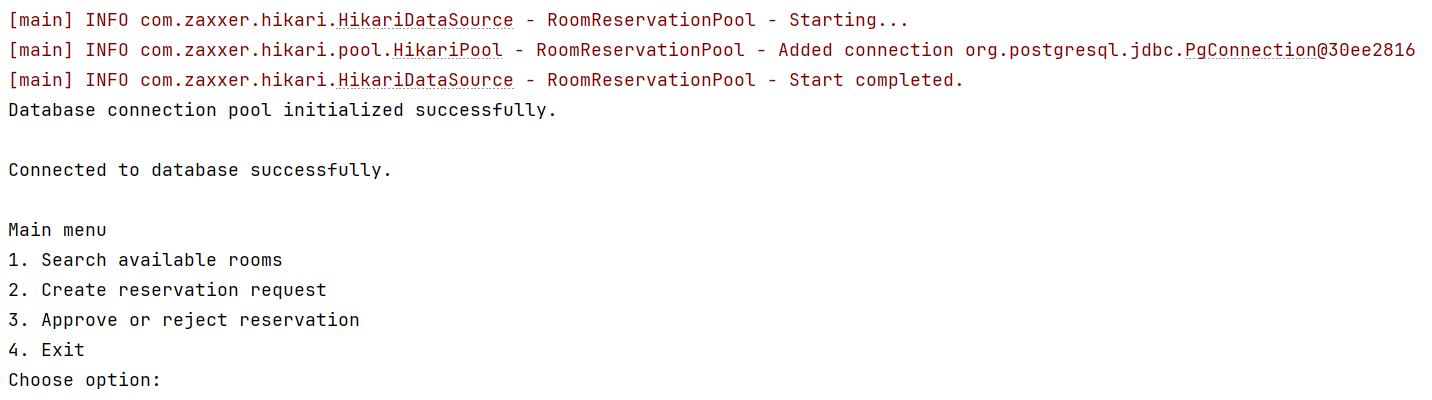
The pool is initialized with the database connection parameters and a pool name. The console output confirms that the pool is started successfully.

The important result shown in the screenshot is that the application no longer connects only through a single direct JDBC connection. Instead, it initializes the connection pool first and then successfully connects to the database.
The application displays:
Database connection pool initialized successfully.

Connected to database successfully.
After the pool is initialized, the main menu is displayed:
Main menu

1. Search available rooms
2. Create reservation request
3. Approve or reject reservation
4. Exit
   Choose option:
Usage in the application
The application uses connections from the pool when executing database operations. The connection is obtained from the pool, used inside the selected use-case, and then closed in the Java code. Closing the connection does not close the physical database connection immediately; it returns the connection to the pool so that it can be reused.
This is used in the implemented use-cases:
- Search available rooms
- Create reservation request
- Approve or reject reservation
Transactions
Transactions are needed when one logical application operation modifies multiple related database tables. If one part of the operation succeeds and another part fails, the database must not remain in a partially modified state.
The Java application therefore uses explicit transaction control for the use-cases where several related database operations are executed together.
The transaction logic follows this structure:
connection.setAutoCommit(false);

try {
// execute several related SQL statements
connection.commit();
} catch (SQLException e) {
connection.rollback();
throw e;
} finally {
connection.setAutoCommit(true);
}
This means that all database changes inside the transaction are saved only if the whole operation is successful. If an error occurs, all changes from that transaction are rolled back.
Transaction 1: Create reservation request
Data requirements description
Creating a reservation request can require changes in more than one table.
A reservation request may include:
- only a room;
- only requested equipment;
- both a room and requested equipment.
When the requester creates a reservation with additional equipment, the application must insert a new record into:
- project.reservations
and then insert one or more related records into:
- project.reservation_equipment
These operations must be executed in one transaction. If the reservation is inserted successfully, but the equipment insert fails, the whole operation must be rolled back. Otherwise, the database could contain an incomplete reservation.
Implementation
The transaction is implemented in the Create reservation request use-case in App.java.
The application performs the following steps:
- The requester is selected from the displayed list of users.
- The reservation date, start time, and end time are entered.
- The requester chooses whether the reservation includes a room.
- If a room is included, the application displays available rooms and the requester selects one of them.
- The requester chooses whether additional/general equipment should be requested.
- If equipment is requested, the application displays available equipment and the requester selects equipment items and quantities.
- The application starts a transaction.
- The application inserts the reservation into project.reservations.
- If requested equipment exists, the application inserts the related rows into project.reservation_equipment.
- If all SQL statements are successful, the transaction is committed.
- If any SQL statement fails, the transaction is rolled back.
Demo execution
The following screenshot shows the creation of a reservation request with additional equipment.

In this test, the requester creates a reservation for room LAB-1 on 2026-06-01 from 09:00 to 10:00 and additionally requests HDMI Cable.
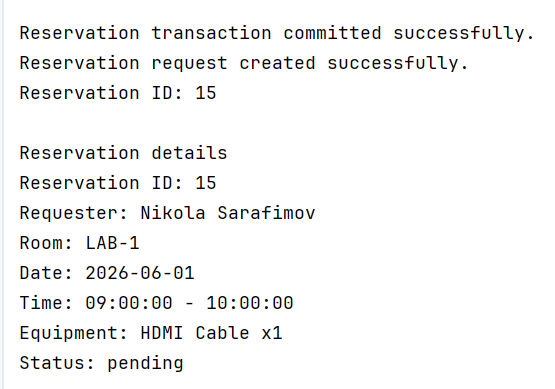
The following screenshot shows that the reservation request was created successfully.

The application displays the generated reservation ID and the created reservation details.
Database verification
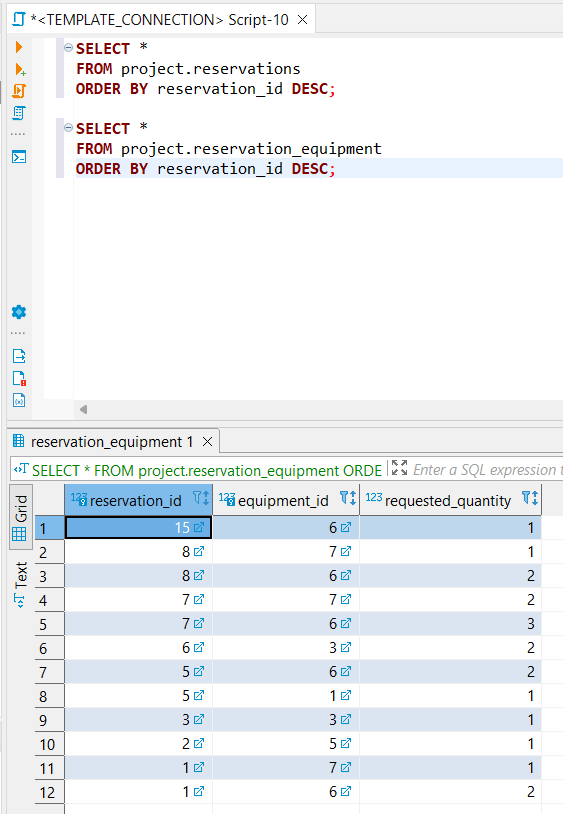
The result can be verified in DBeaver by checking the base tables.
SELECT *
FROM project.reservations
ORDER BY reservation_id DESC;

SELECT *
FROM project.reservation_equipment
ORDER BY reservation_id DESC;
The following screenshot shows that the reservation was inserted into project.reservations and that the requested equipment was inserted into project.reservation_equipment.
Transaction discussion
This operation is a transaction because the reservation and the requested equipment represent one logical request. The database should not contain requested equipment without the corresponding reservation, and it should not contain a partially created reservation if the equipment insert fails.
Therefore, the application commits the transaction only after all related inserts are successful.
Transaction 2: Approve or reject reservation
Data requirements description
Approving or rejecting a reservation also requires more than one database change.
When an approver makes a decision, the application must:
- update the status of the selected reservation in project.reservations;
- insert the approval decision into project.approvals.
These two operations must be executed consistently. The reservation status and the approval record must always match. If the approval record cannot be inserted, the reservation status should not remain changed.
Implementation
The transaction is implemented in the Approve or reject reservation use-case in App.java.
The application performs the following steps:
- The approver opens the Approve or reject reservation option from the main menu.
- The application lists all pending reservations.
- The approver selects a reservation from the displayed list.
- The application lists users who are allowed to approve reservations.
- The approver selects the approving user.
- The approver chooses either approved or rejected.
- The approver enters an optional decision note.
- The application starts a transaction.
- The application updates the reservation status in project.reservations.
- The application inserts a new approval record into project.approvals.
- If both operations are successful, the transaction is committed.
- If an error occurs, the transaction is rolled back.
Demo execution
The following screenshot shows the approval process in the Java prototype.
The approver selects a pending reservation, selects the approving user, chooses the decision, and enters the decision note.
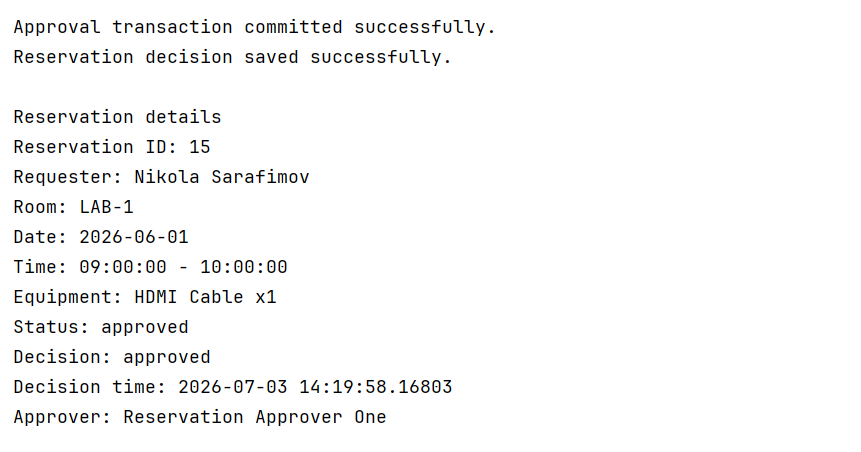
The following screenshot shows the successful result of the approval transaction.
The application displays the final reservation details, including the updated status, decision, decision time, and approver.
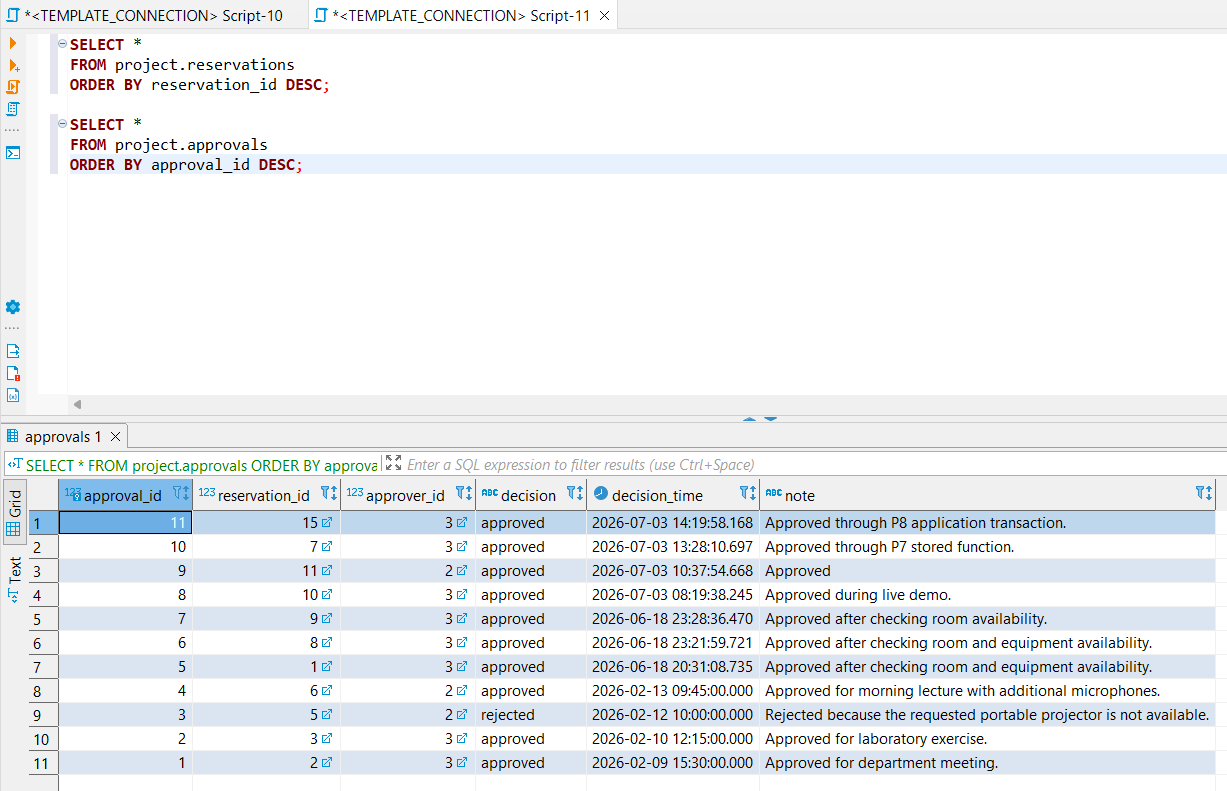
Database verification
The result can be verified in DBeaver by checking the reservations and approvals tables.
SELECT *
FROM project.reservations
ORDER BY reservation_id DESC;

SELECT *
FROM project.approvals
ORDER BY approval_id DESC;
The following screenshot shows that the reservation status was updated and that the corresponding approval record was inserted.
Transaction discussion
This operation is a transaction because approval is not just one table change. The reservation status and approval decision must be saved together. If only the reservation status were updated without inserting an approval record, the database would lose information about who made the decision and when it was made.
Therefore, the application treats the approval operation as one atomic unit of work.
Rollback behavior
The transaction implementation also protects the database from partial changes. If an error happens during a transaction, the application executes rollback.
For example, in the create reservation transaction, if the reservation insert succeeds but a related requested equipment insert fails, the reservation should not remain saved as an incomplete request. Similarly, in the approval transaction, if the reservation status update succeeds but the approval insert fails, the status update should be rolled back.
This behavior is important because it preserves database consistency.
The screenshot above demonstrates that an invalid or failing operation does not leave incomplete data in the database.
Maven configuration
The Maven configuration file pom.xml was updated to include the required dependencies for PostgreSQL JDBC and HikariCP.
The PostgreSQL JDBC driver is required so the Java application can connect to the PostgreSQL database.
HikariCP is required so the application can use database connection pooling.
The relevant configuration is stored in:
pom.xml
Final discussion
Phase P8 improves the Java prototype by adding application-level transaction handling and database connection pooling.
The most important improvements are:
- the application uses a reusable connection pool instead of relying on a single direct JDBC connection;
- the connection pool is initialized once and then reused by the implemented use-cases;
- creating a reservation request is executed as a transaction;
- inserting requested equipment for a reservation is included in the same transaction as the reservation insert;
- approving or rejecting a reservation is executed as a transaction;
- reservation status updates and approval record inserts are saved together;
- rollback is used when a multi-step operation fails;
- database consistency is preserved even when a use-case requires several SQL statements.
These improvements make the prototype more reliable and closer to a real database application, while still keeping the application intentionally simple for the project phase.
Attachments (5)
- p8_approval_database_verification.png (59.8 KB ) - added by 4 months ago.
- p8_approval_transaction_success.png (38.6 KB ) - added by 4 months ago.
- p8_connection_pool_initialized.png (45.6 KB ) - added by 4 months ago.
- p8_create_reservation_database_verification.png (31.1 KB ) - added by 4 months ago.
- p8_create_reservation_transaction_success.png (29.7 KB ) - added by 4 months ago.
Download all attachments as: .zip