| Version 1 (modified by , 4 months ago) ( diff ) |
|---|
Advanced Database Development
This page documents the advanced database development implemented for Phase P7 of the Room Reservation System project. The goal of this phase is to implement non-trivial database-level business rules and supporting database objects using triggers, stored functions, views, and a custom domain.
The implementation extends the database created in the previous phases. It does not replace the relational schema from Phase P2, but it adds advanced database programming objects that enforce important consistency requirements and support the application logic more directly inside PostgreSQL.
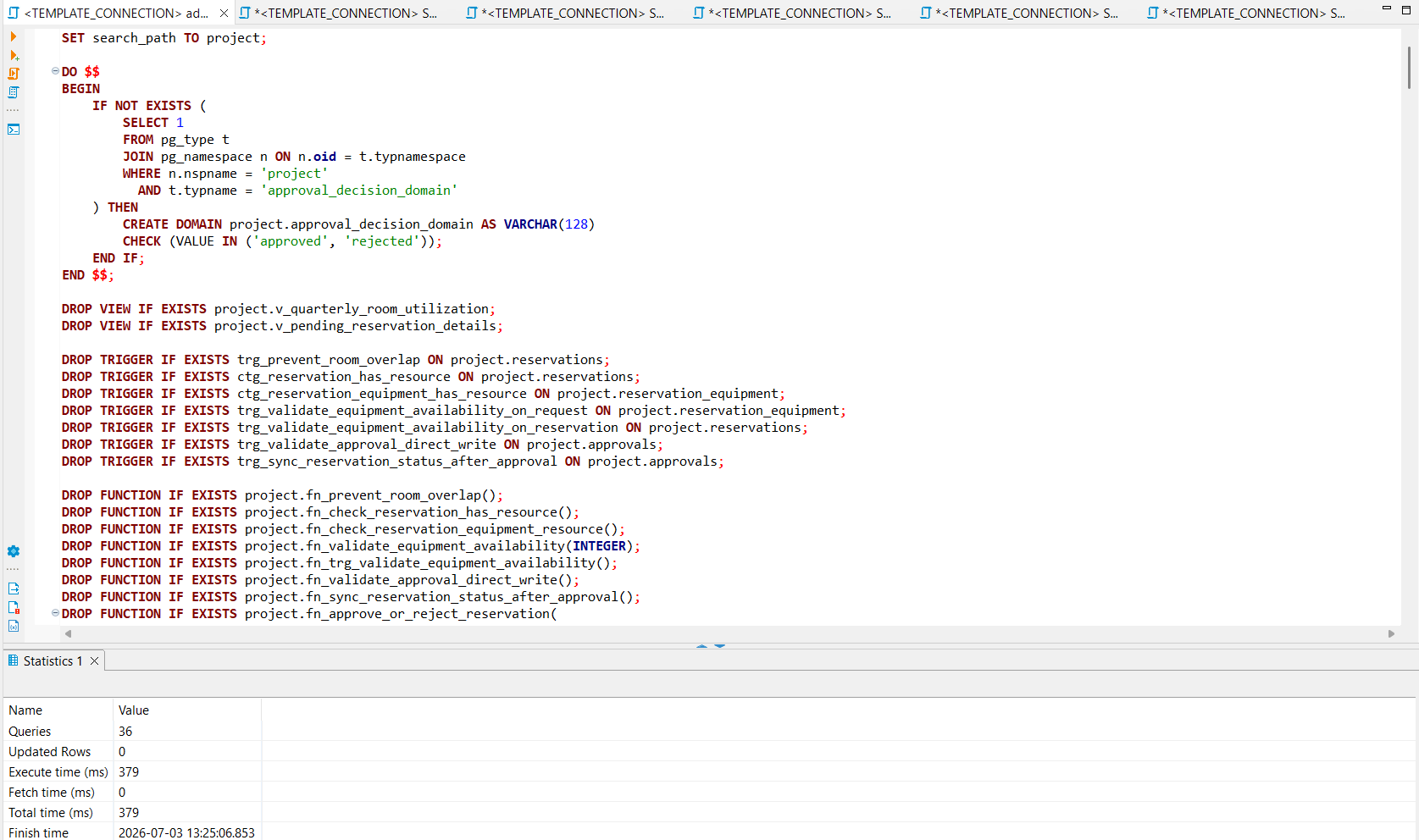
The SQL script for this phase is attached to this page:
advanced_database_development.sql
Data constraints requirements: Prevent overlapping active room reservations
Data requirements description
A room must not have two active reservations that overlap in time. A reservation is considered active when its status is either pending or approved. Rejected and cancelled reservations do not block the room.
The basic unique constraint from Phase P2 only prevents identical reservation intervals for the same room. However, it does not prevent partially overlapping intervals. For example, if a room is reserved from 09:00 to 10:00, another reservation from 09:30 to 10:30 should not be allowed.
This requirement is non-trivial because it depends on comparing the new or updated reservation with other reservations for the same room, same date, active status, and overlapping time intervals.
Implementation
The following trigger function checks whether a new or updated reservation overlaps with an existing active room reservation.
CREATE OR REPLACE FUNCTION project.fn_prevent_room_overlap()
RETURNS TRIGGER AS $$
BEGIN
IF NEW.room_id IS NULL OR NEW.status NOT IN ('pending', 'approved') THEN
RETURN NEW;
END IF;

```
IF EXISTS (
    SELECT 1
    FROM project.reservations r
    WHERE r.room_id = NEW.room_id
      AND r.reservation_date = NEW.reservation_date
      AND r.status IN ('pending', 'approved')
      AND r.reservation_id <> COALESCE(NEW.reservation_id, -1)
      AND NEW.start_time < r.end_time
      AND NEW.end_time > r.start_time
) THEN
    RAISE EXCEPTION
        'Room reservation overlap detected for room_id %, date %, time interval % - %.',
        NEW.room_id,
        NEW.reservation_date,
        NEW.start_time,
        NEW.end_time;
END IF;

RETURN NEW;
```

END;
$$ LANGUAGE plpgsql;
The trigger is executed before inserting or updating a reservation.
CREATE TRIGGER trg_prevent_room_overlap
BEFORE INSERT OR UPDATE OF room_id, reservation_date, start_time, end_time, status
ON project.reservations
FOR EACH ROW
EXECUTE FUNCTION project.fn_prevent_room_overlap();
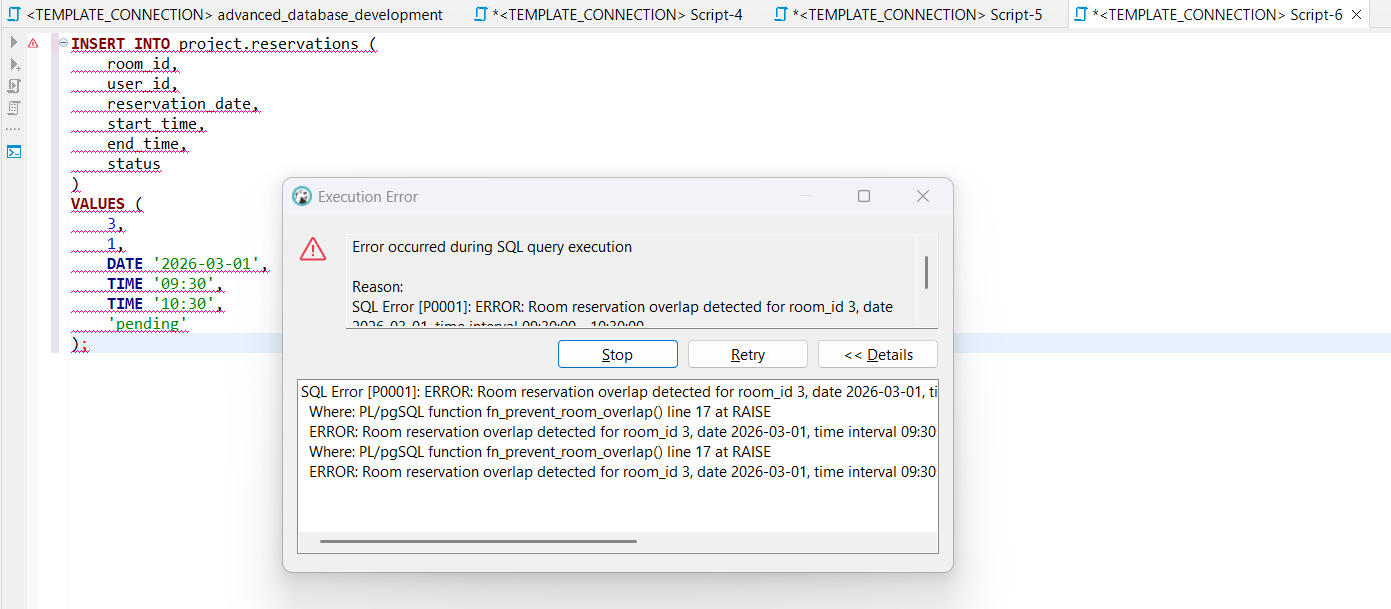
Test example
INSERT INTO project.reservations (
room_id,
user_id,
reservation_date,
start_time,
end_time,
status
)
VALUES (
3,
1,
DATE '2026-03-01',
TIME '09:30',
TIME '10:30',
'pending'
);
If there is already an active reservation for the same room and overlapping time interval, the trigger rejects the insert.
Data constraints requirements: Reservation must contain at least one resource
Data requirements description
A reservation may be created for:
- only a room;
- only equipment;
- both a room and equipment.
However, a reservation without both a room and requested equipment is invalid. This requirement cannot be enforced by a simple column-level CHECK constraint because the requested equipment is stored in a separate relation, project.reservation_equipment.
Therefore, a deferred constraint trigger is used. The trigger checks the rule at transaction commit time, after all related rows have been inserted.
Implementation
The trigger function checks whether the reservation has either a room or at least one requested equipment item.
CREATE OR REPLACE FUNCTION project.fn_check_reservation_has_resource()
RETURNS TRIGGER AS $$
DECLARE
v_has_equipment BOOLEAN;
BEGIN
SELECT EXISTS (
SELECT 1
FROM project.reservation_equipment re
WHERE re.reservation_id = NEW.reservation_id
)
INTO v_has_equipment;

```
IF NEW.room_id IS NULL AND NOT v_has_equipment THEN
    RAISE EXCEPTION
        'Reservation % must include at least one resource: either a room or requested equipment.',
        NEW.reservation_id;
END IF;

RETURN NEW;
```

END;
$$ LANGUAGE plpgsql;
The trigger is created as a deferred constraint trigger.
CREATE CONSTRAINT TRIGGER ctg_reservation_has_resource
AFTER INSERT OR UPDATE OF room_id
ON project.reservations
DEFERRABLE INITIALLY DEFERRED
FOR EACH ROW
EXECUTE FUNCTION project.fn_check_reservation_has_resource();
A second deferred trigger checks the same rule when requested equipment records are inserted, updated, or deleted.
CREATE CONSTRAINT TRIGGER ctg_reservation_equipment_has_resource
AFTER INSERT OR UPDATE OR DELETE
ON project.reservation_equipment
DEFERRABLE INITIALLY DEFERRED
FOR EACH ROW
EXECUTE FUNCTION project.fn_check_reservation_equipment_resource();
Discussion
This rule is important because the conceptual model allows flexible reservations, but it does not allow empty reservations. The use of a deferred constraint trigger is appropriate because equipment-only reservations require data in both project.reservations and project.reservation_equipment.
Data constraints requirements: Requested equipment stock availability
Data requirements description
When equipment is requested as part of a reservation, the requested quantity should not exceed the available general stock for the same equipment type during the same time interval.
This is a complex requirement because it depends on:
- the requested equipment type;
- the requested quantity;
- the reservation date;
- the start and end time;
- other pending or approved reservations that request the same equipment during an overlapping time interval;
- the available stock quantity stored in project.equipment.
Implementation
The function project.fn_validate_equipment_availability checks whether enough equipment is available.
CREATE OR REPLACE FUNCTION project.fn_validate_equipment_availability(
p_reservation_id INTEGER
)
RETURNS VOID AS $$
DECLARE
rec RECORD;
v_overlapping_quantity INTEGER;
BEGIN
FOR rec IN
SELECT
req.equipment_id,
e.name AS equipment_name,
e.stock_quantity,
req.requested_quantity,
res.reservation_date,
res.start_time,
res.end_time,
res.status
FROM project.reservation_equipment req
JOIN project.reservations res
ON req.reservation_id = res.reservation_id
JOIN project.equipment e
ON req.equipment_id = e.equipment_id
WHERE req.reservation_id = p_reservation_id
LOOP
IF rec.status NOT IN ('pending', 'approved') THEN
CONTINUE;
END IF;

```
    SELECT COALESCE(SUM(req2.requested_quantity), 0)
    INTO v_overlapping_quantity
    FROM project.reservation_equipment req2
    JOIN project.reservations res2
        ON req2.reservation_id = res2.reservation_id
    WHERE req2.equipment_id = rec.equipment_id
      AND res2.reservation_id <> p_reservation_id
      AND res2.status IN ('pending', 'approved')
      AND res2.reservation_date = rec.reservation_date
      AND rec.start_time < res2.end_time
      AND rec.end_time > res2.start_time;

    IF v_overlapping_quantity + rec.requested_quantity > rec.stock_quantity THEN
        RAISE EXCEPTION
            'Not enough general stock for equipment %. Requested quantity %, overlapping active quantity %, available stock %.',
            rec.equipment_name,
            rec.requested_quantity,
            v_overlapping_quantity,
            rec.stock_quantity;
    END IF;
END LOOP;
```

END;
$$ LANGUAGE plpgsql;
The validation is executed when requested equipment is inserted or updated, and also when reservation date, time, or status changes.
CREATE TRIGGER trg_validate_equipment_availability_on_request
AFTER INSERT OR UPDATE
ON project.reservation_equipment
FOR EACH ROW
EXECUTE FUNCTION project.fn_trg_validate_equipment_availability();

CREATE TRIGGER trg_validate_equipment_availability_on_reservation
AFTER UPDATE OF reservation_date, start_time, end_time, status
ON project.reservations
FOR EACH ROW
WHEN (NEW.status IN ('pending', 'approved'))
EXECUTE FUNCTION project.fn_trg_validate_equipment_availability();
Discussion
This requirement protects the database from accepting equipment reservations that exceed the available stock during the same period. It is implemented at database level, so the rule is enforced even if the data is inserted outside the prototype application.
Stored function: Approve or reject reservation
Data requirements description
The approval process should be consistent. Only users with role admin or approver should be able to approve or reject reservations. A reservation should be approved or rejected only if it is currently pending. When an approval decision is created, the reservation status should be updated consistently.
This logic is implemented as a stored function so that the database can perform the approval operation as a single controlled action.
Implementation
The following stored function approves or rejects a pending reservation.
CREATE OR REPLACE FUNCTION project.fn_approve_or_reject_reservation(
p_reservation_id INTEGER,
p_approver_id INTEGER,
p_decision project.approval_decision_domain,
p_note VARCHAR DEFAULT NULL
)
RETURNS TABLE (
out_approval_id INTEGER,
out_reservation_id INTEGER,
out_status VARCHAR,
out_decision VARCHAR,
out_decision_time TIMESTAMP
) AS $$
DECLARE
v_status VARCHAR(128);
v_role VARCHAR(128);
v_approval_id INTEGER;
v_decision_time TIMESTAMP;
BEGIN
SELECT status
INTO v_status
FROM project.reservations
WHERE reservation_id = p_reservation_id
FOR UPDATE;

```
IF NOT FOUND THEN
    RAISE EXCEPTION 'Reservation % does not exist.', p_reservation_id;
END IF;

IF v_status <> 'pending' THEN
    RAISE EXCEPTION
        'Only pending reservations can be approved or rejected. Current status is %.',
        v_status;
END IF;

SELECT role
INTO v_role
FROM project.users
WHERE user_id = p_approver_id;

IF NOT FOUND THEN
    RAISE EXCEPTION 'Approver user % does not exist.', p_approver_id;
END IF;

IF v_role NOT IN ('admin', 'approver') THEN
    RAISE EXCEPTION
        'User % cannot approve reservations because role % is not allowed.',
        p_approver_id,
        v_role;
END IF;

UPDATE project.reservations
SET status = p_decision::VARCHAR
WHERE reservation_id = p_reservation_id;

INSERT INTO project.approvals (
    reservation_id,
    approver_id,
    decision,
    decision_time,
    note
)
VALUES (
    p_reservation_id,
    p_approver_id,
    p_decision::VARCHAR,
    CURRENT_TIMESTAMP,
    p_note
)
RETURNING approval_id, decision_time
INTO v_approval_id, v_decision_time;

RETURN QUERY
SELECT
    v_approval_id,
    p_reservation_id,
    p_decision::VARCHAR,
    p_decision::VARCHAR,
    v_decision_time;
```

END;
$$ LANGUAGE plpgsql;
Test example
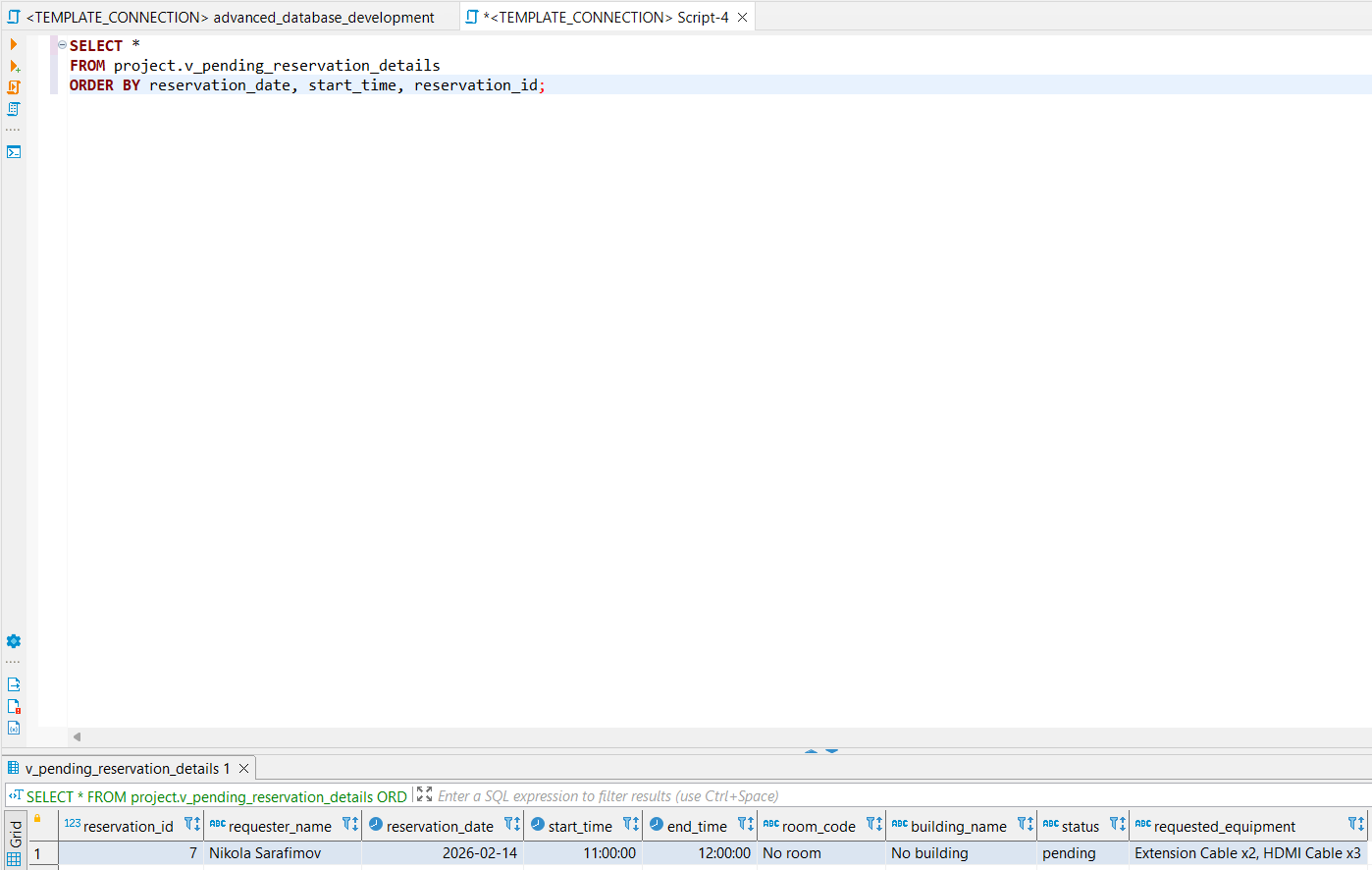
First, pending reservations can be listed through the view:
SELECT *
FROM project.v_pending_reservation_details;
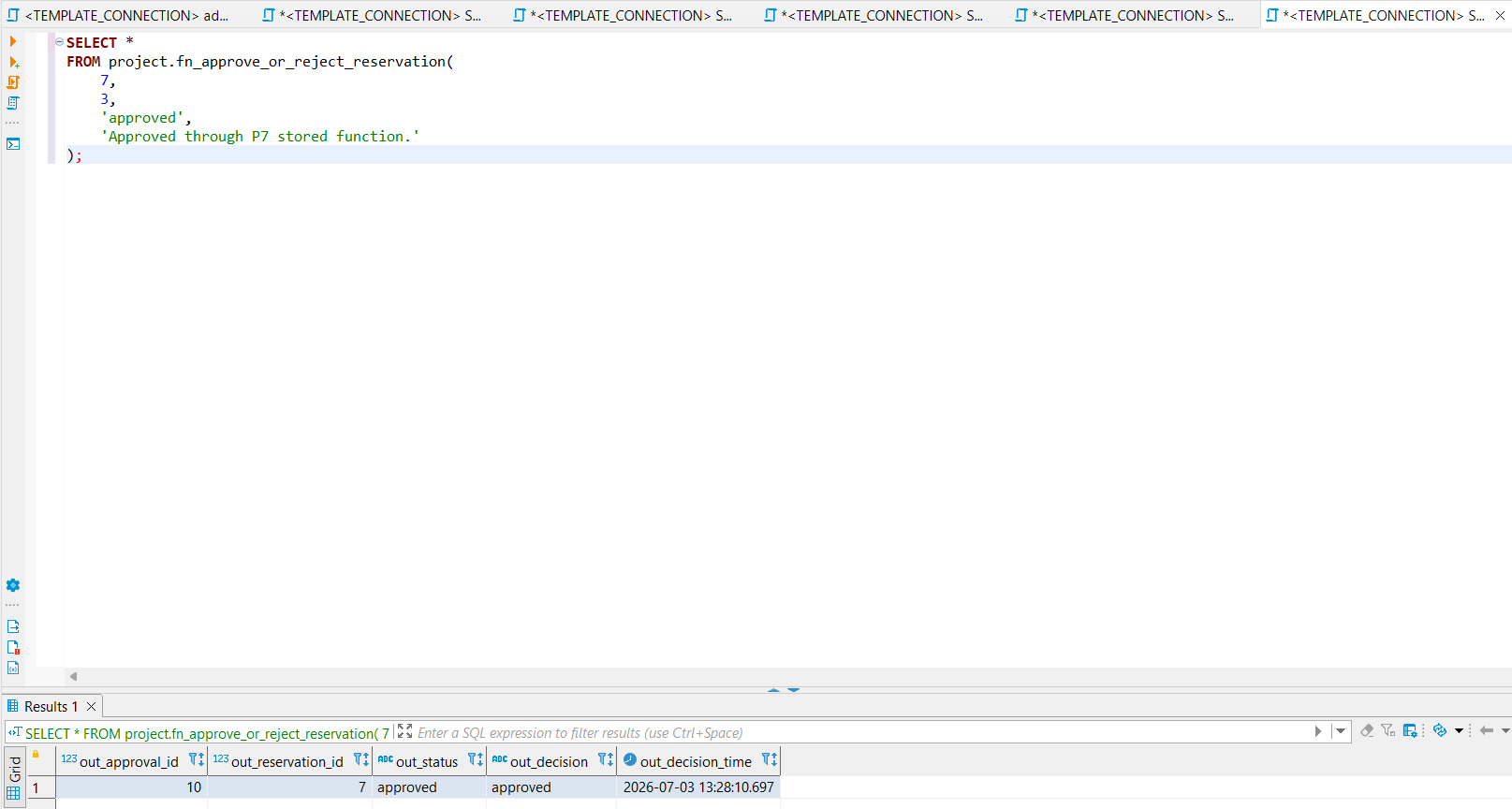
Then the stored function can be executed:
SELECT *
FROM project.fn_approve_or_reject_reservation(
7,
3,
'approved',
'Approved through P7 stored function.'
);
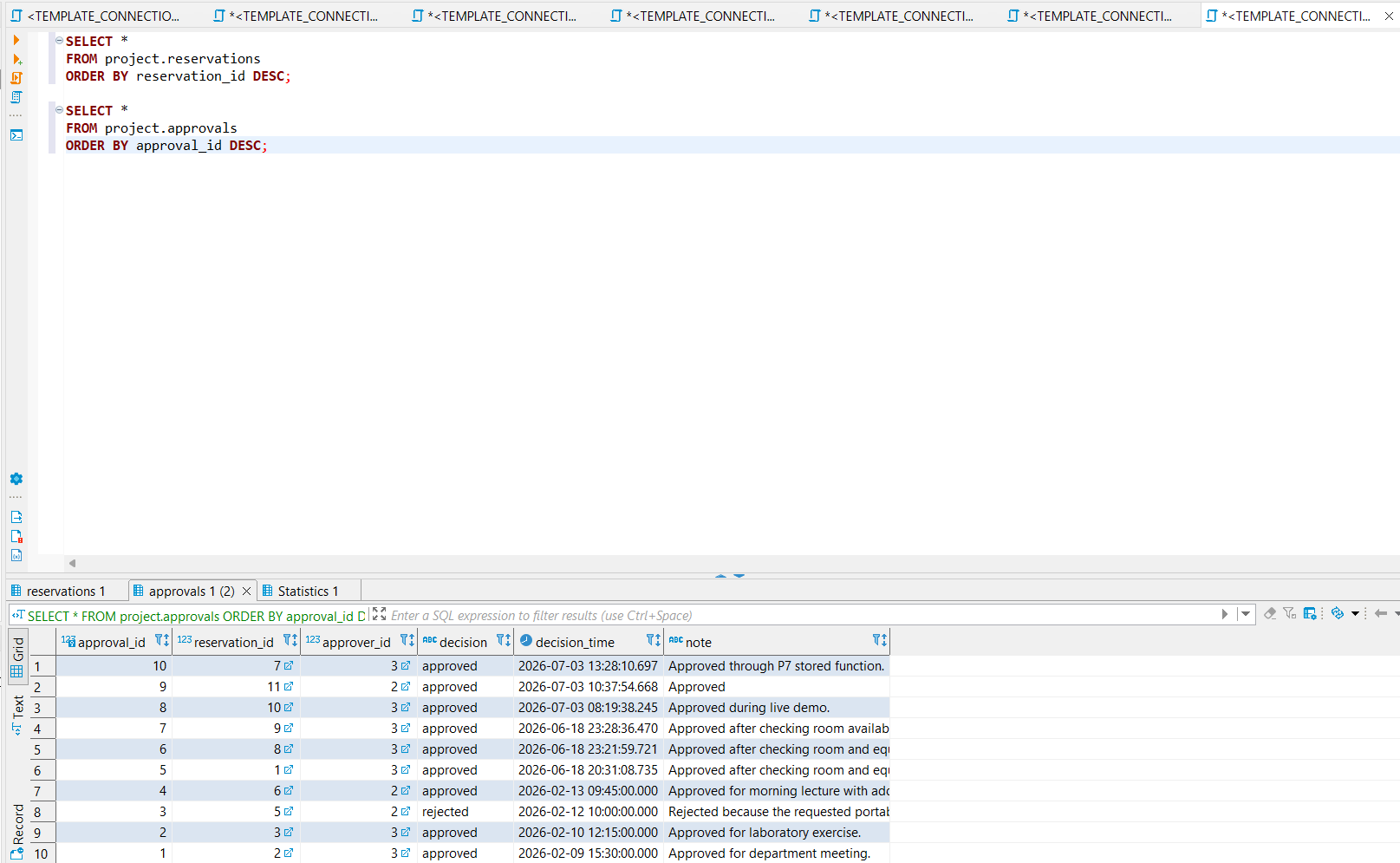
After execution, the result can be checked in the base tables:
SELECT *
FROM project.reservations
ORDER BY reservation_id DESC;

SELECT *
FROM project.approvals
ORDER BY approval_id DESC;
Trigger: Validate direct approval writes
Data requirements description
Even if an approval is inserted directly into the project.approvals table, the database must still check whether the approver has an appropriate role. This prevents invalid approval records from being inserted manually.
Implementation
The trigger trg_validate_approval_direct_write checks the role of the approver before an approval row is inserted or updated.
CREATE TRIGGER trg_validate_approval_direct_write
BEFORE INSERT OR UPDATE
ON project.approvals
FOR EACH ROW
EXECUTE FUNCTION project.fn_validate_approval_direct_write();
Another trigger synchronizes the reservation status after an approval is inserted.
CREATE TRIGGER trg_sync_reservation_status_after_approval
AFTER INSERT
ON project.approvals
FOR EACH ROW
EXECUTE FUNCTION project.fn_sync_reservation_status_after_approval();
Custom domain: Approval decision domain
Data requirements description
The approval decision has a restricted domain of allowed values. Instead of repeating this rule only as a table-level check, a reusable PostgreSQL custom domain is created for approval decisions.
Implementation
CREATE DOMAIN project.approval_decision_domain AS VARCHAR(128)
CHECK (VALUE IN ('approved', 'rejected'));
This custom domain is used as the type of the p_decision parameter in the stored function project.fn_approve_or_reject_reservation.
View: Pending reservation details
Data requirements description
Approvers need a clear overview of pending reservations. The raw database tables store this information across several relations, so a view is created to present the data in a readable form.
The view combines:
- reservation data;
- requester information;
- room and building information;
- requested equipment information.
Implementation
CREATE OR REPLACE VIEW project.v_pending_reservation_details AS
SELECT
res.reservation_id,
u.full_name AS requester_name,
res.reservation_date,
res.start_time,
res.end_time,
COALESCE(r.room_code, 'No room') AS room_code,
COALESCE(b.name, 'No building') AS building_name,
res.status,
COALESCE(eq.requested_equipment, 'No equipment') AS requested_equipment
FROM project.reservations res
JOIN project.users u
ON res.user_id = u.user_id
LEFT JOIN project.rooms r
ON res.room_id = r.room_id
LEFT JOIN project.buildings b
ON r.building_id = b.building_id
LEFT JOIN (
SELECT
req.reservation_id,
string_agg(e.name || ' x' || req.requested_quantity, ', ' ORDER BY e.name) AS requested_equipment
FROM project.reservation_equipment req
JOIN project.equipment e
ON req.equipment_id = e.equipment_id
GROUP BY req.reservation_id
) eq
ON res.reservation_id = eq.reservation_id
WHERE res.status = 'pending';
Test query
SELECT *
FROM project.v_pending_reservation_details
ORDER BY reservation_date, start_time, reservation_id;
View: Quarterly room utilization
Data requirements description
The system also needs analytical information about room usage. A view is created to summarize room reservations by quarter, building, room, room type, and status.
This view supports report-style analysis and can be used by administrators to see which rooms are used most frequently.
Implementation
CREATE OR REPLACE VIEW project.v_quarterly_room_utilization AS
WITH room_reservation_base AS (
SELECT
date_trunc('quarter', res.reservation_date)::date AS quarter_start,
b.name AS building_name,
r.room_id,
r.room_code,
r.type,
r.capacity,
res.reservation_id,
res.status,
EXTRACT(EPOCH FROM (res.end_time - res.start_time)) / 3600.0 AS reservation_hours
FROM project.reservations res
JOIN project.rooms r
ON res.room_id = r.room_id
JOIN project.buildings b
ON r.building_id = b.building_id
WHERE res.room_id IS NOT NULL
),
room_quarter_summary AS (
SELECT
quarter_start,
building_name,
room_id,
room_code,
type,
capacity,
COUNT(reservation_id) AS total_room_reservations,
COUNT(*) FILTER (WHERE status = 'approved') AS approved_reservations,
COUNT(*) FILTER (WHERE status = 'rejected') AS rejected_reservations,
COUNT(*) FILTER (WHERE status = 'cancelled') AS cancelled_reservations,
COUNT(*) FILTER (WHERE status = 'pending') AS pending_reservations,
ROUND(SUM(reservation_hours), 2) AS requested_hours,
ROUND(COALESCE(SUM(reservation_hours) FILTER (WHERE status = 'approved'), 0), 2) AS approved_hours
FROM room_reservation_base
GROUP BY
quarter_start,
building_name,
room_id,
room_code,
type,
capacity
)
SELECT
quarter_start,
building_name,
room_code,
type,
capacity,
total_room_reservations,
approved_reservations,
rejected_reservations,
cancelled_reservations,
pending_reservations,
requested_hours,
approved_hours,
ROUND(
approved_hours / NULLIF(SUM(approved_hours) OVER (PARTITION BY quarter_start), 0) * 100,
2
) AS approved_hours_share_percent,
DENSE_RANK() OVER (
PARTITION BY quarter_start
ORDER BY approved_hours DESC, total_room_reservations DESC, room_code
) AS utilization_rank,
CASE
WHEN approved_hours >= 4 THEN 'high_usage'
WHEN approved_hours >= 2 THEN 'medium_usage'
WHEN approved_hours > 0 THEN 'low_usage'
ELSE 'no_approved_usage'
END AS utilization_level
FROM room_quarter_summary;
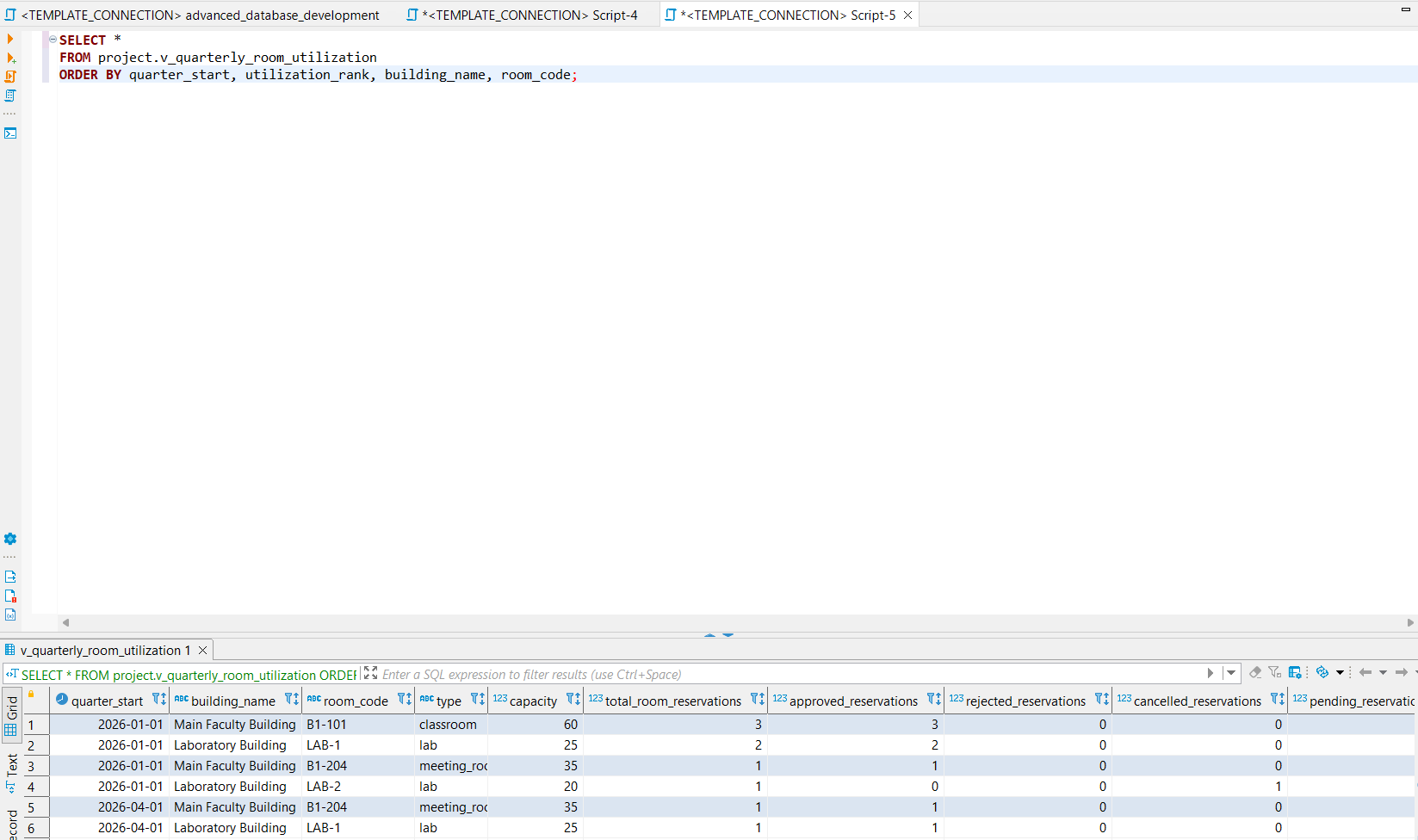
Test query
SELECT *
FROM project.v_quarterly_room_utilization
ORDER BY quarter_start, utilization_rank, building_name, room_code;
Final discussion
The implemented database objects enforce important business rules directly inside the database. This improves the reliability of the system because the rules are checked even when data is inserted or changed outside the Java prototype application.
The most important improvements are:
- overlapping active room reservations are prevented;
- empty reservations without both room and equipment are prevented;
- requested equipment quantities are checked against available stock during overlapping time intervals;
- approval decisions are restricted to authorized users;
- approval processing is centralized through a stored function;
- pending reservations and room utilization can be accessed through reusable views;
- a custom domain is used for approval decisions.
These additions are more advanced than the basic constraints from Phase P2 because they require triggers, stored functions, cross-table checks, aggregation, and procedural database logic.
Attachments (7)
- advanced_database_development.sql (14.5 KB ) - added by 4 months ago.
- p7_approval_verification.png (62.5 KB ) - added by 4 months ago.
- p7_approve_reject_function_result.png (33.4 KB ) - added by 4 months ago.
- p7_quarterly_room_utilization_view.png (50.5 KB ) - added by 4 months ago.
- p7_room_overlap_trigger_error.png (57.0 KB ) - added by 4 months ago.
- p7_script_execution.png (86.6 KB ) - added by 4 months ago.
- p7_pending_reservation_details_view.png (34.1 KB ) - added by 4 months ago.
Download all attachments as: .zip