| Version 2 (modified by , 2 months ago) ( diff ) |
|---|
Other Topics
This page documents the work completed for Phase P9 of the Room Reservation System project.
The focus of this phase is:
- performance analysis of the complex SQL reports from Phase P6
- creation of indexes that support the complex reports
- verification that PostgreSQL can use the created indexes through
EXPLAIN ANALYZE - security measures at application and database level
The phase is based on the complex reports created in Phase P6 and the advanced database objects created in Phase P7.
SQL Performance Analysis
The performance analysis was performed using PostgreSQL execution plans with:
EXPLAIN (ANALYZE, BUFFERS)
The goal was to analyze the complex report queries from Phase P6 and to create indexes that support the filtering, joining, grouping and ordering used by those reports.
The tested reports are:
- Report 1: Quarterly room utilization report
- Report 2: Quarterly equipment demand and stock risk report
Because the project database contains a small amount of sample data, PostgreSQL may sometimes choose sequential scans even when indexes exist. This is expected optimizer behavior, because reading a small table sequentially can be cheaper than using an index.
For that reason, the documentation includes an additional index-usage verification plan using:
SET enable_seqscan = off;
This setting was used only for testing and documentation purposes, in order to prove that the created indexes are applicable to the query predicates and join conditions. After the verification queries, the setting was reset using:
RESET enable_seqscan;
Created Performance Indexes
The following indexes were created to improve filtering, joining and reporting performance.
CREATE INDEX IF NOT EXISTS idx_p9_reservations_room_date_status_time
ON project.reservations (room_id, reservation_date, status, start_time, end_time)
WHERE room_id IS NOT NULL;

CREATE INDEX IF NOT EXISTS idx_p9_reservations_date_status_id
ON project.reservations (reservation_date, status, reservation_id);

CREATE INDEX IF NOT EXISTS idx_p9_rooms_building_id
ON project.rooms (building_id);

CREATE INDEX IF NOT EXISTS idx_p9_reservation_equipment_reservation_id
ON project.reservation_equipment (reservation_id);

CREATE INDEX IF NOT EXISTS idx_p9_reservation_equipment_equipment_id
ON project.reservation_equipment (equipment_id);

CREATE INDEX IF NOT EXISTS idx_p9_room_equipment_equipment_id
ON project.room_equipment (equipment_id);

CREATE INDEX IF NOT EXISTS idx_p9_approvals_reservation_id
ON project.approvals (reservation_id);
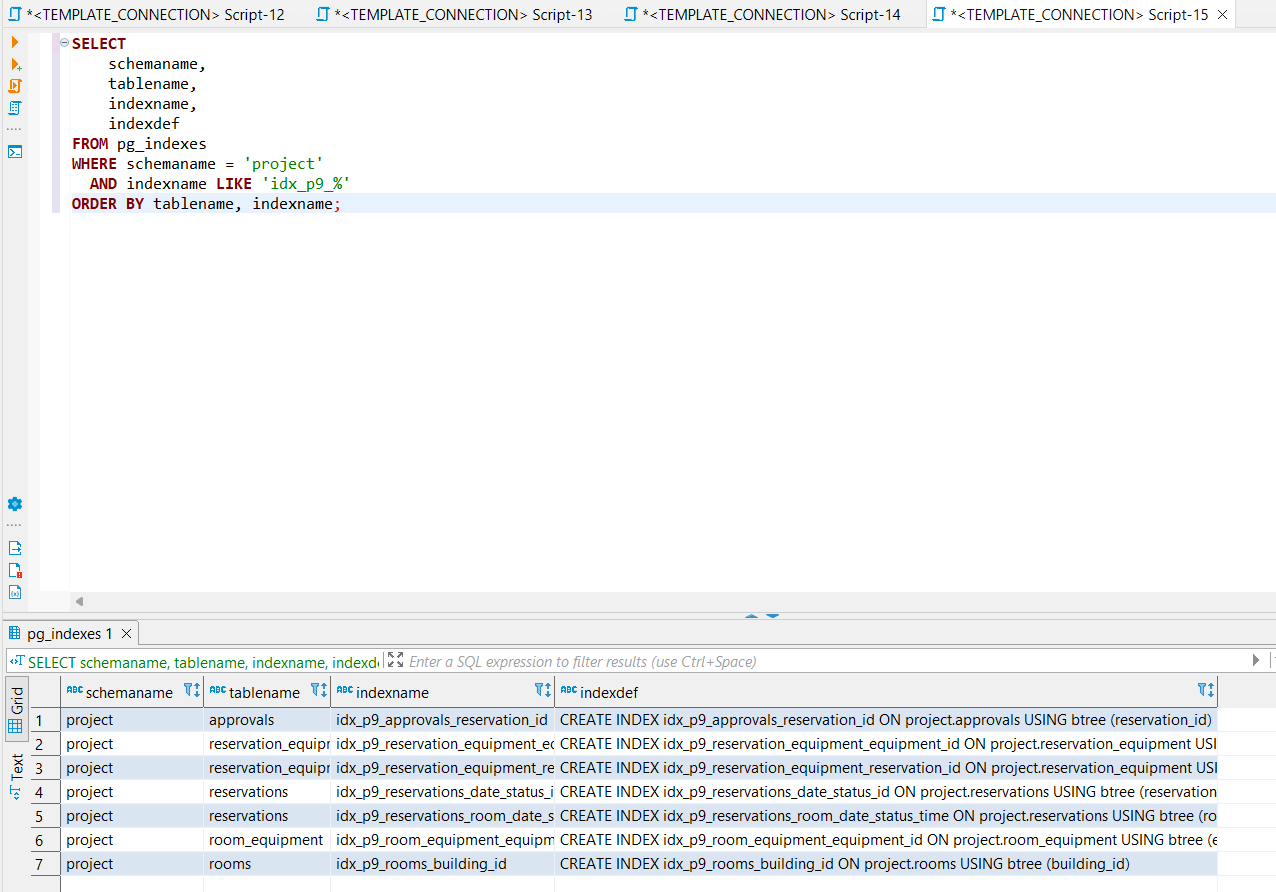
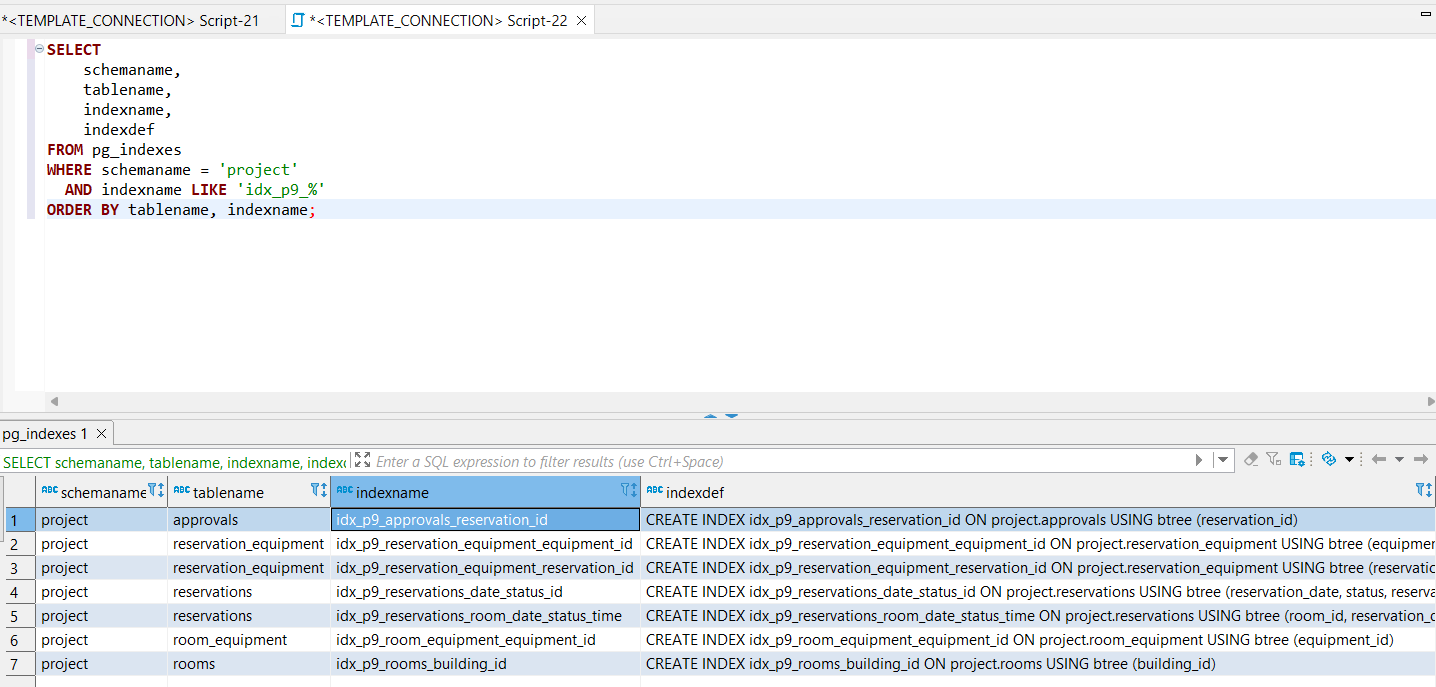
The created indexes were verified in PostgreSQL using the pg_indexes system view.
SELECT
    schemaname,
    tablename,
    indexname,
    indexdef
FROM pg_indexes
WHERE schemaname = 'project'
  AND indexname LIKE 'idx_p9_%'
ORDER BY tablename, indexname;

Figure: Created performance indexes for Phase P9.
Explanation of the created indexes
The index idx_p9_reservations_room_date_status_time supports queries that search reservations by room, date, status, start time and end time. This is useful for room availability checks and for the quarterly room utilization report.
The index idx_p9_reservations_date_status_id supports queries that filter reservations by date and status. This is useful for quarterly reports, reservation status analysis and equipment demand reporting.
The index idx_p9_rooms_building_id supports joins between project.rooms and project.buildings.
The indexes on project.reservation_equipment support joins between reservations and requested equipment. They are important for the equipment demand and stock risk report.
The index idx_p9_room_equipment_equipment_id supports queries that calculate how much equipment is assigned to rooms.
The index idx_p9_approvals_reservation_id supports faster lookup of approval records for a selected reservation.
Report 1: Quarterly Room Utilization
Report description
The first complex report analyzes room usage by quarter. It groups room reservations by quarter, building, room code, room type and capacity.
The report calculates:
- total room reservations
- approved reservations
- rejected reservations
- cancelled reservations
- pending reservations
- requested hours
- approved hours
- utilization ranking
- utilization level
This report is useful for identifying highly used rooms and rooms with lower utilization.
SQL used for index verification
The report reads data mainly from:
project.reservationsproject.roomsproject.buildings
The most relevant created index for this report is:
idx_p9_reservations_room_date_status_time
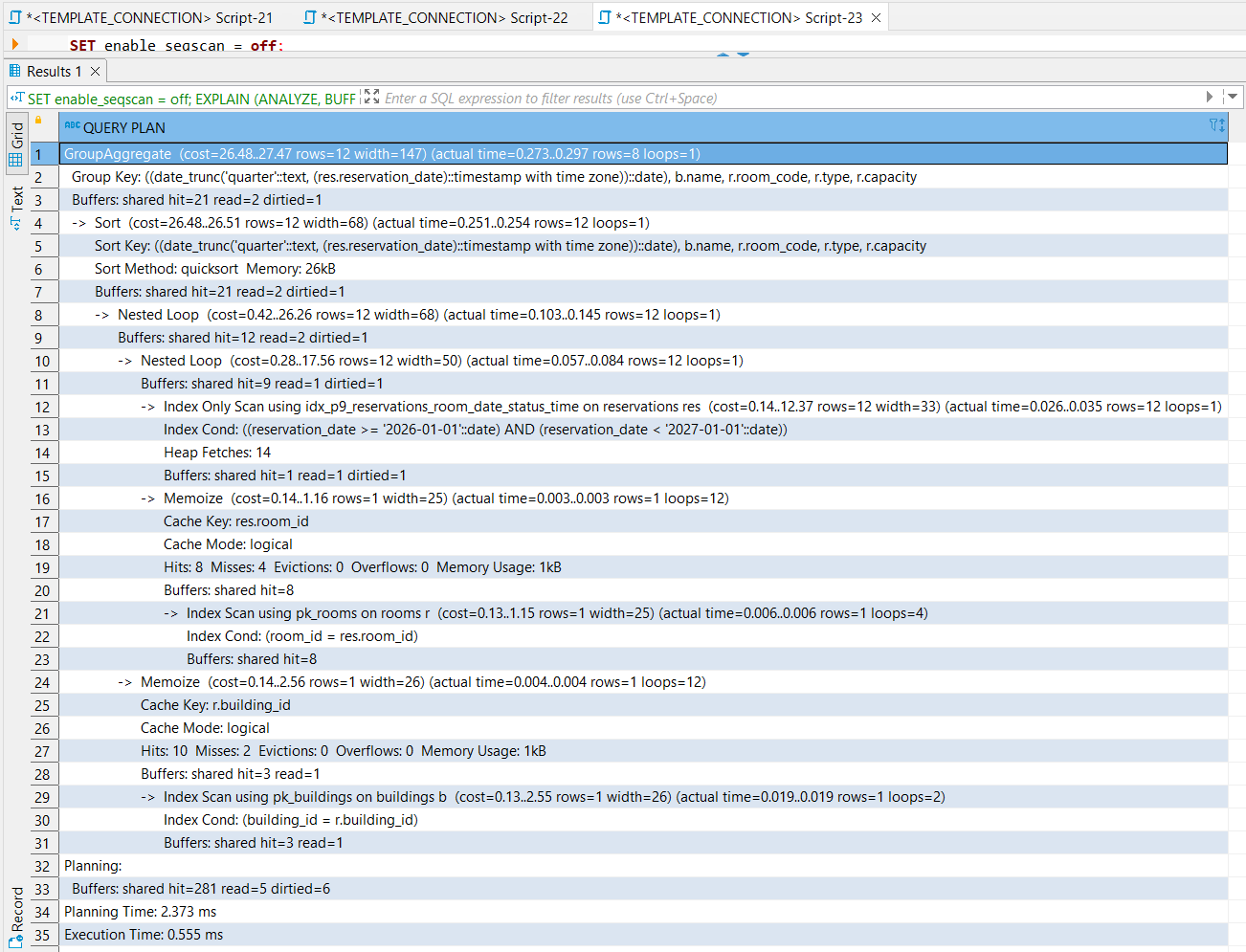
The following query was executed with EXPLAIN ANALYZE to verify index usage.
SET enable_seqscan = off;

EXPLAIN (ANALYZE, BUFFERS)
SELECT
    date_trunc('quarter', res.reservation_date)::date AS quarter_start,
    b.name AS building_name,
    r.room_code,
    r.type,
    r.capacity,
    COUNT(*) AS total_room_reservations,
    COUNT(*) FILTER (WHERE res.status = 'approved') AS approved_reservations,
    COUNT(*) FILTER (WHERE res.status = 'rejected') AS rejected_reservations,
    COUNT(*) FILTER (WHERE res.status = 'cancelled') AS cancelled_reservations,
    COUNT(*) FILTER (WHERE res.status = 'pending') AS pending_reservations,
    SUM(EXTRACT(EPOCH FROM (res.end_time - res.start_time)) / 3600.0) AS requested_hours,
    COALESCE(
        SUM(EXTRACT(EPOCH FROM (res.end_time - res.start_time)) / 3600.0)
        FILTER (WHERE res.status = 'approved'),
        0
    ) AS approved_hours
FROM project.reservations res
JOIN project.rooms r
    ON res.room_id = r.room_id
JOIN project.buildings b
    ON r.building_id = b.building_id
WHERE res.room_id IS NOT NULL
  AND res.reservation_date >= DATE '2026-01-01'
  AND res.reservation_date < DATE '2027-01-01'
GROUP BY
    date_trunc('quarter', res.reservation_date)::date,
    b.name,
    r.room_code,
    r.type,
    r.capacity
ORDER BY
    quarter_start,
    building_name,
    room_code;

RESET enable_seqscan;
Execution plan and index usage

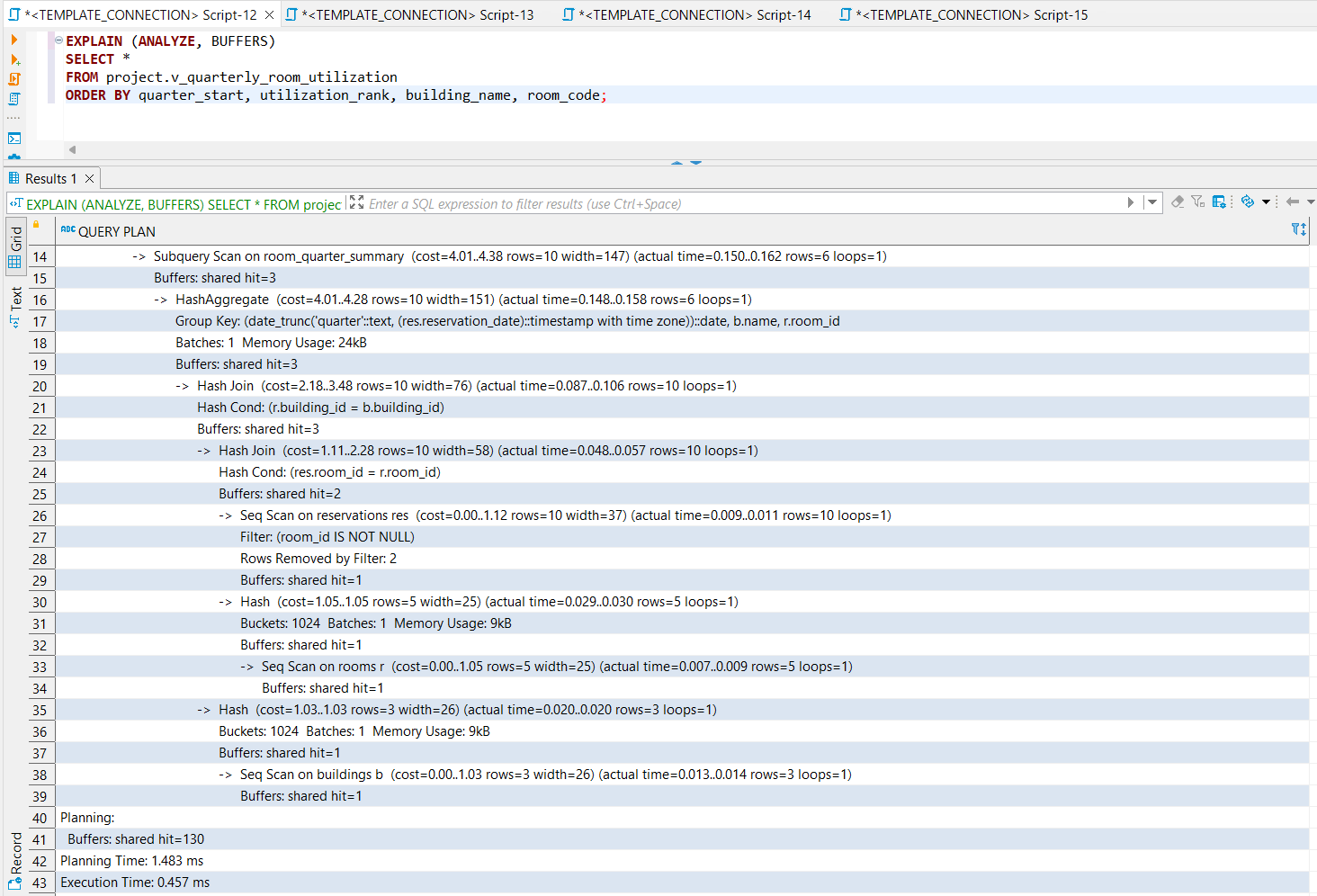
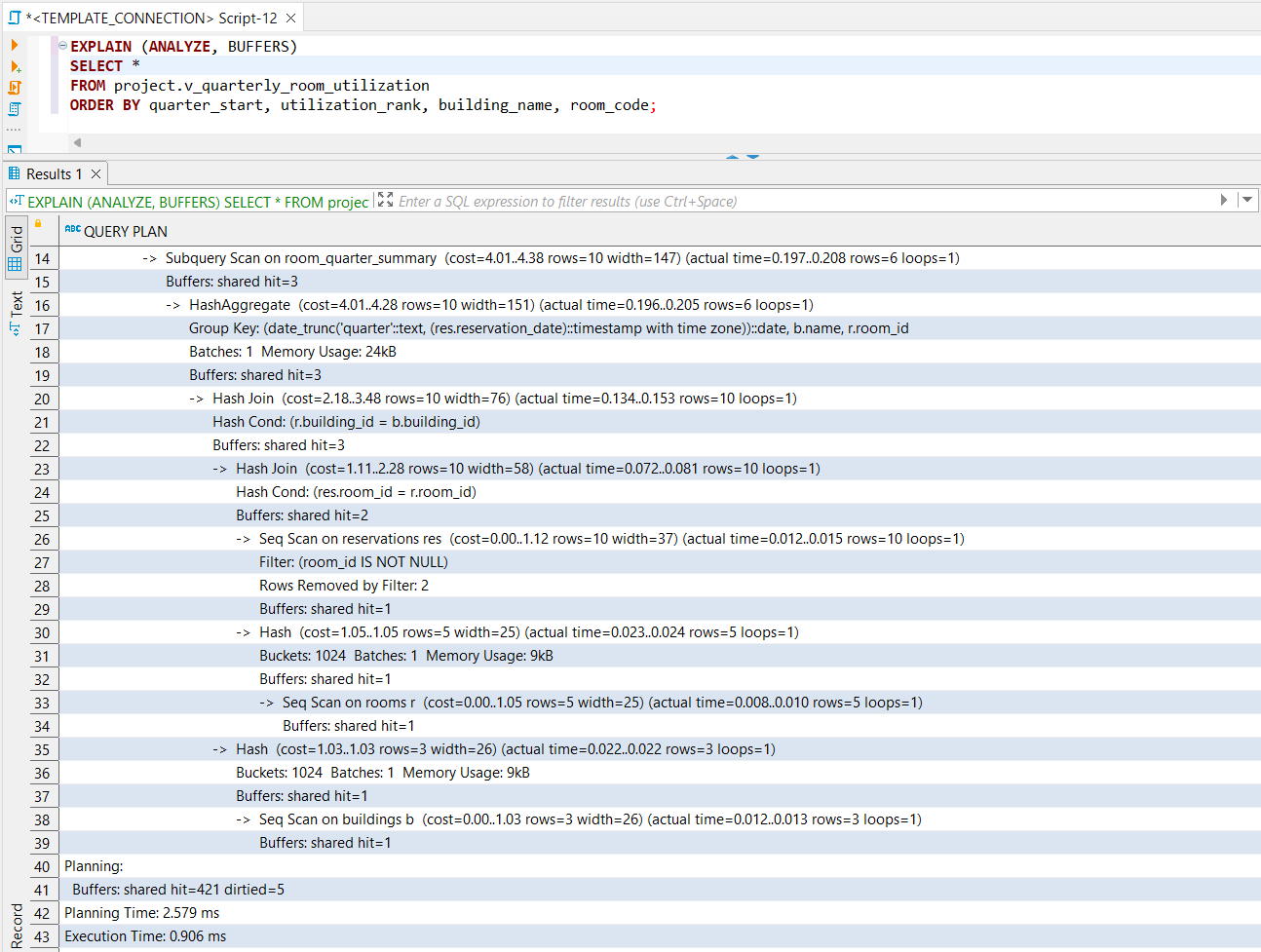
Figure: EXPLAIN ANALYZE plan for the room utilization report showing index usage.
The important part of the execution plan is:
Index Only Scan using idx_p9_reservations_room_date_status_time
This proves that PostgreSQL can use the created index for the room utilization report.
The index supports the report because the query filters room-based reservations by reservation date and then joins the result with rooms and buildings.
Report 2: Quarterly Equipment Demand and Stock Risk
Report description
The second complex report analyzes equipment demand by quarter. It compares requested equipment quantities with available equipment stock and equipment assigned to rooms.
The report calculates:
- total registered equipment quantity
- number of reservations with equipment
- total requested quantity
- approved requested quantity
- pending requested quantity
- rejected requested quantity
- demand-to-registered percentage
- demand rank
- demand level
This report is useful for identifying equipment types with high demand or possible stock risk.
SQL used for index verification
The report reads data mainly from:
project.reservation_equipmentproject.reservationsproject.equipmentproject.room_equipment
The most relevant created indexes for this report are:
idx_p9_reservations_date_status_id
idx_p9_reservation_equipment_reservation_id
idx_p9_reservation_equipment_equipment_id
idx_p9_room_equipment_equipment_id
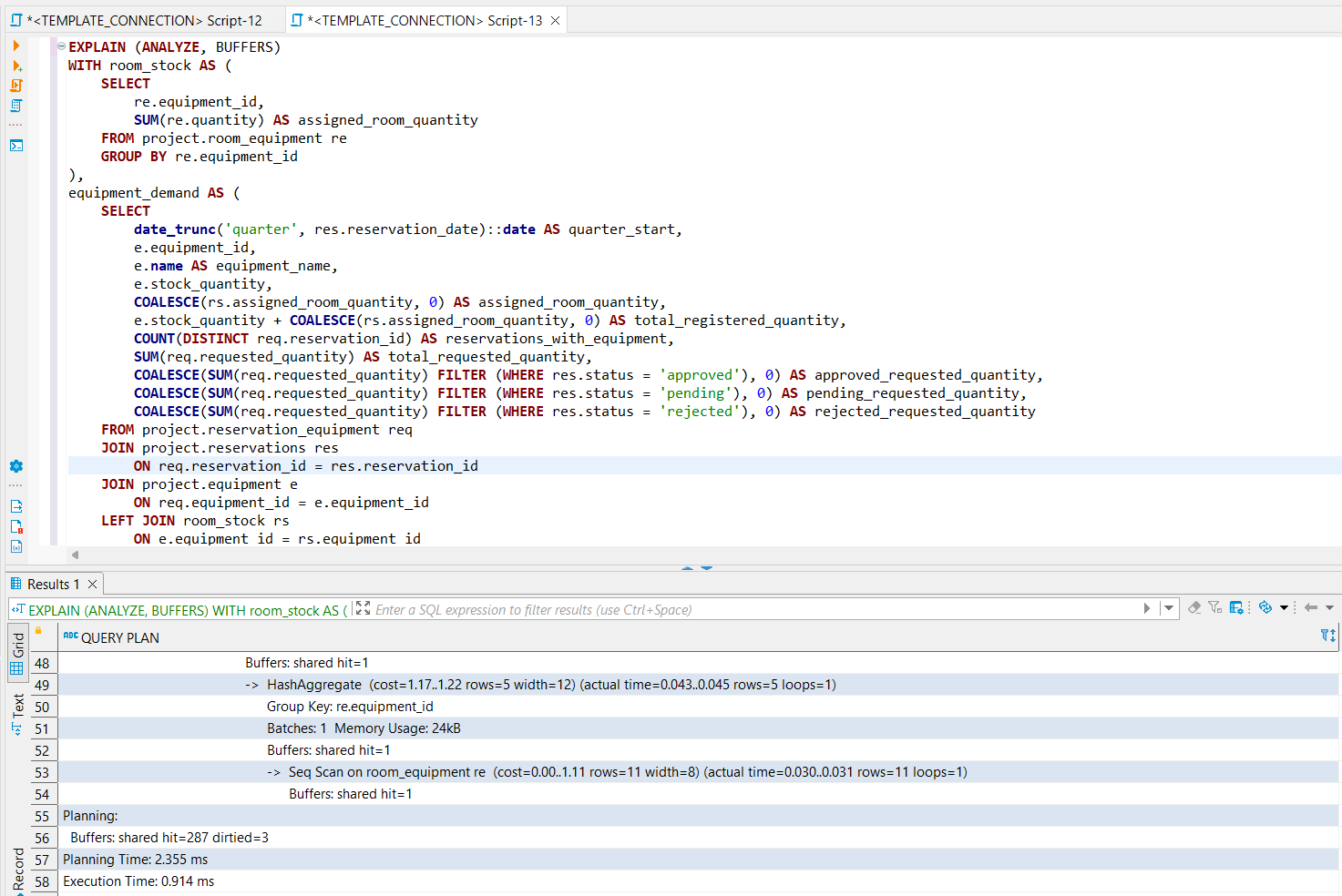
The following query was executed with EXPLAIN ANALYZE to verify index usage.
SET enable_seqscan = off;

EXPLAIN (ANALYZE, BUFFERS)
WITH room_stock AS (
    SELECT
        re.equipment_id,
        SUM(re.quantity) AS assigned_room_quantity
    FROM project.room_equipment re
    GROUP BY re.equipment_id
),
equipment_demand AS (
    SELECT
        date_trunc('quarter', res.reservation_date)::date AS quarter_start,
        e.equipment_id,
        e.name AS equipment_name,
        e.stock_quantity,
        COALESCE(rs.assigned_room_quantity, 0) AS assigned_room_quantity,
        e.stock_quantity + COALESCE(rs.assigned_room_quantity, 0) AS total_registered_quantity,
        COUNT(DISTINCT req.reservation_id) AS reservations_with_equipment,
        SUM(req.requested_quantity) AS total_requested_quantity,
        COALESCE(SUM(req.requested_quantity) FILTER (WHERE res.status = 'approved'), 0) AS approved_requested_quantity,
        COALESCE(SUM(req.requested_quantity) FILTER (WHERE res.status = 'pending'), 0) AS pending_requested_quantity,
        COALESCE(SUM(req.requested_quantity) FILTER (WHERE res.status = 'rejected'), 0) AS rejected_requested_quantity
    FROM project.reservation_equipment req
    JOIN project.reservations res
        ON req.reservation_id = res.reservation_id
    JOIN project.equipment e
        ON req.equipment_id = e.equipment_id
    LEFT JOIN room_stock rs
        ON e.equipment_id = rs.equipment_id
    WHERE res.reservation_date >= DATE '2026-01-01'
      AND res.reservation_date < DATE '2027-01-01'
    GROUP BY
        date_trunc('quarter', res.reservation_date)::date,
        e.equipment_id,
        e.name,
        e.stock_quantity,
        rs.assigned_room_quantity
)
SELECT
    quarter_start,
    equipment_name,
    stock_quantity,
    assigned_room_quantity,
    total_registered_quantity,
    reservations_with_equipment,
    total_requested_quantity,
    approved_requested_quantity,
    pending_requested_quantity,
    rejected_requested_quantity,
    ROUND(
        total_requested_quantity::numeric / NULLIF(total_registered_quantity, 0) * 100,
        2
    ) AS demand_to_registered_percent,
    DENSE_RANK() OVER (
        PARTITION BY quarter_start
        ORDER BY total_requested_quantity DESC, reservations_with_equipment DESC, equipment_name
    ) AS demand_rank,
    CASE
        WHEN total_requested_quantity > total_registered_quantity THEN 'stock_risk'
        WHEN total_requested_quantity >= total_registered_quantity * 0.75 THEN 'high_demand'
        WHEN total_requested_quantity > 0 THEN 'normal_demand'
        ELSE 'no_demand'
    END AS demand_level
FROM equipment_demand
ORDER BY quarter_start, demand_rank, equipment_name;

RESET enable_seqscan;
Execution plan and index usage

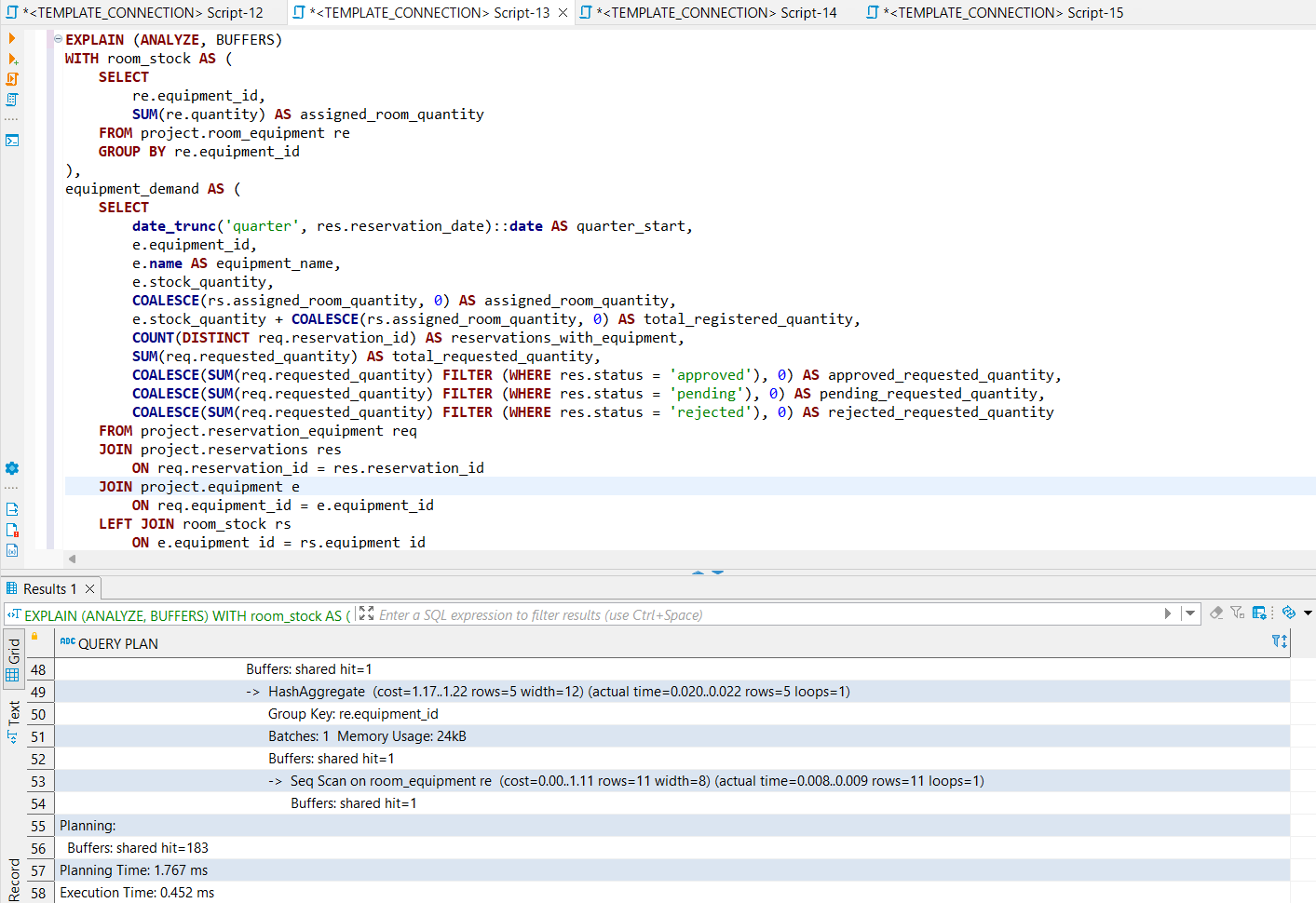
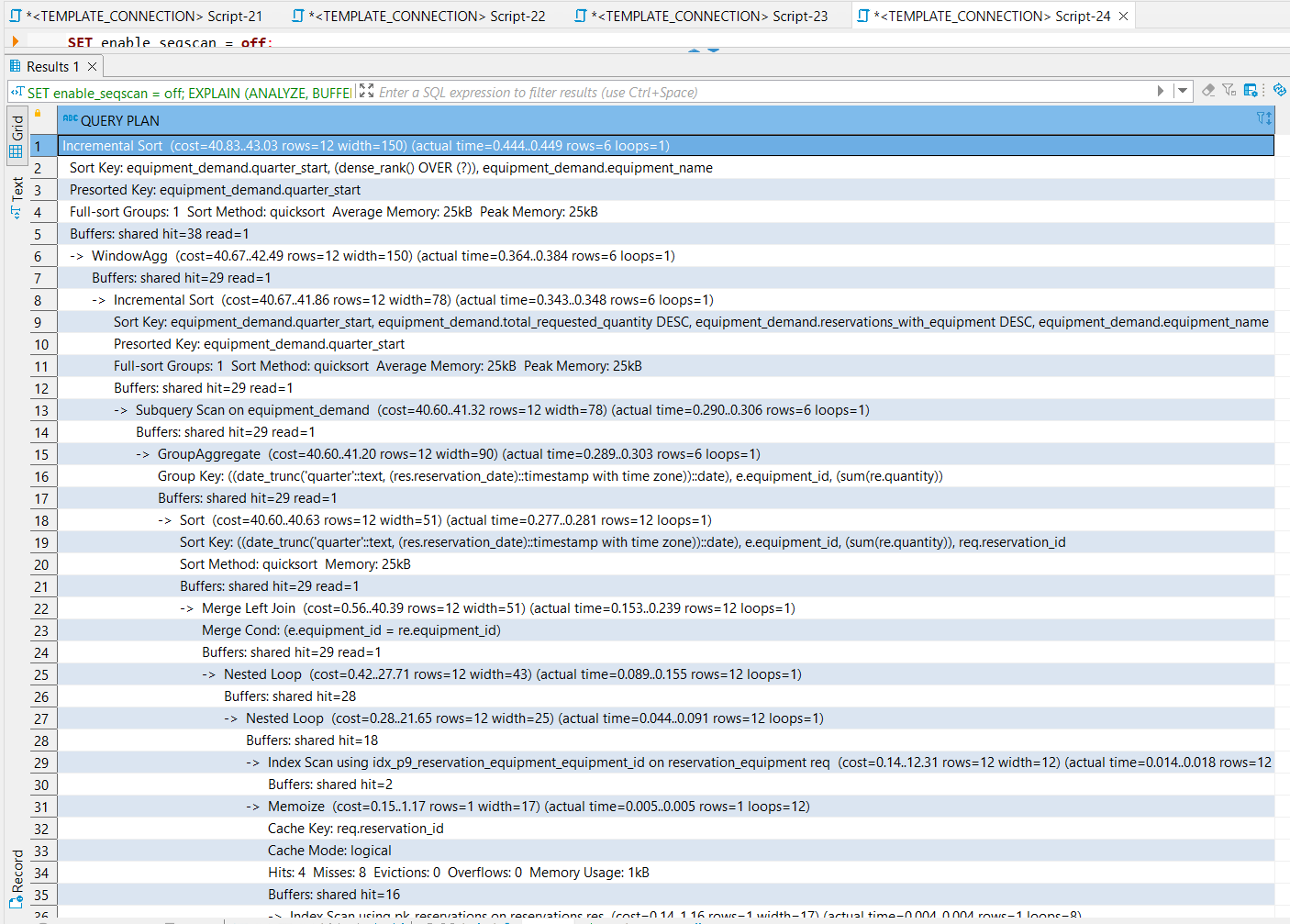
Figure: EXPLAIN ANALYZE plan for the equipment demand report showing index usage.
The important part of the execution plan is:
Index Scan using idx_p9_reservation_equipment_equipment_id
This proves that PostgreSQL can use the created index for the equipment demand report.
The index supports the report because the query joins requested equipment records with equipment records and aggregates demand by equipment type.
Discussion About Small Dataset and Sequential Scans
The current project database has a small number of sample rows. Because of this, PostgreSQL may normally choose sequential scans or hash joins for some queries, even when indexes exist.
This does not mean that the indexes are incorrect. It means that for very small tables, the optimizer estimates that reading the whole table is cheaper than using an index.
To explicitly demonstrate that the created indexes match the query predicates and join conditions, the verification queries were executed with:
SET enable_seqscan = off;
This was used only during testing. It was reset immediately after the verification queries with:
RESET enable_seqscan;
The execution plans show that the created indexes are applicable and can be used by PostgreSQL. The indexes become more important as the number of reservations, rooms, equipment records and approval records increases.
SQL Performance Conclusion
The performance analysis shows that the complex reports from Phase P6 are supported by indexes that match their filtering and joining patterns.
The most important indexed access patterns are:
- searching reservations by room and reservation date
- filtering reservations by date and status
- joining rooms with buildings
- joining reservations with requested equipment
- joining equipment with requested equipment
- calculating equipment assigned to rooms
- finding approvals by reservation
The execution plans demonstrate that PostgreSQL can use the created indexes. This improves the scalability of the project and makes the complex reports more suitable for larger datasets.
Security Measures
This project includes security measures at both the application level and the database level.
Application-level security measures
The final application is implemented with a Spring Boot backend. Database access is performed through Spring JdbcTemplate.
The backend uses parameterized SQL queries. User input is passed as query parameters instead of being concatenated directly into SQL strings. This reduces the risk of SQL injection.
Examples of parameterized inputs include:
- username or email during login
- registration data
- reservation date
- start time and end time
- selected room
- selected equipment
- approval decision
- approval note
The database password is not hard-coded in the source code. It is provided through an environment variable:
SPRING_DATASOURCE_PASSWORD
The database URL and username are also configured through environment variables:
SPRING_DATASOURCE_URL
SPRING_DATASOURCE_USERNAME
This prevents sensitive credentials from being committed to the Git repository.
The application also uses BCrypt password hashing. User passwords are not stored as plain text. The application stores only the password hash in the project.user_credentials table.
Database-level security measures
The database contains additional protection logic implemented in Phase P7.
The most important database-level security and consistency measures are:
- only users with role
adminorapprovercan approve or reject reservations - invalid approval decisions are rejected by the custom domain
project.approval_decision_domain - approval logic is handled through the stored function
project.fn_approve_or_reject_reservation - reservation overlap is prevented at database level
- empty reservations without both room and equipment are rejected
- requested equipment quantity is checked against available stock
- invalid direct writes are rejected by triggers
These measures protect the database even if someone tries to insert data directly through DBeaver or another database client.
Unauthorized Approval Rejection Test
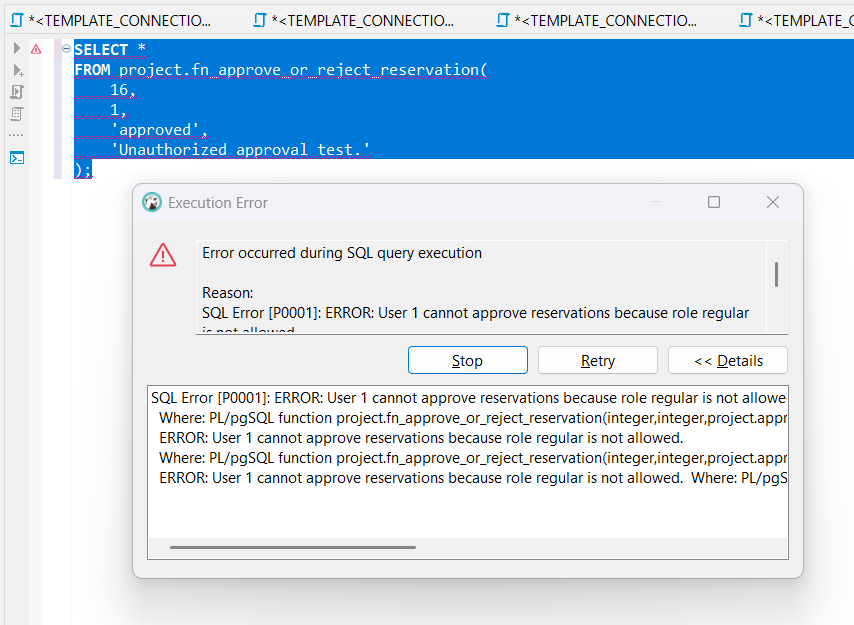
To test database-level security, an unauthorized approval attempt was executed. The test tries to insert an approval using a user who does not have the required role.
Example of an invalid approval attempt:
INSERT INTO project.approvals (
    reservation_id,
    approver_id,
    decision,
    decision_time,
    note
)
VALUES (
    7,
    1,
    'approved',
    CURRENT_TIMESTAMP,
    'Unauthorized approval attempt.'
);
In this example, user ID 1 is a regular user and is not allowed to approve reservations. The database trigger rejects the operation.

Figure: Unauthorized approval attempt rejected by the database security rule.
Security discussion
The unauthorized approval test confirms that approval security is enforced inside the database.
Even if someone tries to bypass the Spring Boot application and insert an approval directly into the project.approvals table, the database checks the role of the approver and rejects invalid writes.
This is stronger than only checking the rule in the application, because the rule remains active for all database clients.
Other Developments
No additional optional topic was added in this phase. The main focus was performance analysis with indexes and security measures for application and database access.
Final Conclusion
Phase P9 improves the Room Reservation System in two important directions.
First, the complex reports from Phase P6 were analyzed using PostgreSQL execution plans. Indexes were created for the most important filtering and join columns. The documentation now includes explicit index-usage evidence through EXPLAIN ANALYZE.
Second, the project security was documented and tested. The Spring Boot backend uses parameterized SQL access through JdbcTemplate, environment-based credentials and BCrypt password hashing. The database enforces important security and consistency rules through triggers, stored functions and a custom domain.
Together, these additions make the Room Reservation System more scalable, more reliable and better protected against invalid or unauthorized database operations.
Attachments (9)
- p9_created_indexes.png (54.1 KB ) - added by 4 months ago.
- p9_report1_after_indexes.png (81.3 KB ) - added by 4 months ago.
- p9_report1_before_indexes.png (73.1 KB ) - added by 4 months ago.
- p9_report2_after_indexes.png (82.1 KB ) - added by 4 months ago.
- p9_report2_before_indexes.png (82.8 KB ) - added by 4 months ago.
- p9_unauthorized_approval_rejected.png (46.6 KB ) - added by 4 months ago.
- p9_indexes_created_after_correction.png (52.1 KB ) - added by 2 months ago.
- p9_report1_index_usage_explain.png (84.8 KB ) - added by 2 months ago.
- p9_report2_index_usage_explain.png (98.6 KB ) - added by 2 months ago.
Download all attachments as: .zip