| Version 2 (modified by , 4 months ago) ( diff ) |
|---|
`wiki
Relational Design
This page documents Phase P2: Logical and Physical Design and Database Creation. The entity-relationship model from Phase P1 is transformed into a relational database schema and implemented in PostgreSQL in the assigned project database. The official schema used for the project is named project.
Relational schema
The following relational schema is derived from the ER model in Phase P1. Primary keys are marked with PK, foreign keys are marked with FK, and unique keys are explicitly noted.
BUILDINGS(
building_id PK, name, address, UNIQUE(name, address)
)
ROOMS(
room_id PK, building_id FK → BUILDINGS(building_id), room_code UNIQUE, capacity, type
)
EQUIPMENT(
equipment_id PK, name UNIQUE
)
ROOM_EQUIPMENT(
room_id PK, FK → ROOMS(room_id), equipment_id PK, FK → EQUIPMENT(equipment_id), quantity
)
USERS(
user_id PK, username UNIQUE, email UNIQUE, full_name, role
)
RESERVATIONS(
reservation_id PK, room_id FK → ROOMS(room_id), user_id FK → USERS(user_id), reservation_date, start_time, end_time, status, UNIQUE(room_id, reservation_date, start_time, end_time)
)
APPROVALS(
approval_id PK, reservation_id FK, UNIQUE → RESERVATIONS(reservation_id), approver_id FK → USERS(user_id), decision, decision_time, note
)
Transformation notes
The ER model was transformed into a relational model using partial transformation. Each strong entity set from the ER diagram is transformed into a separate relation. The entities Buildings, Rooms, Equipment, Users, Reservations, and Approvals are represented as separate tables.
The many-to-many relationship between Rooms and Equipment is represented through the associative relation ROOM_EQUIPMENT. This relation has a composite primary key consisting of room_id and equipment_id. It also contains the additional attribute quantity, which stores how many pieces of a specific equipment type are available in a specific room.
The one-to-many relationships are implemented using foreign keys:
- each room references exactly one building;
- each reservation references exactly one room;
- each reservation references exactly one user;
- each approval references exactly one reservation;
- each approval references exactly one authorized user.
The optional one-to-one relationship between Reservations and Approvals is implemented by allowing reservations to exist without an approval record, while each approval must reference exactly one reservation. The UNIQUE constraint on approvals.reservation_id ensures that one reservation can have at most one approval record.
Constraints
The database schema includes the following constraints:
- Primary keys for all tables.
- Foreign keys for all relationships derived from the ER model.
- Composite primary key on ROOM_EQUIPMENT(room_id, equipment_id).
- UNIQUE constraint on BUILDINGS(name, address).
- UNIQUE constraint on ROOMS(room_code).
- UNIQUE constraint on EQUIPMENT(name).
- UNIQUE constraints on USERS(username) and USERS(email).
- UNIQUE constraint on RESERVATIONS(room_id, reservation_date, start_time, end_time).
- UNIQUE constraint on APPROVALS(reservation_id).
- CHECK constraint that room capacity must be greater than 0.
- CHECK constraint that room equipment quantity must be greater than 0.
- CHECK constraint that reservation end_time must be greater than start_time.
- CHECK constraints for controlled values of room types, user roles, reservation statuses, and approval decisions.
DDL script for creating the database schema and objects
The DDL script recreates the project schema and all database objects. It first drops the existing schema if it already exists, then creates the schema named project. After that, it creates all tables and defines all primary keys, foreign keys, unique constraints, and check constraints.
The script is designed to work both in an empty database and in a database where the project schema and tables already exist, because it drops the existing project schema and recreates it.
Attached file: schema_creation.sql
DML script for filling tables with data
The DML script fills all created tables with realistic sample data. The sample data includes buildings, rooms, equipment, equipment quantities per room, users, reservations, and approval decisions. The data is logically related and simulates realistic room reservation situations.
The script can be executed multiple times because it first truncates the tables, restarts identity values, and then reloads the sample data.
Attached file: data_load.sql
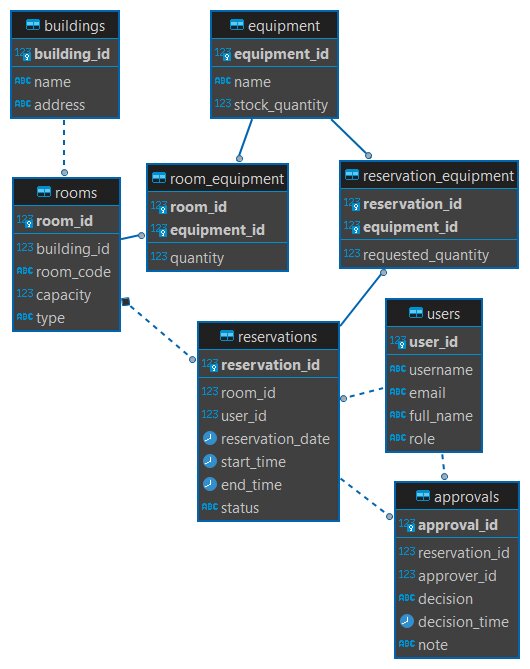
Relational diagram
The relational schema diagram is generated in DBeaver from the PostgreSQL schema named project. The diagram uses crow-foot notation and visually represents the tables, primary keys, foreign keys, and relationships created by the DDL script.

Attached file: relational_schema.jpg
Attachments (3)
- schema_creation.sql (5.1 KB ) - added by 4 months ago.
- data_load.sql (3.0 KB ) - added by 4 months ago.
- relational_schema.jpg (56.6 KB ) - added by 4 months ago.
Download all attachments as: .zip