| Version 1 (modified by , 5 days ago) ( diff ) |
|---|
Имплементација на случаи на употреба
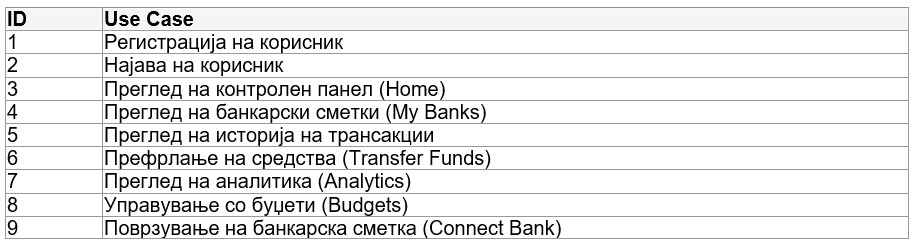
Заклучно со оваа фаза се имплементирани сите предвидени кориснички сценарија, односно:

Ненајавен корисник
ИД 1 - Регистрација на корисник
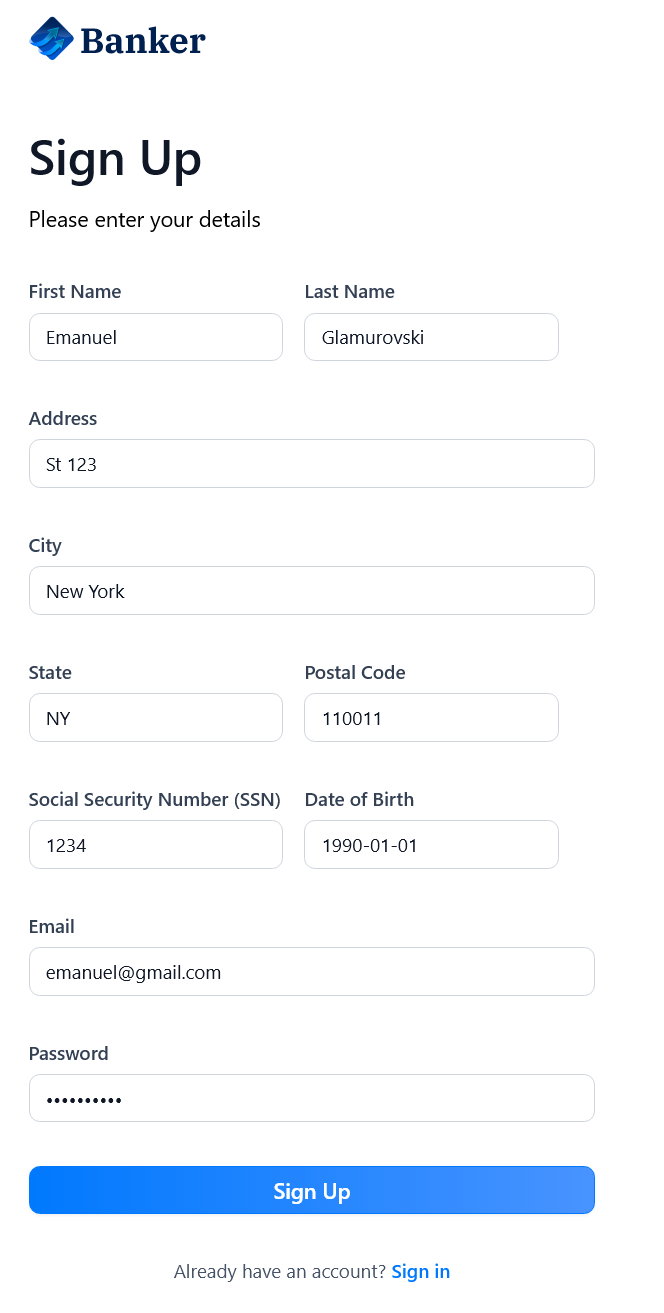
Корисникот се наоѓа на home страницата и го кликнува копчето за регистрација на корисник.

Притоа, корисникот е пренасочен кон /sign-up каде што внесува потребни информации за регистрација (име, презиме, адреса, град, држава, поштенски код, SSN, датум на раѓање, email, лозинка).

ИД 1
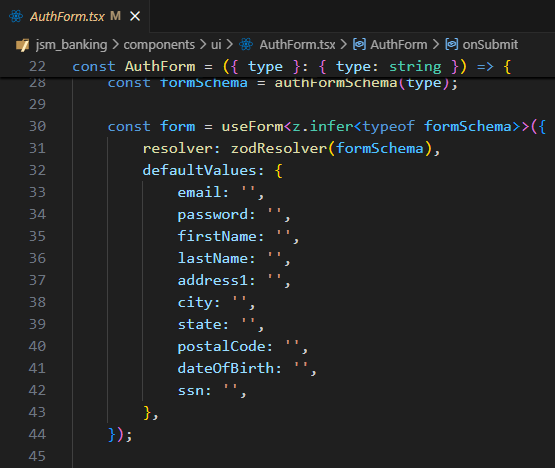
За секоја потребна информација чуваме посебен Hook, и тие се ажурираат при секоја промена од страна на корисникот.
const form = useForm<z.infer<typeof formSchema>>({
    resolver: zodResolver(formSchema),
    defaultValues: {
        email: '', password: '', firstName: '', lastName: '',
        address1: '', city: '', state: '', postalCode: '',
        dateOfBirth: '', ssn: '',
    },
});
ИД 1
Во следните неколку слики е опишана обработката на регистрацијата на корисникот. При клик на копчето Sign Up, се испраќа POST барање до backend апликацијата во кој се сместени поднесените информации.
const onSubmit = async (data: z.infer<typeof formSchema>) => {
    setIsLoading(true);
    try {
        if (type === 'sign-up') {
            await register({
                firstName: data.firstName!, lastName: data.lastName!,
                email: data.email, password: data.password,
                address1: data.address1!, city: data.city!,
                state: data.state!, postalCode: data.postalCode!,
                dateOfBirth: data.dateOfBirth!, ssn: data.ssn!,
            });
            setSuccess('Registration successful! Redirecting...');
        }
    } catch (error) {
        setError(error instanceof Error ? error.message : 'Authentication failed');
    }
};
ИД 1
Во backend апликацијата, POST request-от е примен од страна на контролерот register_view кој го содржи соодветен API endpoint, кој ги препраќа потребните информации кон базата.
@api_view(['POST'])
@permission_classes([AllowAny])
def register_view(request):
    data = request.data
    email = data.get('email')
    password = data.get('password')
    first_name = data.get('firstName', '')
    last_name = data.get('lastName', '')

    user = User.objects.create_user(
        username=email, email=email, password=password,
        first_name=first_name, last_name=last_name
    )

    refresh = RefreshToken.for_user(user)
    return Response({
        'user': {'id': user.id, 'email': user.email},
        'access': str(refresh.access_token),
        'refresh': str(refresh)
    }, status=status.HTTP_201_CREATED)
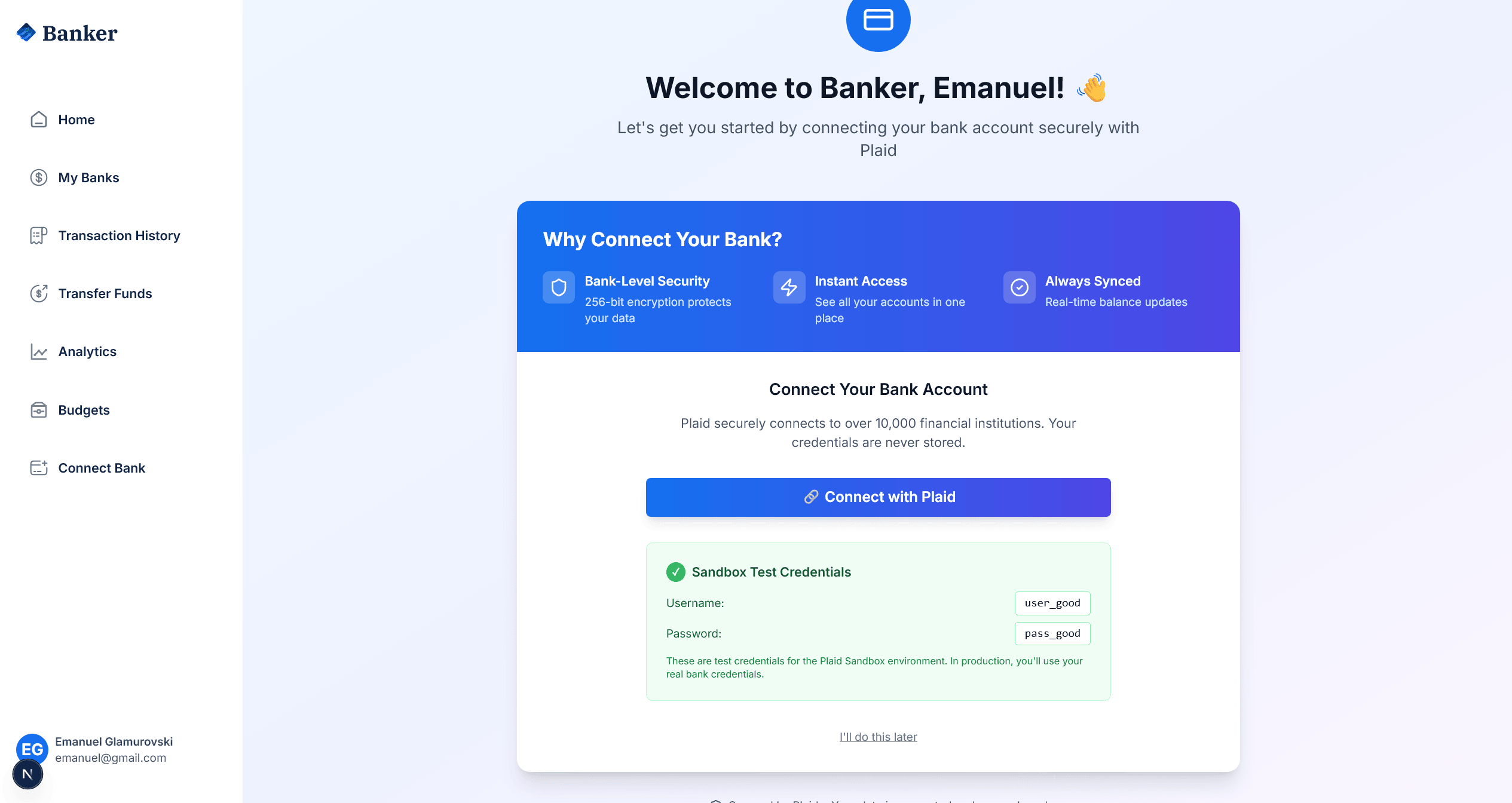
При успешна регистрација, корисникот е пренасочен кон страницата за поврзување на банкарска сметка преку Plaid.

ИД 2 - Најава на корисник
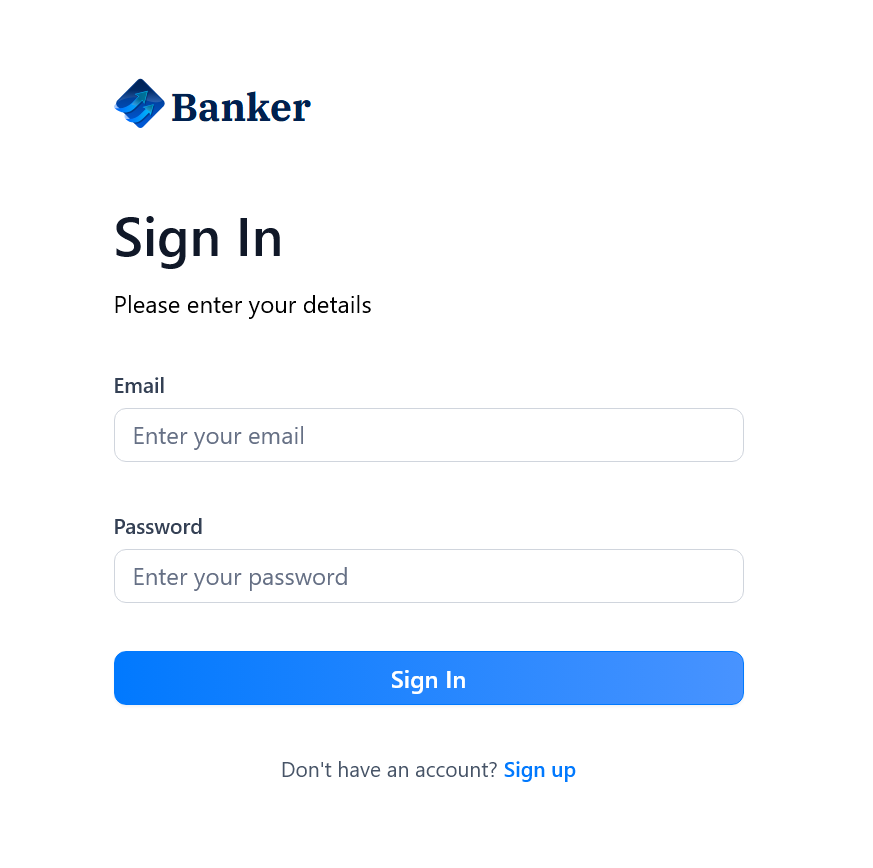
Корисникот се најавува и е редиректиран на home страницата како најавен корисник со дополнителни функции.
ИД 2
При клик на копчето Sign In, се испраќа POST барање до backend апликацијата за верификација на креденцијалите.
const login = async (email: string, password: string) => {
    const response = await fetch('http://localhost:8000/api/auth/login/', {
        method: 'POST',
        headers: { 'Content-Type': 'application/json' },
        body: JSON.stringify({ email, password }),
    });

    if (response.ok) {
        const data = await response.json();
        localStorage.setItem('access_token', data.access);
        localStorage.setItem('refresh_token', data.refresh);
        setUser(data.user);
        router.push('/');
    }
};
ИД 2
Во backend апликацијата, се верификуваат креденцијалите и се генерираат JWT токени.
@api_view(['POST'])
@permission_classes([AllowAny])
def login_view(request):
    email = request.data.get('email')
    password = request.data.get('password')

    user = authenticate(request, username=email, password=password)

    if user is None:
        return Response({'error': 'Invalid credentials'},
                       status=status.HTTP_401_UNAUTHORIZED)

    refresh = RefreshToken.for_user(user)
    return Response({
        'user': {'id': user.id, 'email': user.email},
        'access': str(refresh.access_token),
        'refresh': str(refresh)
    })

Најавен корисник (User)
ИД 3 - Преглед на контролен панел (Home)
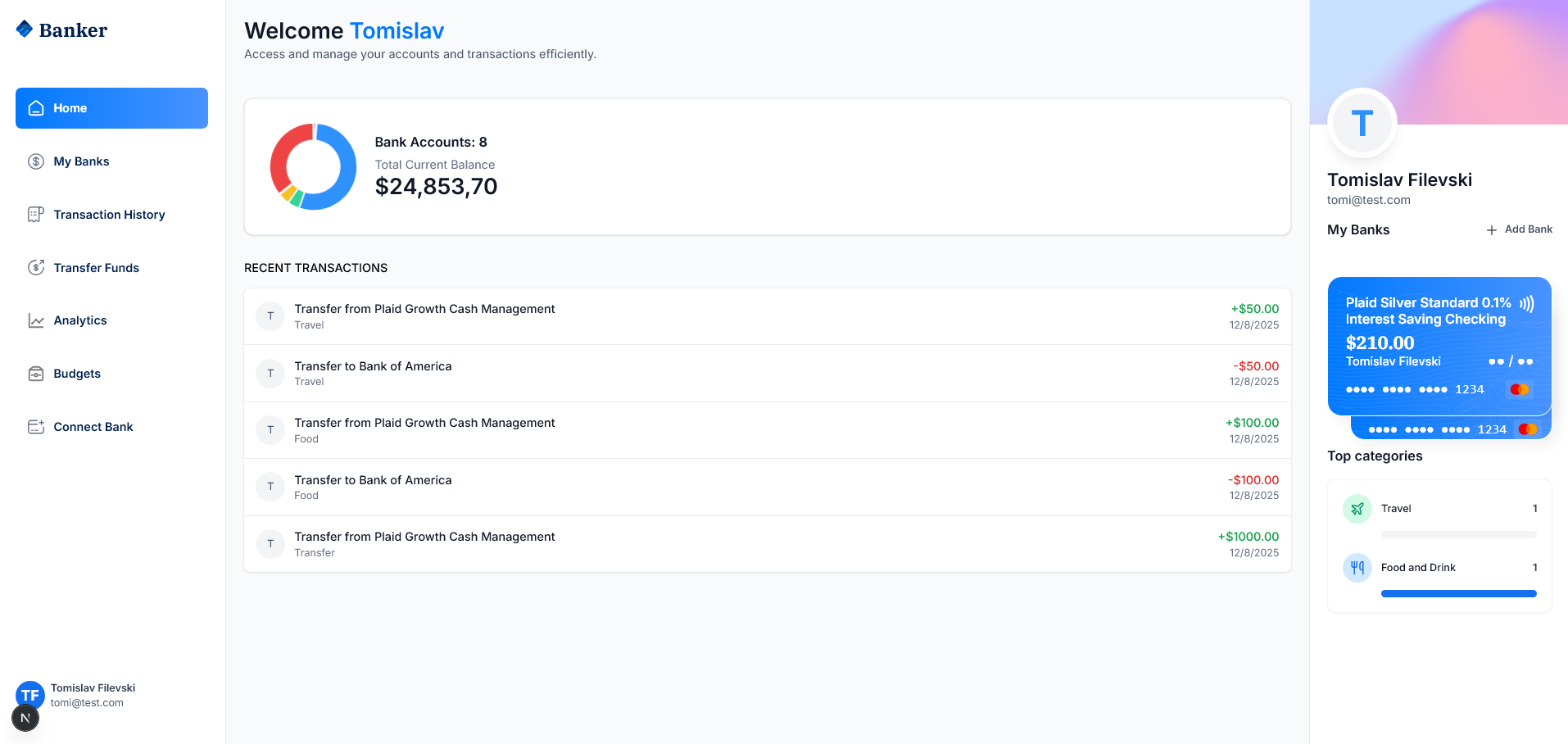
Корисникот го кликнува копчето Home во навигацијата за преглед на контролниот панел со вкупен баланс, број на сметки и последни трансакции.
ИД 3
Се користи custom hook useDashboard за превземање на податоците од backend.
export const useDashboard = () => {
  const [data, setData] = useState<DashboardData | null>(null);

  const fetchDashboard = async () => {
    const accessToken = localStorage.getItem('access_token');
    const response = await fetch('http://localhost:8000/api/banking/dashboard/', {
      headers: {
        'Authorization': `Bearer ${accessToken}`,
        'Content-Type': 'application/json',
      },
    });

    if (response.ok) {
      const dashboardData = await response.json();
      setData(dashboardData);
    }
  };

  return { data, loading, error, refetch: fetchDashboard };
};
ИД 3
Backend API го враќа вкупниот баланс, бројот на сметки и последните трансакции.
@api_view(['GET'])
@permission_classes([IsAuthenticated])
def dashboard_view(request):
    user_accounts = Account.objects.filter(user=request.user)
    total_balance = sum(account.balance for account in user_accounts)
    recent_transactions = Transaction.objects.filter(
        account__in=user_accounts
    ).order_by('-created_at')[:5]

    return Response({
        'total_balance': float(total_balance),
        'accounts_count': user_accounts.count(),
        'accounts': accounts_data,
        'recent_transactions': transactions_data,
    })
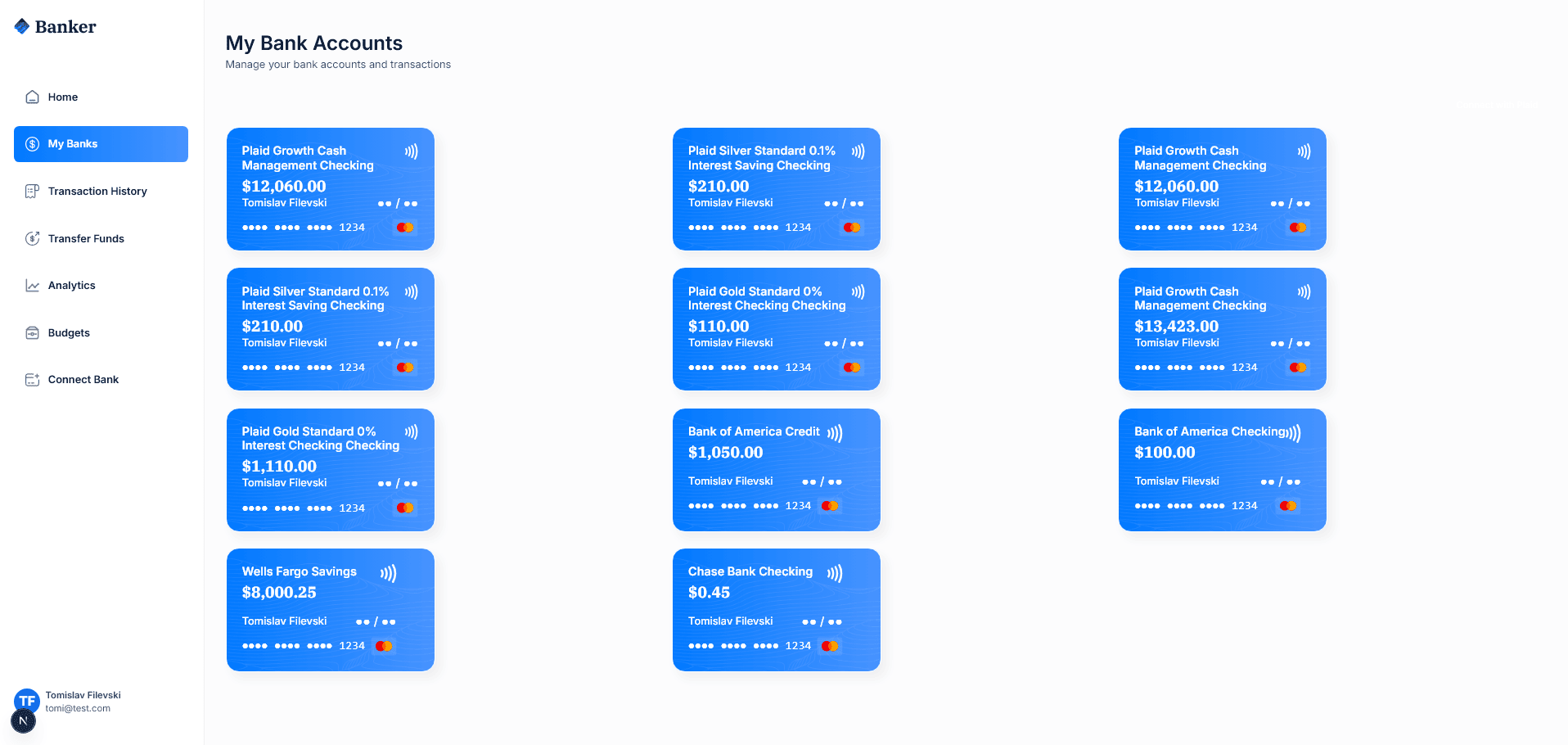
ИД 4 - Преглед на банкарски сметки (My Banks)
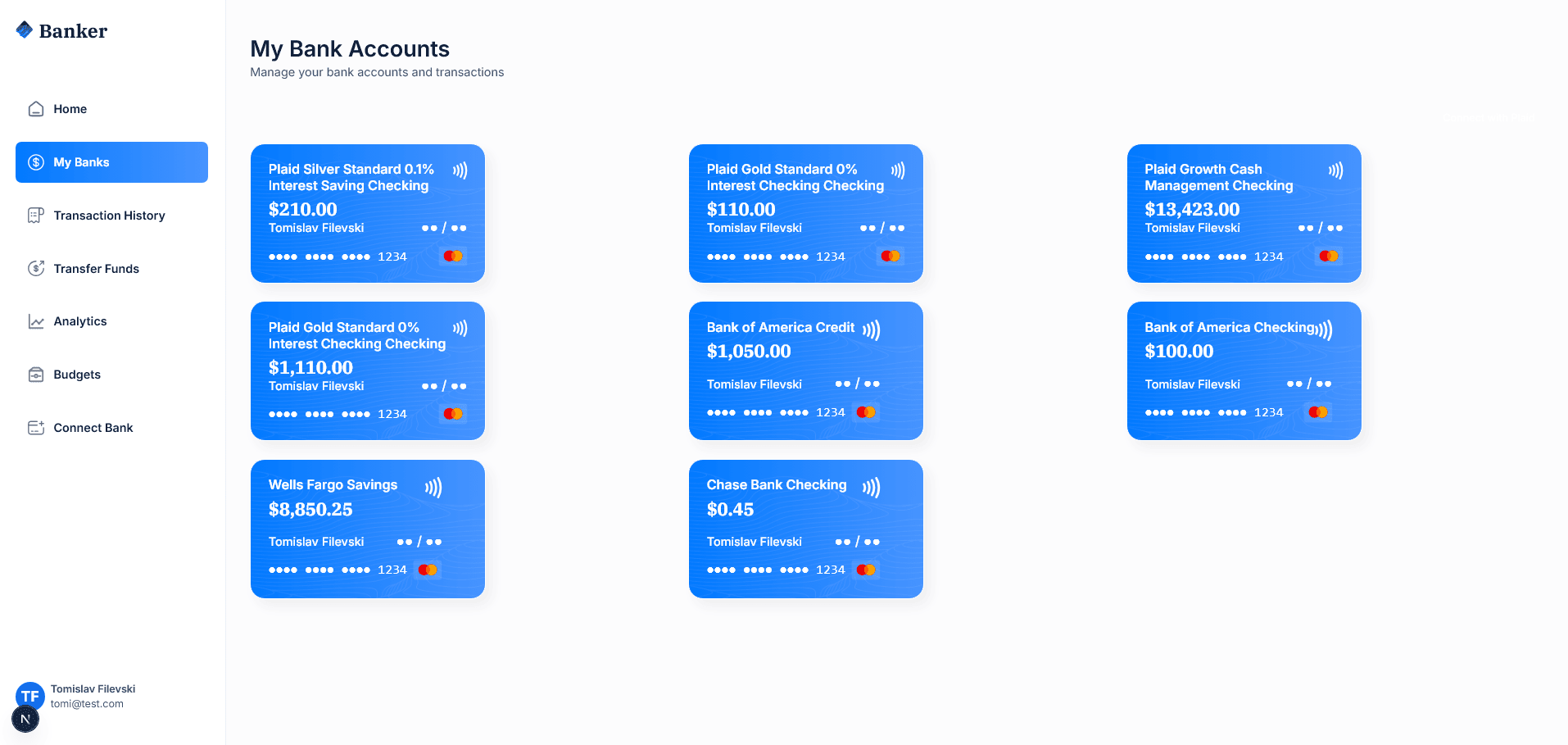
Корисникот кликнува на My Banks во навигацијата и ги гледа сите поврзани банкарски сметки како визуелни картички.

ИД 4
Компонентата BankCard ги прикажува деталите за секоја банкарска сметка.
const BankCard = ({account, userName, showBalance = true}: CreditCardProps) => {
  return (
    <div className='flex flex-col'>
      <Link href='/' className='bank-card relative overflow-hidden'>
        <div className='bank-card-content'>
          <h1 className='text-18 font-semibold text-white'>
            {account.name || userName}
          </h1>
          <p className='font-bold text-white text-24'>
            {formatAmount(account.currentBalance)}
          </p>
        </div>
      </Link>
    </div>
  )
}
ИД 4
Backend API ги враќа сите банкарски сметки поврзани со корисникот.
@api_view(['GET'])
@permission_classes([IsAuthenticated])
def accounts_view(request):
    user_accounts = Account.objects.filter(user=request.user)
    accounts_data = []

    for account in user_accounts:
        accounts_data.append({
            'id': str(account.id),
            'name': f"{account.bank.name} {account.account_type.title()}",
            'currentBalance': float(account.balance),
            'type': account.account_type,
            'account_number': account.account_number,
        })

    return Response({'accounts': accounts_data})
ИД 5 - Преглед на историја на трансакции
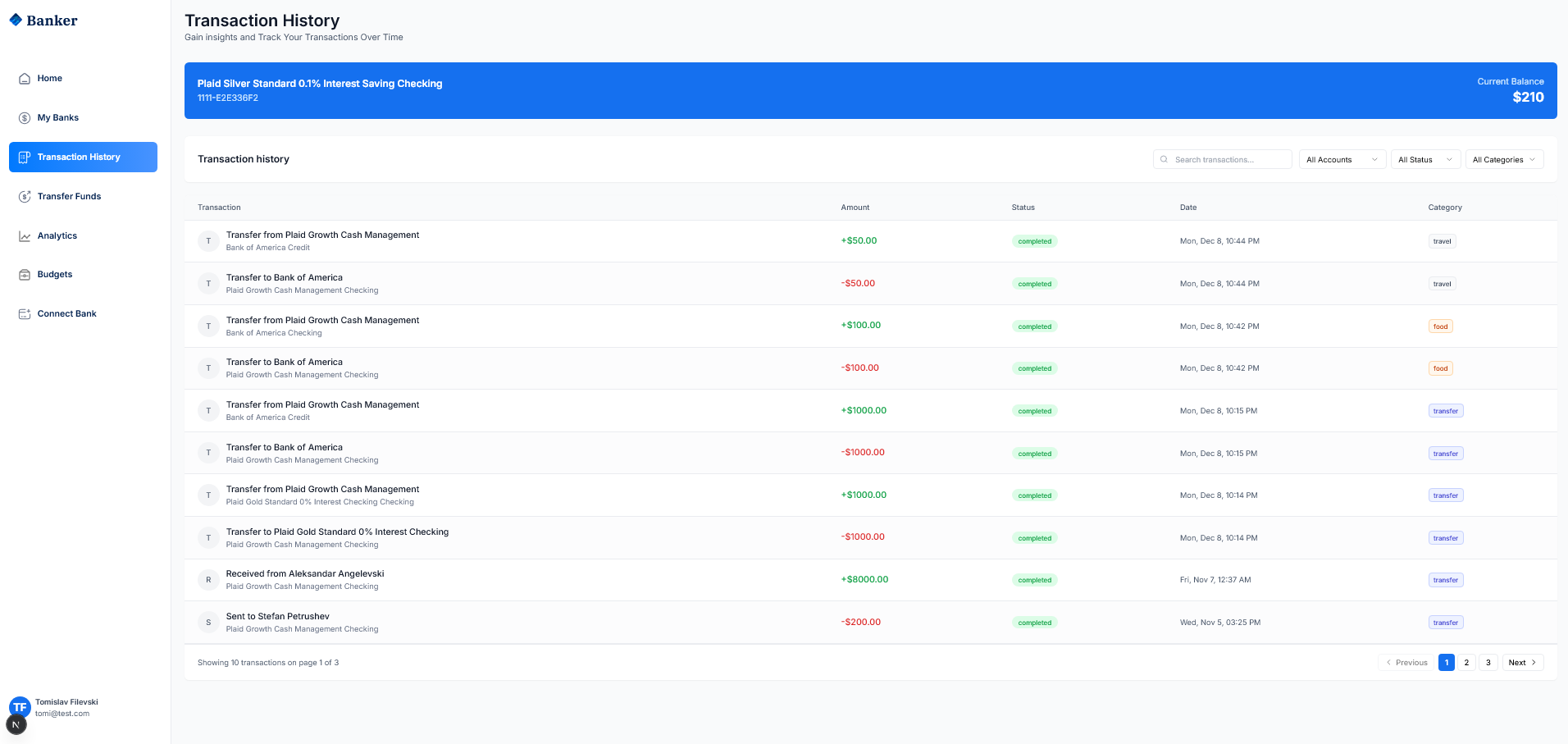
Корисникот кликнува на Transaction History и ја гледа табелата со сите трансакции. Може да филтрира по сметка, статус и категорија.

ИД 5
Frontend компонентата овозможува филтрирање и пагинација на трансакциите.
const fetchTransactions = async () => {
  const params = new URLSearchParams({
    page: currentPage.toString(),
    per_page: '10',
  });

  if (searchQuery) params.append('search', searchQuery);
  if (statusFilter !== 'all') params.append('status', statusFilter);
  if (categoryFilter !== 'all') params.append('category', categoryFilter);

  const response = await fetch(
    `http://localhost:8000/api/banking/transactions/?${params}`,
    { headers: { 'Authorization': `Bearer ${accessToken}` } }
  );

  const data = await response.json();
  setTransactions(data.transactions);
  setTotalPages(data.total_pages);
};
ИД 5
Backend API ги враќа трансакциите со поддршка за филтрирање и пагинација.
@api_view(['GET'])
@permission_classes([IsAuthenticated])
def transactions_view(request):
    user_accounts = Account.objects.filter(user=request.user)
    transactions_query = Transaction.objects.filter(account__in=user_accounts)

    # Apply filters
    if category and category != 'all':
        transactions_query = transactions_query.filter(category=category)
    if status and status != 'all':
        transactions_query = transactions_query.filter(status=status)

    return Response({
        'transactions': transactions_data,
        'total': total_transactions,
        'page': page,
        'total_pages': total_pages
    })
ИД 6 - Префрлање на средства (Transfer Funds)
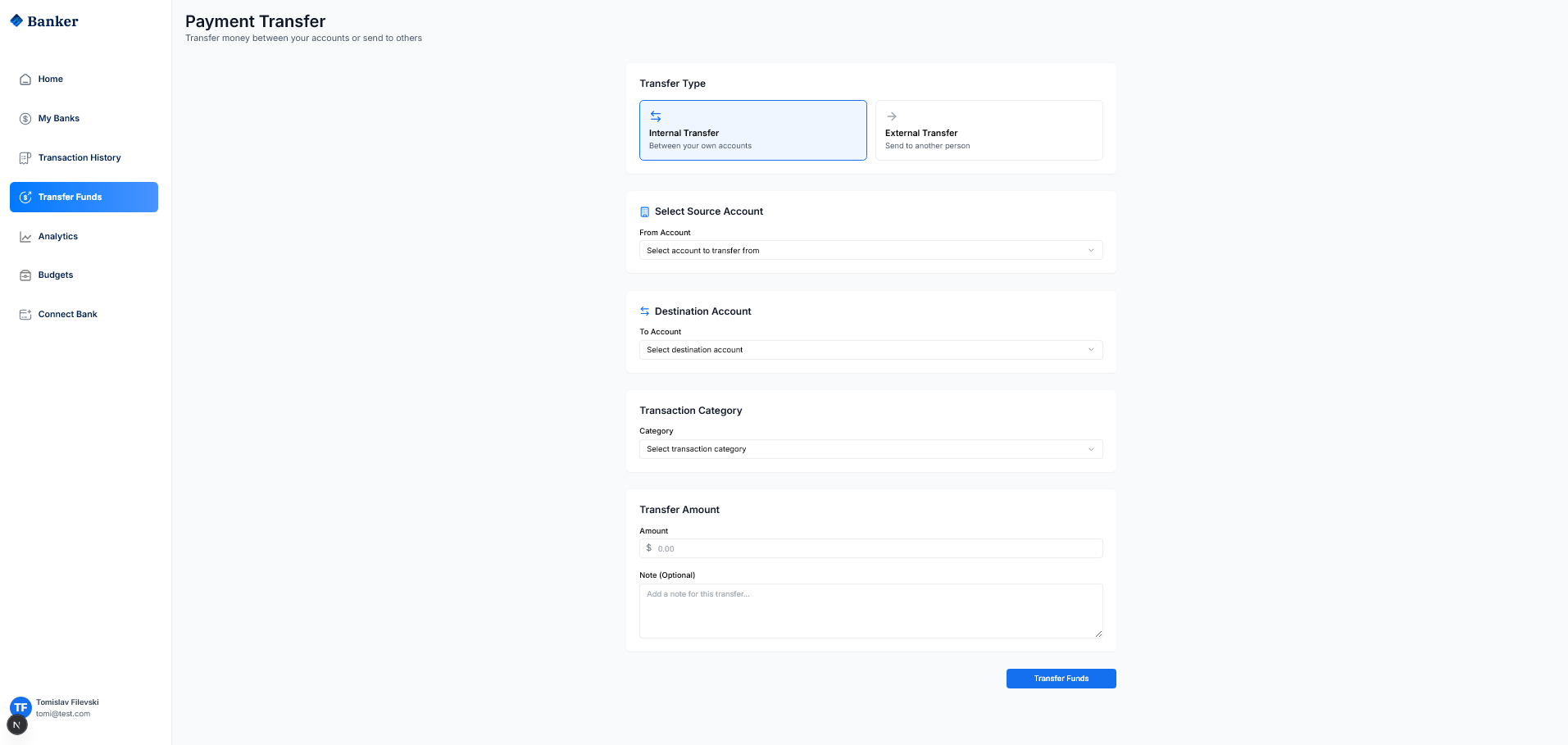
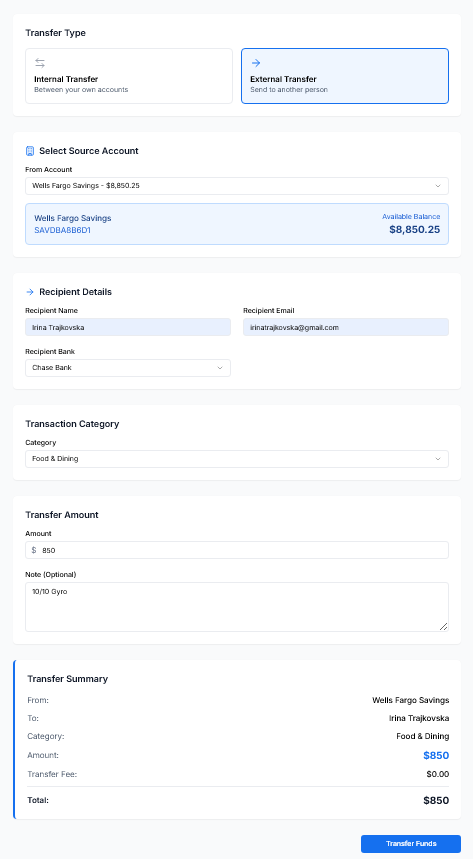
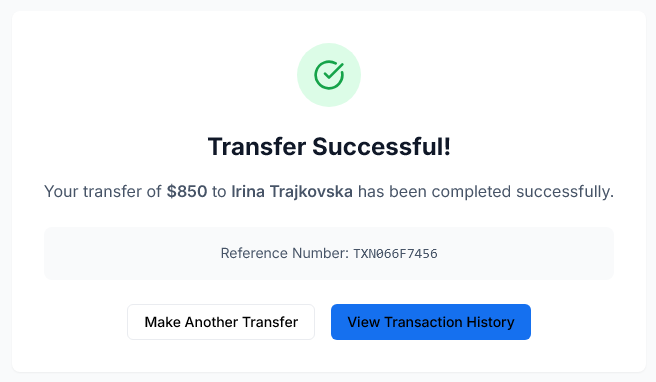
Корисникот кликнува на Transfer Funds, избира тип на трансфер (Internal/External), изворна и дестинациска сметка, категорија, износ и кликнува Transfer Funds. Трансферот се процесира преку Dwolla API.


ИД 6 Frontend формата за трансфер користи react-hook-form за валидација.
const onSubmit = async (data: TransferFormData) => {
  const requestBody = {
    source_account_id: data.sourceAccount,
    amount: data.amount,
    category: data.category,
    note: data.note,
  };

  if (data.transferType === 'internal') {
    requestBody.destination_account_id = data.destinationAccount;
  } else {
    requestBody.recipient_name = data.recipientName;
    requestBody.recipient_email = data.recipientEmail;
  }

  const response = await fetch('http://localhost:8000/api/banking/transfer/', {
    method: 'POST',
    headers: { 'Authorization': `Bearer ${accessToken}` },
    body: JSON.stringify(requestBody),
  });
};
ИД 6
Backend API го процесира трансферот и ги ажурира балансите на сметките.
@api_view(['POST'])
@permission_classes([IsAuthenticated])
def transfer_funds(request):
    source_account = Account.objects.get(id=source_account_id, user=request.user)

    with transaction.atomic():
        Transaction.objects.create(
            account=source_account,
            transaction_type='debit',
            amount=amount,
            description=f"Transfer to {destination_account.bank.name}",
            category=category,
            status='completed'
        )

        source_account.balance -= amount
        source_account.save()

        destination_account.balance += amount
        destination_account.save()

    return Response({'message': 'Transfer completed successfully'})

ИД 7 - Преглед на аналитика (Analytics)
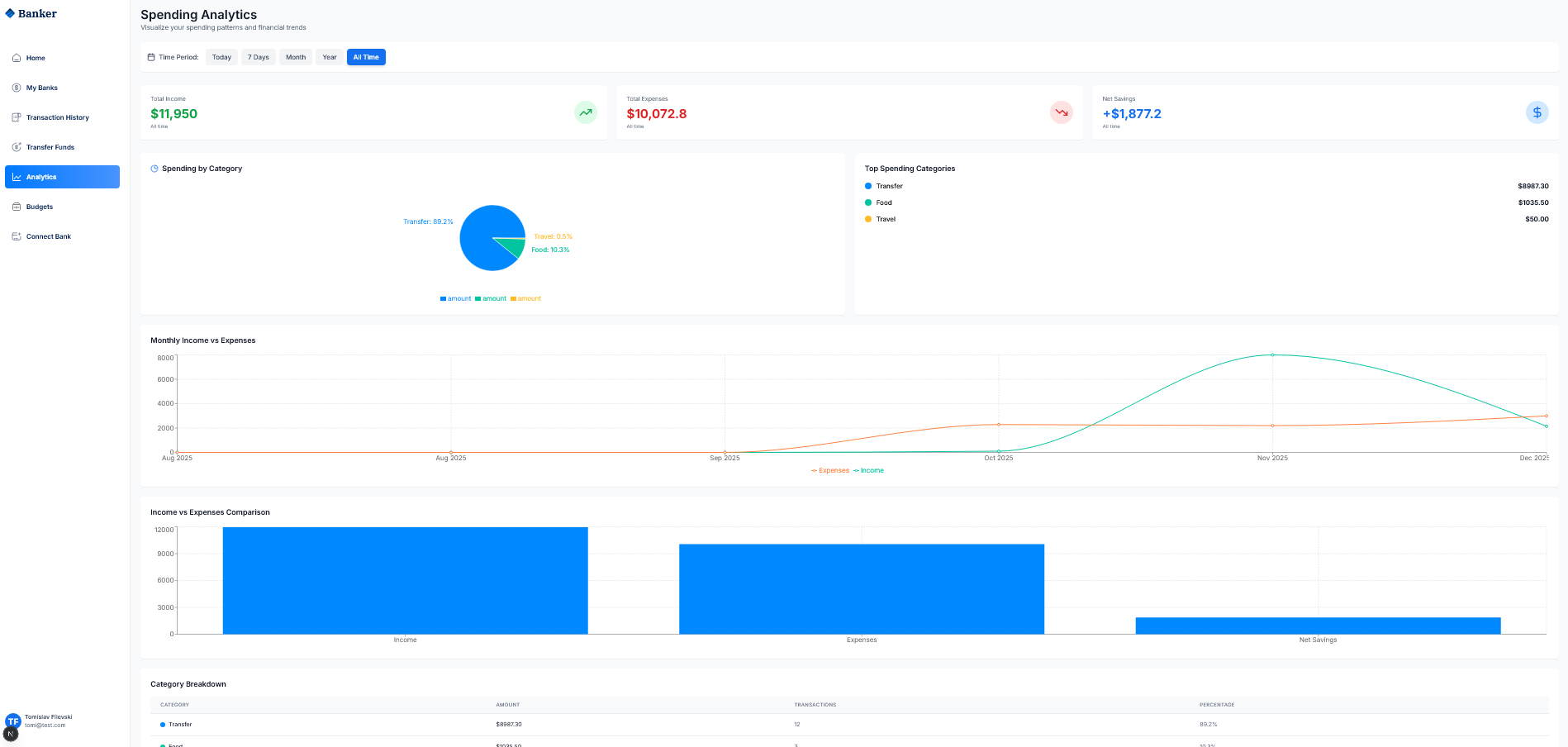
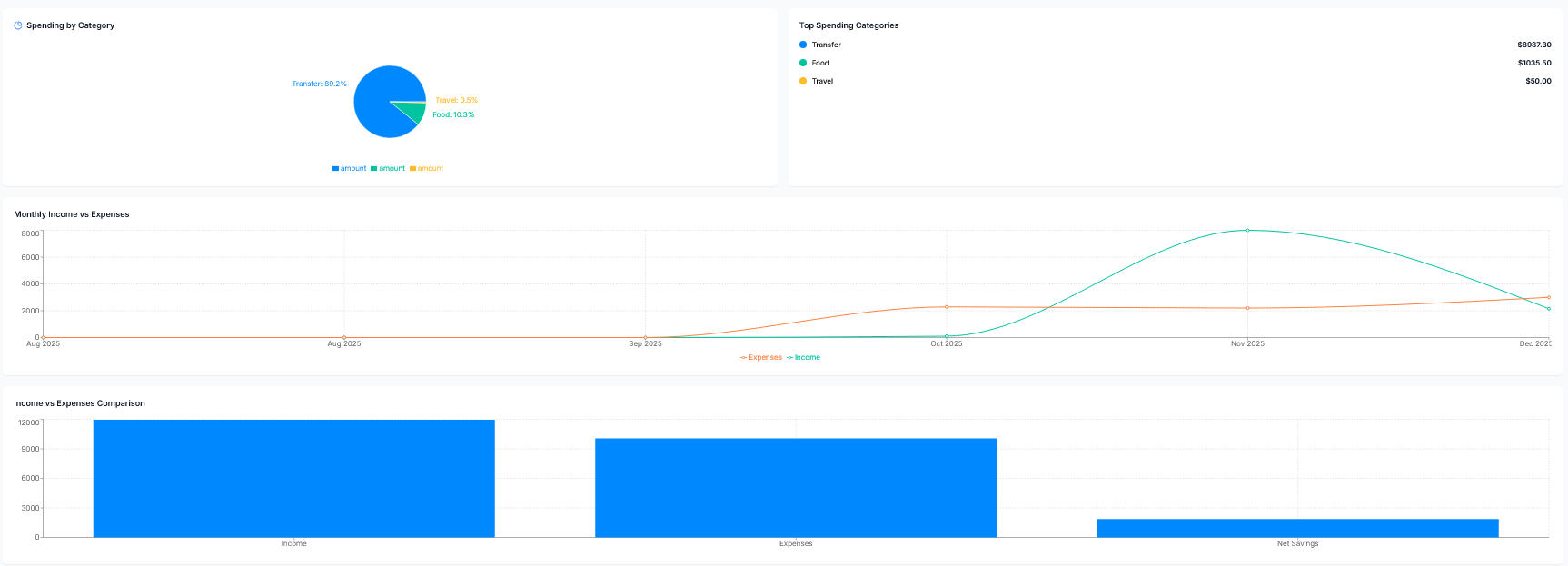
Корисникот кликнува на Analytics и ги гледа графиците за Total Income, Total Expenses, Net Savings, pie chart по категории и месечна споредба.

ИД 7
Frontend компонентата користи Recharts библиотека за визуелизација на податоците.
const Analytics = () => {
  const { data, loading } = useAnalytics(dateRange);

  return (
    <ResponsiveContainer width="100%" height={300}>
      <PieChart>
        <Pie
          data={data.categoryBreakdown}
          dataKey="amount"
          label={({ category, percentage }) => `${category}: ${percentage}%`}
        >
          {data.categoryBreakdown.map((entry, index) => (
            <Cell key={index} fill={COLORS[index % COLORS.length]} />
          ))}
        </Pie>
        <Tooltip formatter={(value) => `$${value.toFixed(2)}`} />
      </PieChart>
    </ResponsiveContainer>
  );
};
ИД 7
Backend API ги пресметува аналитичките податоци од трансакциите.
@api_view(['GET'])
@permission_classes([IsAuthenticated])
def analytics_view(request):
    transactions = Transaction.objects.filter(account__in=user_accounts)

    # Category Breakdown
    category_data = {}
    for txn in transactions:
        if txn.transaction_type == 'debit':
            category = txn.category or 'other'
            category_data[category]['amount'] += float(txn.amount)

    total_income = transactions.filter(transaction_type='credit').aggregate(Sum('amount'))
    total_expenses = transactions.filter(transaction_type='debit').aggregate(Sum('amount'))

    return Response({
        'categoryBreakdown': category_breakdown,
        'incomeVsExpenses': {
            'totalIncome': total_income,
            'totalExpenses': total_expenses,
            'netSavings': total_income - total_expenses
        }
    })
ИД 8 - Управување со буџети (Budgets)
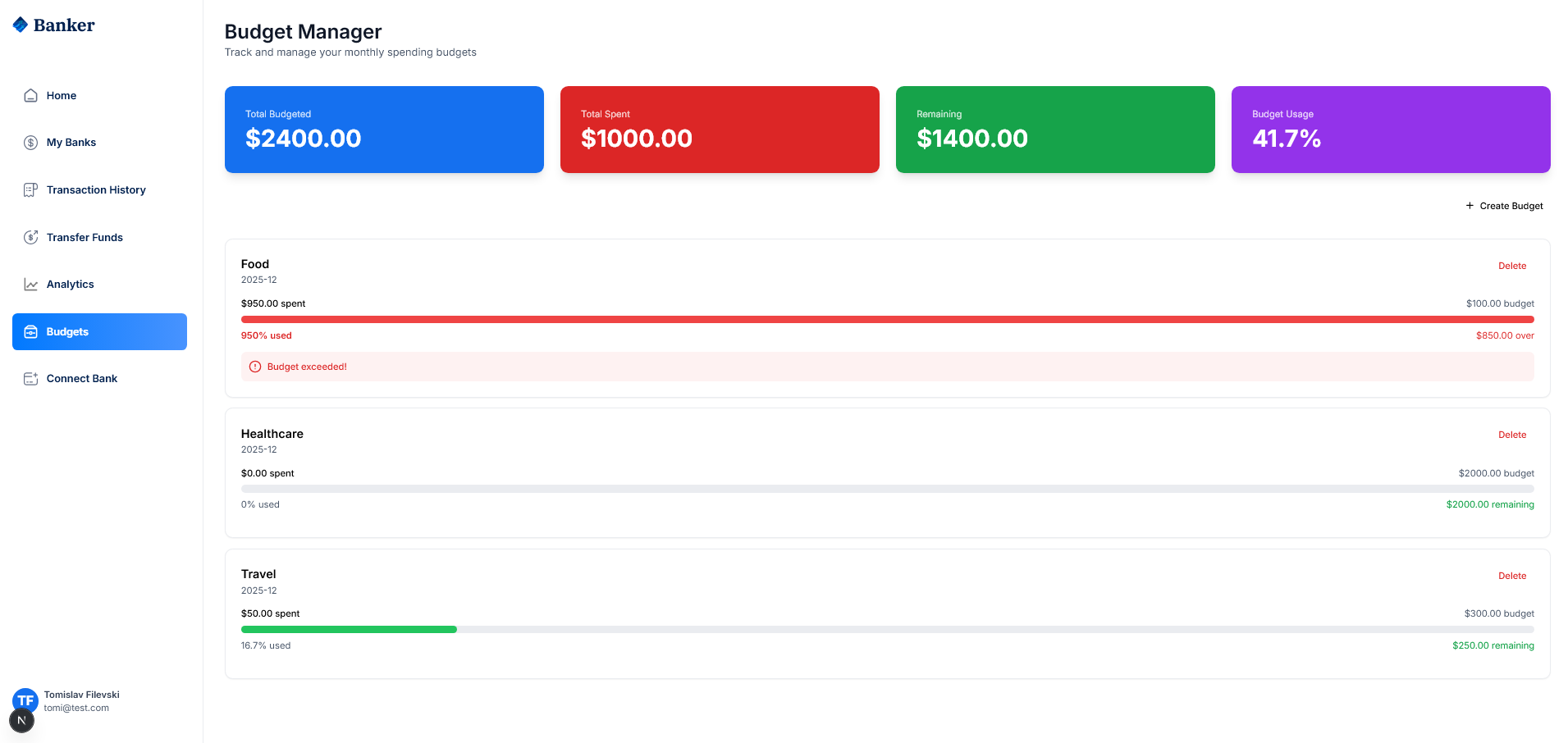
Корисникот кликнува на Budgets и го гледа Budget Manager со вкупно буџетирано, потрошено и останато. Може да креира нови буџети по категории.

ИД 8
Budget моделот во Django ги пресметува потрошените средства автоматски.
class Budget(models.Model):
    user = models.ForeignKey(User, on_delete=models.CASCADE)
    category = models.CharField(max_length=100)
    amount = models.DecimalField(max_digits=10, decimal_places=2)
    month = models.DateField()

    @property
    def spent_amount(self):
        spent = Transaction.objects.filter(
            account__user=self.user,
            category__iexact=self.category,
            transaction_type='debit',
            created_at__gte=self.month
        ).aggregate(total=Sum('amount'))['total'] or Decimal('0.00')
        return float(spent)

    @property
    def percentage_used(self):
        return round((self.spent_amount / float(self.amount)) * 100, 1)
ИД 8
Backend API за креирање на нов буџет.
@api_view(['POST'])
@permission_classes([IsAuthenticated])
def create_budget(request):
    category = request.data.get('category')
    amount = Decimal(str(request.data.get('amount', 0)))

    budget = Budget.objects.create(
        user=request.user,
        category=category,
        amount=amount,
        month=month_date
    )

    return Response({
        'budget': {
            'id': budget.id,
            'category': budget.category,
            'amount': float(budget.amount),
            'spent': budget.spent_amount,
            'percentage_used': budget.percentage_used
        }
    })
ИД 9 - Поврзување на банкарска сметка (Connect Bank)
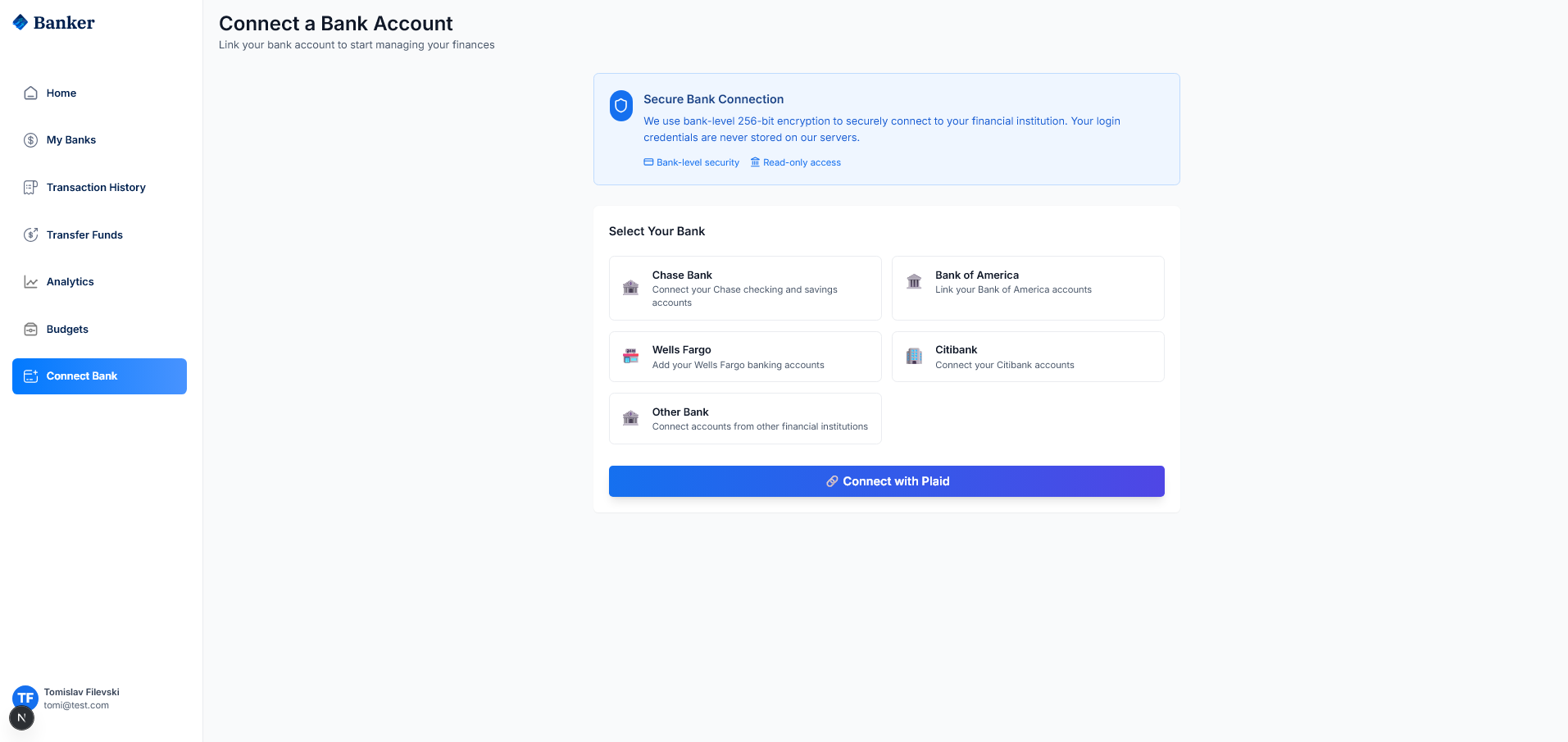
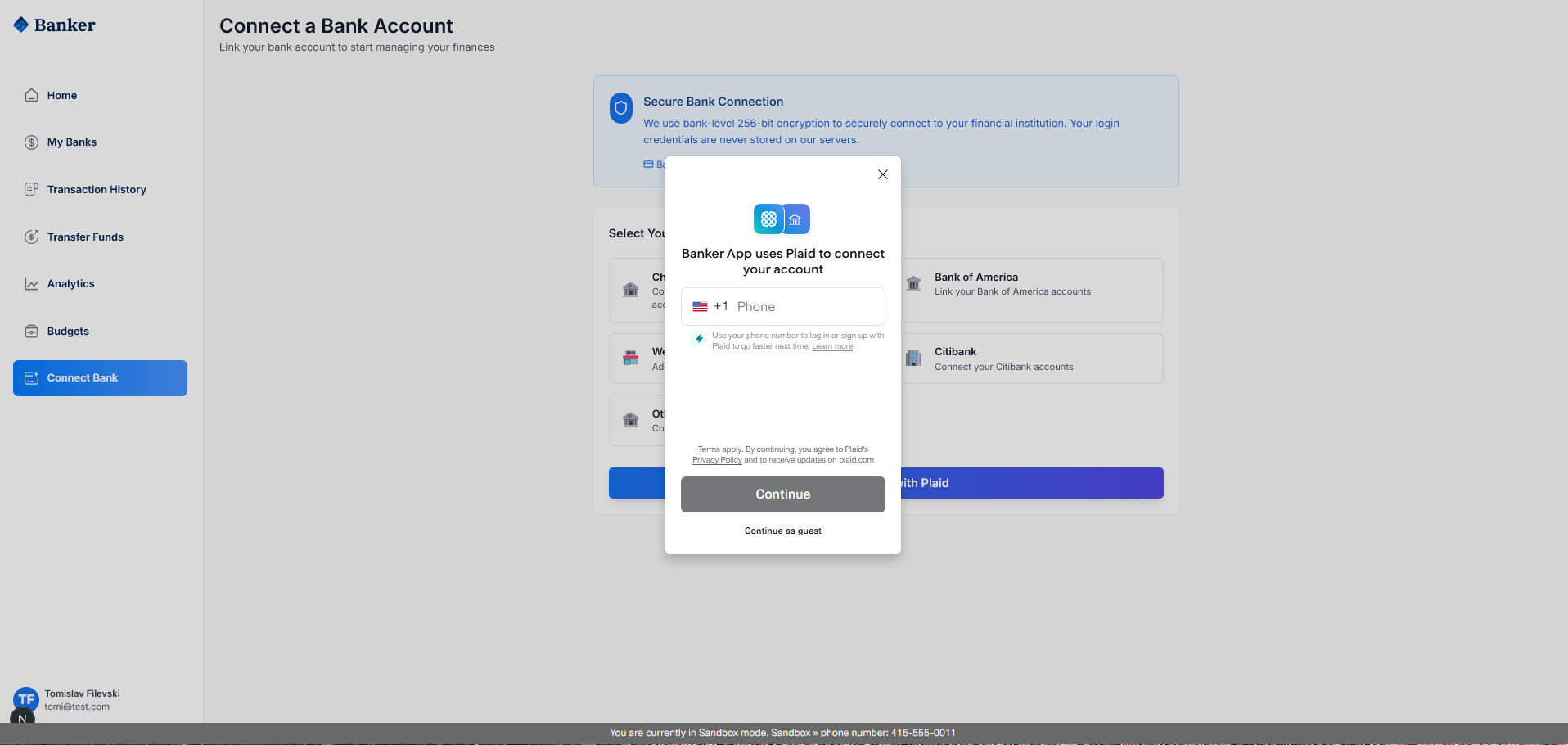
Корисникот кликнува на Connect Bank, ја гледа информацијата за Secure Bank Connection со 256-bit енкрипција, избира банка и кликнува Connect with Plaid.

ИД 9
PlaidLink компонентата го иницира процесот на поврзување со Plaid API.
const PlaidLink = ({ variant, onSuccess }: PlaidLinkProps) => {
  const [linkToken, setLinkToken] = useState<string | null>(null);

  useEffect(() => {
    const createLinkToken = async () => {
      const response = await fetch(
        'http://localhost:8000/api/banking/plaid/create-link-token/',
        { method: 'POST', headers: { 'Authorization': `Bearer ${accessToken}` } }
      );
      const data = await response.json();
      setLinkToken(data.link_token);
    };
    createLinkToken();
  }, []);

  const onPlaidSuccess = useCallback(async (public_token, metadata) => {
    await fetch('http://localhost:8000/api/banking/plaid/exchange-token/', {
      method: 'POST',
      body: JSON.stringify({ public_token }),
    });
    router.push('/my-banks');
  }, []);

  const { open, ready } = usePlaidLink({ token: linkToken, onSuccess: onPlaidSuccess });
};
ИД 9
Backend API за креирање на Plaid Link Token.
@api_view(['POST'])
@permission_classes([IsAuthenticated])
def create_link_token(request):
    link_request = LinkTokenCreateRequest(
        user=LinkTokenCreateRequestUser(client_user_id=str(request.user.id)),
        client_name='Banker App',
        products=[Products('auth'), Products('transactions')],
        country_codes=[CountryCode('US')],
        language='en'
    )
    response = client.link_token_create(link_request)
    return Response({'link_token': response['link_token']})
ИД 9
По успешно поврзување преку Plaid, се креираат банкарски сметки во базата.
@api_view(['POST'])
@permission_classes([IsAuthenticated])
def exchange_public_token(request):
    exchange_response = client.item_public_token_exchange(
        ItemPublicTokenExchangeRequest(public_token=public_token)
    )
    access_token = exchange_response['access_token']

    accounts_response = client.accounts_get(AccountsGetRequest(access_token=access_token))

    for plaid_account in accounts_response['accounts']:
        account = Account.objects.create(
            user=request.user,
            bank=bank,
            account_type=account_subtype,
            balance=Decimal(str(current_balance)),
            status='active'
        )

    return Response({'message': 'Bank accounts connected via Plaid'})


Attachments (17)
- p.png (30.1 KB ) - added by 5 days ago.
- p1.png (34.9 KB ) - added by 5 days ago.
- r1.png (55.6 KB ) - added by 5 days ago.
- r5.png (210.9 KB ) - added by 5 days ago.
- r2.png (59.6 KB ) - added by 5 days ago.
- r3.png (121.6 KB ) - added by 5 days ago.
- r8.png (77.7 KB ) - added by 5 days ago.
- r9.png (125.8 KB ) - added by 5 days ago.
- r11.png (63.0 KB ) - added by 5 days ago.
- r12.png (30.0 KB ) - added by 5 days ago.
- r13.png (19.9 KB ) - added by 5 days ago.
- r14.png (77.7 KB ) - added by 5 days ago.
- r15.png (40.7 KB ) - added by 5 days ago.
- r17.png (83.6 KB ) - added by 5 days ago.
- r19.png (105.0 KB ) - added by 5 days ago.
- r20.png (129.6 KB ) - added by 5 days ago.
- r21.png (109.5 KB ) - added by 5 days ago.
Download all attachments as: .zip