ERModel Current Version v04
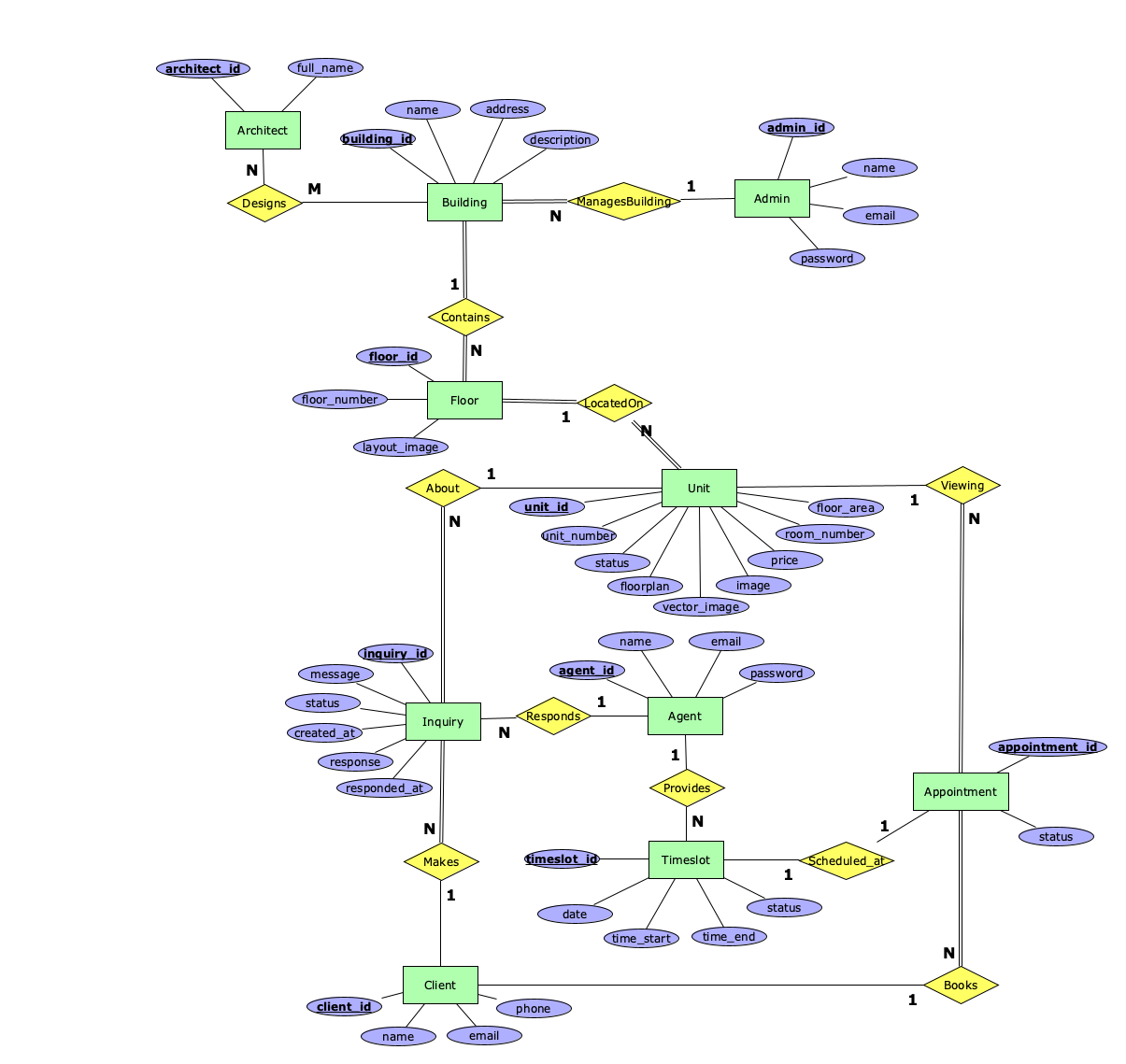
Diagram
Entities
Admin
Admins create and manage building projects, define units. This entity enforces access control, ensuring only an authorised person can modify critical business data. Admin is modeled separately to maintain clear separation of concerns and support future admin-specific features.
- Candidate Keys:
- admin_id (Primary Key) - Artificially generated identifier
- Attributes:
- admin_id (VARCHAR(36), required) - Automatically generated unique identifier for each admin. This attribute would be the primary key.
- name (VARCHAR(128), required) - Full name of the administrator. Must not be empty.
- email (VARCHAR(128), required, unique) - Email address of the administrator used for system login. Must be of valid email format (contains @ symbol and domain).
- password (VARCHAR(128), required) - Encrypted password for authentication. Stored using a hashing algorithm. Minimum 8 characters required before hashing. (Could introduce further restrictions for special characters)
Architect
The Architect entity represents architectural professionals who design buildings in the system. This entity is used for legal, marketing, and historical purposes. Architects are modeled separately to support many-to-many relationships where one architect designs multiple buildings and buildings can have multiple contributing architects.
- Candidate Keys:
- architect_id (Primary Key) - Artificially generated identifier
- Attributes:
- architect_id (VARCHAR(36), required) - Automatically generated unique identifier for each architect. This attribute is the primary key.
- full_name (VARCHAR(128), required) - Architect's complete name or firm name. Must not be empty.
Building
The Building entity represents a physical building projects in the system. Each building serves as a container for floors and units, and is the top layer displayed between all other buildings. Buildings are managed by admins who created them.
- Candidate Keys:
- building_id (Primary Key) - Artificially generated identifier
- Attributes:
- building_id (VARCHAR(36), required) - Automatically generated unique identifier for each building. This attribute is the primary key.
- name (VARCHAR(256), required) - Descriptive name for the building. Must not be empty.
- address (VARCHAR(512), required) - Complete address of the building including street, city, and postal code. Must not be empty.
- description (TEXT, optional) - Detailed description of the building mainly for marketing purposes.
Floor
The Floor entity represents a level within a building, serving as an intermediary layer between buildings and units. Floors are modeled separately because they represent a distinct structural component shared by multiple units, that primarily will serve as to hold the image of the floor (3D render, floorplan).
- Candidate Keys:
- floor_id (Primary Key) - Artificially generated identifier
- Attributes:
- floor_id (VARCHAR(36), required) - Automatically generated unique identifier for each floor. This attribute is the primary key.
- floor_number (INTEGER, required, unique) - The numeric level of the floor within the building. Must be unique within a building.
- layout_image (VARCHAR(512), required) - URL or file path to the floor's image. Will be used for interactive flat selection from the image and this image will be the base on which flat images will be overlaid.
Unit
The Unit entity represents an individual space available for sale. Units are the core entity, containing all information needed for sales including pricing, availability, physical characteristics, and images.
- Candidate Keys:
- unit_id (Primary Key) - Artificially generated identifier
- Attributes:
- unit_id (VARCHAR(36), required) - Automatically generated unique identifier for each unit. This attribute is the primary key.
- unit_number (VARCHAR(64), required, unique) - Presentable identifier of the unit. Must be unique within a floor.
- room_number (INTEGER, required) - Total number of rooms in the unit. Must be a positive integer.
- status (VARCHAR(32), required) - Current availability status of the unit. Allowed values: "Available", "Reserved", "Sold". Default: "Available".
- price (DECIMAL(15,2), required) - Sale price of the unit in the system's base currency. Must be a positive number.
- floor_area (DECIMAL(10,2), required) - Total floor area of the unit in square meters. Must be a positive number.
- image (VARCHAR(512), optional) - URL or file path to the promotional image of the unit. Used for listings and thumbnails.
- floorplan (VARCHAR(512), optional) - URL or file path to the unit's floorplan image or PDF showing room layout and dimensions.
- vector_image (VARCHAR(512), required) - URL or file path to a vector representation of the unit for overlaying on top of the floor image for interactive flat selections within a floor.
Client
The Client entity represents potential buyers who submit inquiries or book appointments. Modeled without authentication, the system allows anyone to express interest without creating an account. Clients are automatically created from information they provide in forms.
- Candidate Keys:
- client_id (Primary Key) - Artificially generated identifier
- Attributes:
- client_id (VARCHAR(36), required) - Automatically generated unique identifier for each client. This attribute is the primary key.
- name (VARCHAR(128), required) - The full name of the client as provided in inquiry or appointment forms. Must not be empty.
- email (VARCHAR(256), required, unique) - Email address of the client for communication. Must follow valid email format.
- phone (VARCHAR(32), required) - Phone number of the client for direct contact. Format validation varies by country. Must not be empty.
Agent
The Agent entity represents real estate agents who respond to inquiries, manage availability through timeslots, and conduct viewings. Agents are authenticated users modeled separately from Admin and Client to enforce role-based access control for the creation of timeslots.
- Candidate Keys:
- agent_id (Primary Key) - Artificially generated identifier
- Attributes:
- agent_id (VARCHAR(36), required) - Automatically generated unique identifier for each agent. This entity is the primary key.
- name (VARCHAR(256), required) - Full name of the agent. Must not be empty.
- email (VARCHAR(256), required, unique) - Email address of the agent used for system login. Must follow valid email format.
- password (VARCHAR(256), required) - Encrypted password for authentication. Stored using a hashing algorithm. Minimum 8 characters required before hashing. (Could introduce further restrictions for special characters)
Inquiry
The Inquiry entity represents questions about units that are created by clients. Each inquiry is assigned to an agent for response, with status tracking. Inquiries serve as the initial contact for interested buyers.
- Candidate Keys:
- inquiry_id (Primary Key) - Artificially generated identifier
- Attributes:
- inquiry_id (VARCHAR(36), required) - Automatically generated unique identifier for each inquiry. This attribute is the primary key.
- message (TEXT, required) - The text content of the client's questions or detailed information that they request. Must not be empty.
- status (VARCHAR(32), required) - Current state of the inquiry. Allowed values: "New", "Replied", "Closed". Default: "New".
- created_at (TIMESTAMP, required) - Automatically set to current timestamp when inquiry is submitted. Used for sorting.
- response (TEXT, optional) - The agent reply text to the client inquiry. After being filled in the status of the inquiry changes to "Replied".
- responded_at (TIMESTAMP, optional) - Timestamp of when the agent submitted the response.
Appointment
The Appointment entity represents scheduled property viewings linking client, unit, agent, and timeslot. Appointments are the critical from the business perspective it's the point where clients physically view the property. Status tracking manages the scheduling through completion or cancellation, needed for coordinating the viewing process.
- Candidate Keys:
- appointment_id (Primary Key) - Artificially generated identifier
- Attributes:
- appointment_id (VARCHAR(36), required) - Automatically generated unique identifier for each appointment. This attribute is the primary key.
- status (VARCHAR(32), required) - Current state of the appointment. Allowed values: "Scheduled", "Completed", "Cancelled". Default: "Scheduled".
Timeslot
The Timeslot entity represents the agent availability periods for viewings. Agents create timeslots defining their availability, and clients book appointments by selecting from available slots. Each timeslot supports one appointment, with status changing from "Available" to "Booked" when used, preventing race conditions.
- Candidate Keys:
- timeslot_id (Primary Key) - Artificially generated identifier
- Attributes:
- timeslot_id (VARCHAR(36), required) - Automatically generated unique identifier for each timeslot. This attribute is the primary key.
- date (DATE, required) - The calendar date for this timeslot. Format: DD-MM-YYYY. Must be today or in the future.
- time_start (TIME, required) - Start time of the timeslot window. Format: HH:MM:SS.
- time_end (TIME, required) - End time of the timeslot window. Format: HH:MM:SS. Must be after time_start.
- status (VARCHAR(32), required) - Current state of the timeslot. Allowed values: "Available", "Booked". Default: "Available".
Relationships
- Designs
- The Designs relationship links architects to buildings they designed. Modeled as many-to-many because projects often involve multiple architects, and architects work on multiple buildings.
- Cardinality: Many-to-Many (M:N)
- Participation: Partial on both sides.
- Contains (Building-Floor)
- The Contains relationship represents floors contained within buildings. Each floor belongs to exactly one building, while buildings contain multiple floors.
- Cardinality: One-to-Many (1:N)
- Participation: Total on Floor side because every floor needs a building, partial on Building side buildings under construction may lack final floor definitions.
- LocatedOn (Unit-Floor)
- The LocatedOn relationship represents units contained within floors. Each unit is on exactly one floor (in most real world scenarios the unit can span multiple floors but it has a door on one floor only), while floors contain multiple units.
- Cardinality: One-to-Many (1:N)
- Participation: Total on Unit side (every unit needs a floor), partial on Floor side (may lack unit definition in early stages of construction).
- ManagesBuilding (Admin-Building)
- The ManagesBuilding relationship indicates which admin created and manages a building. Each building has one managing admin for clear accountability, while admins manage multiple buildings. Necessary for access control.
- Cardinality: One-to-Many (1:N)
- Participation: Total on Building side, partial on Admin side.
- About
- The About relationship indicates which unit the inquiry is about. Each inquiry adheres to one unit, while units can receive multiple inquiries. Enables filtering inquiries by unit.
- Cardinality: One-to-Many (1:N)
- Participation: Total on Inquiry side, partial on Unit side.
- Makes
- The Makes relationship indicates which client submitted an inquiry. Each inquiry has one submitter, while clients can make multiple inquiries.
- Cardinality: One-to-Many (1:N)
- Participation: Total on Inquiry side, partial on Client side.
- Responds
- The Responds relationship indicates which agent handles an inquiry. Each inquiry has one assigned agent to ensure accountability, while agents handle multiple inquiries.
- Cardinality: One-to-Many (1:N)
- Participation: Total on Inquiry side, partial on Agent side.
- Books
- The Books relationship indicates which client scheduled an appointment. Each appointment has one booker, while clients can book multiple appointments. Necessary for enabling appointment management.
- Cardinality: One-to-Many (1:N)
- Participation: Total on Appointment side, partial on Client side.
- Viewing
- The Viewing relationship indicates which unit is shown during an appointment. Each appointment shows one unit, while units can have multiple viewings.
- Cardinality: One-to-Many (1:N)
- Participation: Total on Appointment side, partial on Unit side.
- Provides
- The Provides relationship indicates which agent created a timeslot. Each timeslot has one managing agent who controls their availability, while agents create multiple timeslots across different times.
- Cardinality: One-to-Many (1:N)
- Participation: Total on Timeslot side, partial on Agent side.
- Scheduled_at
- The Scheduled_at relationship links appointments to timeslots. Each appointment occurs at one timeslot, and each timeslot accommodates one appointment maximum to prevent double-booking. When appointments are created, timeslot status changes to "Booked".
- Cardinality: One-to-One (1:1)
- Participation: Total on Appointment side, partial on Timeslot side.
ERModel History
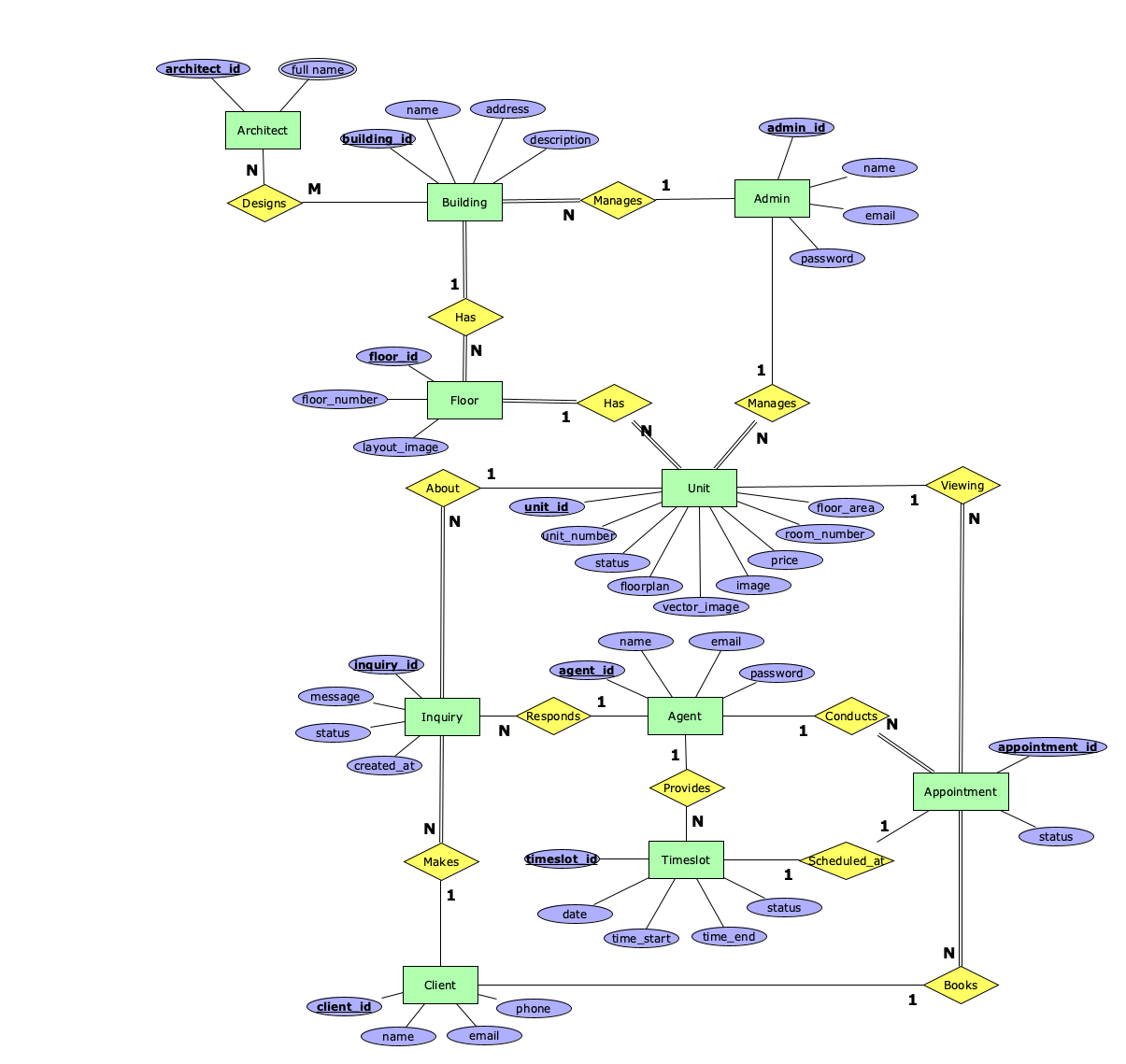
- Version 01
- Initial version
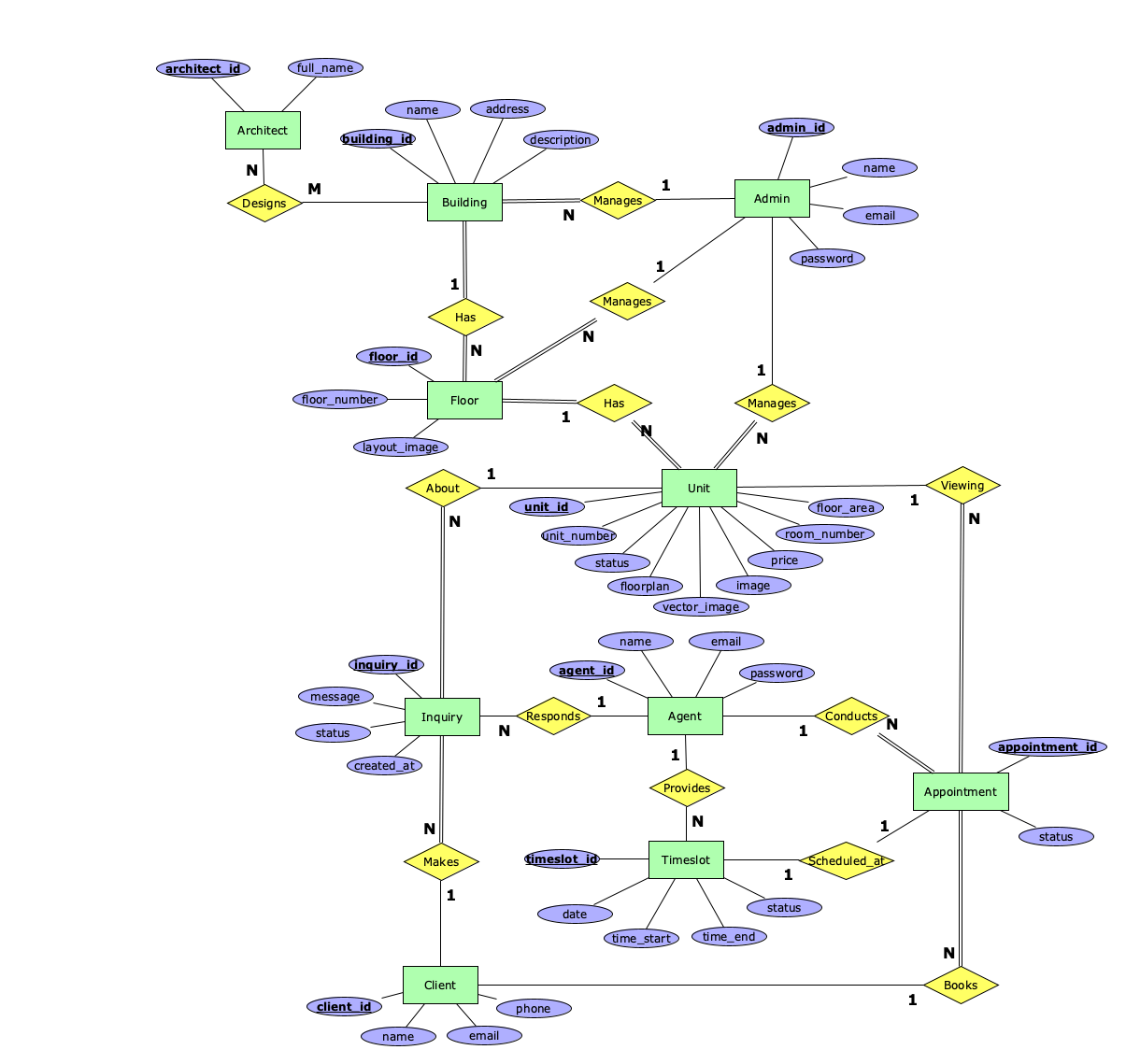
- Version 02
- Added relation between admin and floor
- full_name on architect entity changed from multivalue attribute to an attribute
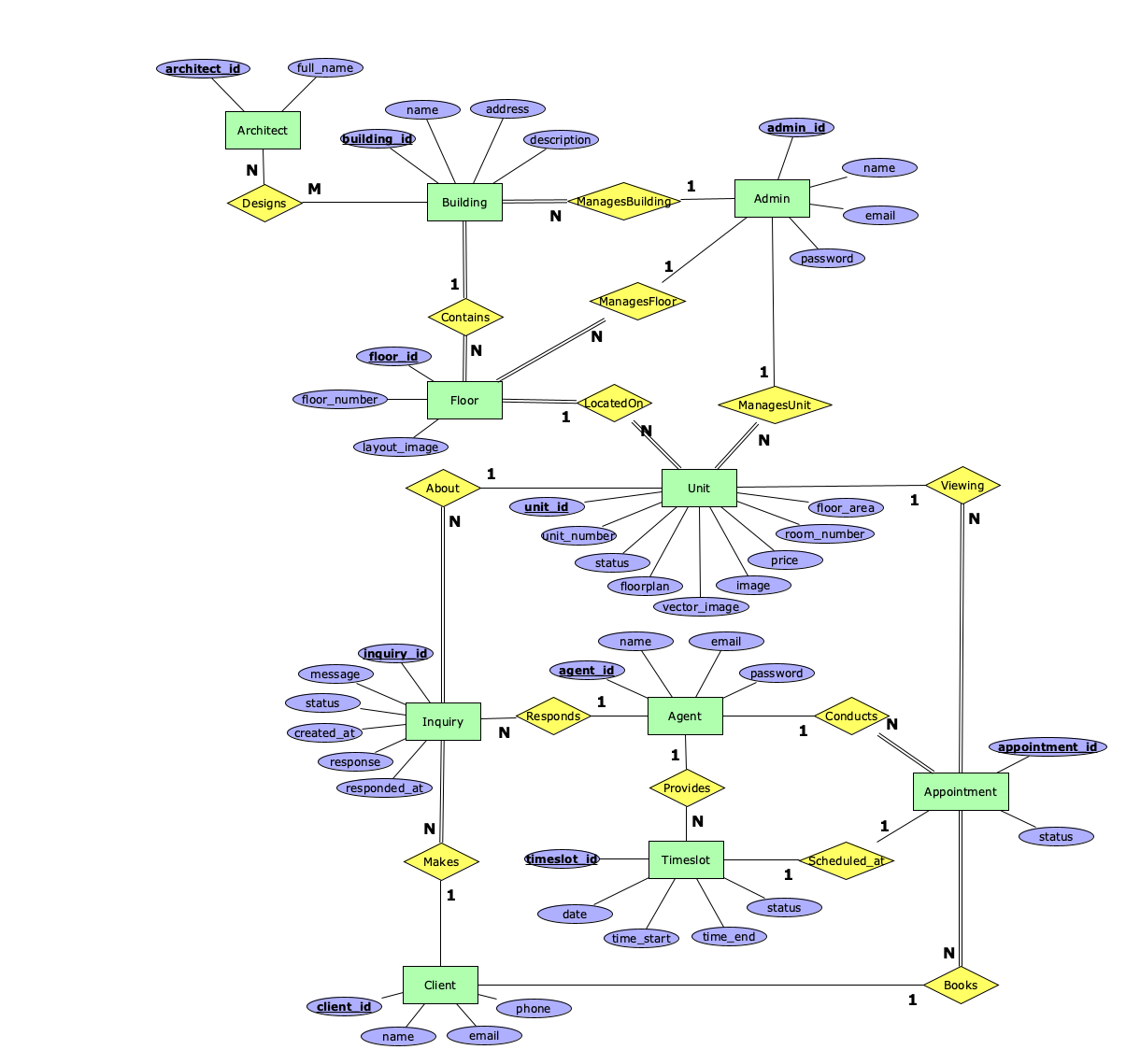
- Version 03
- Expanded Inquiry to include response and responded_at attributes.
- Renamed "Has" relationships to unique names Contains (Building-Floor), LocatedOn (Floor-Unit).
- Renamed "Manages" relationships to unique names ManagesBuilding, ManagesFloor, ManagesUnit.
- Version 04
- Omitted the need for the relationships ManagesUnit, ManagesFloor, Conducts.
- Updated the ERModel image
Attachments (8)
- ERModel_v01.png (130.9 KB ) - added by 11 months ago.
- ERModel_v01.xml (46.5 KB ) - added by 11 months ago.
- ERModel_v02.png (133.6 KB ) - added by 10 months ago.
- ERModel_v02.xml (47.5 KB ) - added by 10 months ago.
- ERModel_v03.xml (48.9 KB ) - added by 2 months ago.
- ERModel_v03.png (145.4 KB ) - added by 2 months ago.
- ERModel_v04.xml (45.2 KB ) - added by 2 months ago.
- ERModel_v04.png (133.0 KB ) - added by 2 months ago.
Download all attachments as: .zip