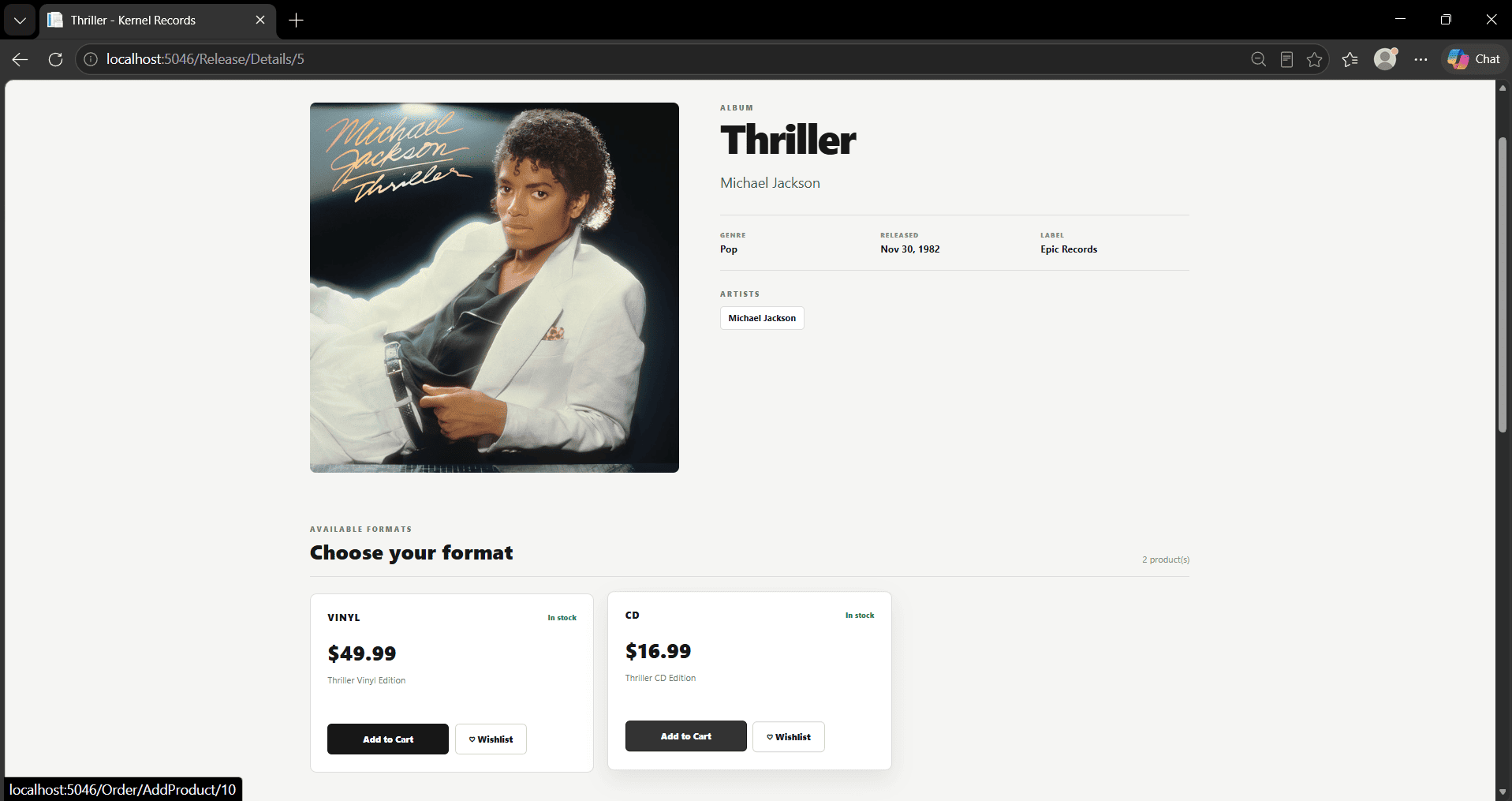
UseCase007 Implementation - Add Product to Order
Initiating actors:
- Logged-In Consumer
- Logged-In Admin
The goal of this use case is to allow an authenticated user to add a selected physical product to their current pending order. Before adding the product, the system retrieves its current price and stock information, identifies or creates the user's pending order, checks whether an active discount applies to the product, and stores the quantity and calculated price in the Order_Products table.
Scenario
- User selects a specific Product and chooses the option to add it to their Order.

- System retrieves the selected Product together with its associated Release information. The retrieved Product data includes its current price and stock level, allowing the application to verify that the requested product is available.
SELECT
p.product_id,
p.format,
p.price,
p.product_description,
p.release_id,
p.stock,
r.release_id,
r.cover_photo,
r.genre,
r.record_label,
r.release_date,
r.title
FROM project.products AS p
INNER JOIN project.releases AS r
ON p.release_id = r.release_id
WHERE p.product_id = @__id_0
LIMIT 1;
- System searches for an existing Order belonging to the authenticated user whose status is PENDING. The existing Order_Products records are also retrieved so that the application has access to the products already contained in the order.
SELECT
t.order_id,
t.payment_method,
t.points_earned,
t.points_used,
t.purchase_date,
t.status,
t.user_id,
o0.order_id,
o0.product_id,
o0.price_at_purchase,
o0.quantity
FROM (
SELECT
o.order_id,
o.payment_method,
o.points_earned,
o.points_used,
o.purchase_date,
o.status,
o.user_id
FROM project.orders AS o
WHERE o.user_id = @__userId_Value_0
AND o.status = 'PENDING'::project.order_status_type
LIMIT 1
) AS t
LEFT JOIN project.order_products AS o0
ON t.order_id = o0.order_id
ORDER BY
t.order_id,
o0.order_id;
- If no pending Order exists for the authenticated user, the system creates a new Order and returns the generated order_id. The newly created order stores the user, payment and loyalty-point information together with its initial PENDING status.
INSERT INTO project.orders
(payment_method, points_earned, points_used, purchase_date, status, user_id)
VALUES
(@p0, @p1, @p2, @p3, @p4, @p5)
RETURNING order_id;
- Before storing the product in the order, the system checks whether the selected Product is associated with a valid discount modification. If multiple discounts exist, the most recently created applicable discount is retrieved.
SELECT
m0.modification_id,
m0.admin_id,
m0.date_modified,
m0.discount,
m0.type_of_modification
FROM project.modification_products AS m
INNER JOIN project.modifications AS m0
ON m.modification_id = m0.modification_id
WHERE m.product_id = @__product_ProductId_0
AND m0.type_of_modification = 'DISCOUNT'::project.modification_type
AND m0.discount IS NOT NULL
AND m0.discount > 0.0
ORDER BY m0.date_modified DESC
LIMIT 1;
- System inserts the selected Product into the Order_Products table, linking it to the active order. The record stores the requested quantity and the price determined by the application for the transaction, including any applicable discount.
INSERT INTO project.order_products
(order_id, product_id, price_at_purchase, quantity)
VALUES
(@p0, @p1, @p2, @p3);
- After the product has been added, the system retrieves the user's pending Order again together with all Order_Products, Product information, and associated Release information. This allows the application to display the updated contents of the order.
SELECT
t.order_id,
t.payment_method,
t.points_earned,
t.points_used,
t.purchase_date,
t.status,
t.user_id,
t0.order_id,
t0.product_id,
t0.price_at_purchase,
t0.quantity,
t0.product_id0,
t0.format,
t0.price,
t0.product_description,
t0.release_id,
t0.stock,
t0.release_id0,
t0.cover_photo,
t0.genre,
t0.record_label,
t0.release_date,
t0.title
FROM (
SELECT
o.order_id,
o.payment_method,
o.points_earned,
o.points_used,
o.purchase_date,
o.status,
o.user_id
FROM project.orders AS o
WHERE o.user_id = @__userId_Value_0
AND o.status = 'PENDING'::project.order_status_type
LIMIT 1
) AS t
LEFT JOIN (
SELECT
o0.order_id,
o0.product_id,
o0.price_at_purchase,
o0.quantity,
p.product_id AS product_id0,
p.format,
p.price,
p.product_description,
p.release_id,
p.stock,
r.release_id AS release_id0,
r.cover_photo,
r.genre,
r.record_label,
r.release_date,
r.title
FROM project.order_products AS o0
INNER JOIN project.products AS p
ON o0.product_id = p.product_id
INNER JOIN project.releases AS r
ON p.release_id = r.release_id
) AS t0
ON t.order_id = t0.order_id
ORDER BY
t.order_id,
t0.order_id,
t0.product_id,
t0.product_id0;
- System calculates the total quantity of products currently contained in the user's pending Order. This value is used to update the shopping-cart quantity displayed by the application.
SELECT COALESCE(sum(o.quantity), 0.0)::bigint
FROM project.order_products AS o
INNER JOIN project.orders AS o0
ON o.order_id = o0.order_id
WHERE o0.user_id = @__userId_0
AND o0.status = 'PENDING'::project.order_status_type;
Last modified
6 weeks ago
Last modified on 09/11/26 07:24:54
Attachments (1)
- addtoorder.png (91.7 KB ) - added by 6 weeks ago.
Download all attachments as: .zip
Note:
See TracWiki
for help on using the wiki.