| Version 37 (modified by , 13 days ago) ( diff ) |
|---|
Relational Design
Notation
- Primary keys are enclosed in [ ] and underlined.
- Foreign keys are marked with * at the end of their name and the referenced entity is written in parentheses.
Tables
University ( Id, Name, Location, is_private )
Faculty ( Id, University_Id* (University), Name, Location, Study_field )
Professor ( Id, Faculty_Id* (Faculty), Name, Surname, Age )
Student ( Id, Faculty_Id* (Faculty), Name, Surname, Location, Student_Index )
Subject ( Id, Faculty_Id* (Faculty), Name, Semester, Credits )
Student_Subject ( [Student_Id* (Student), Subject_Id* (Subject), Ss_Id], Professor_Id* (Professor), Enrollment_Date, Status, Final_Grade, Absences_Count )
Advice ( [Student_Id* (Student), Professor_Id* (Professor), Start_Date], End_Date )
Affiliated ( [University_Id* (University), Professor_Id* (Professor)] )
Teach ( [Professor_Id* (Professor), Subject_Id* (Subject)] )
DDL script for creating the database schema and objects:
DML script for inserting data in the tables
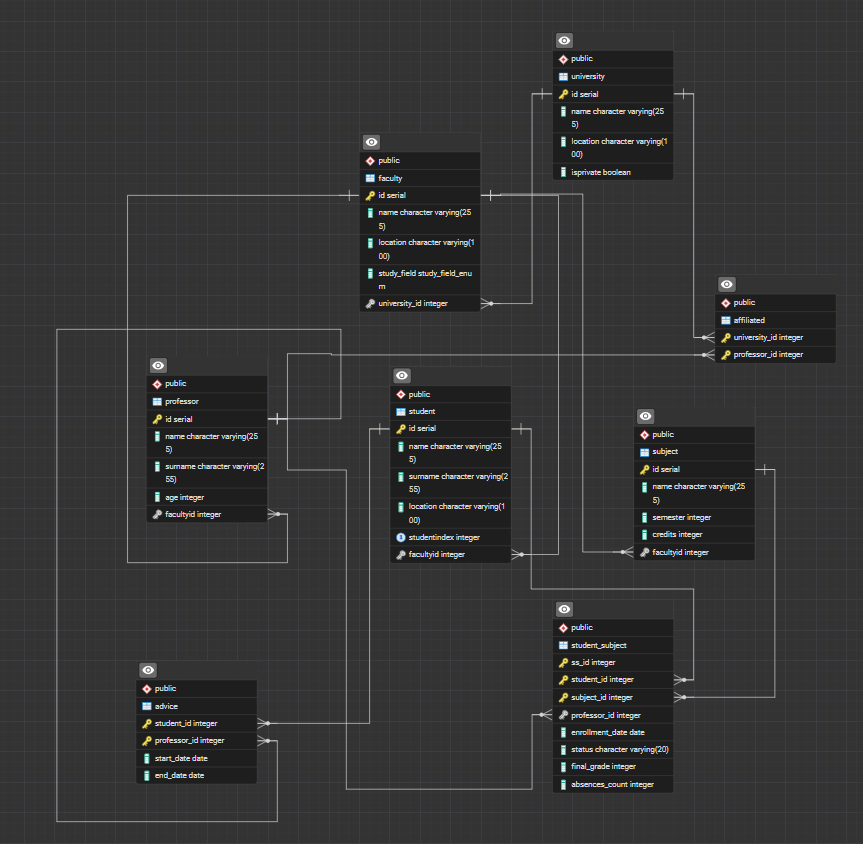
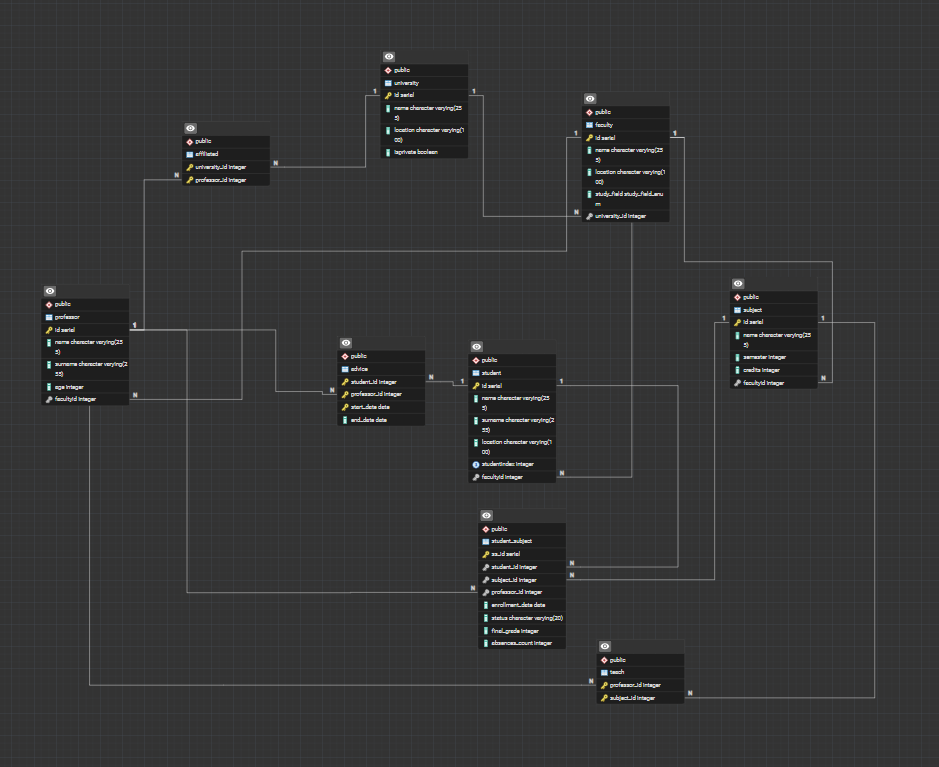
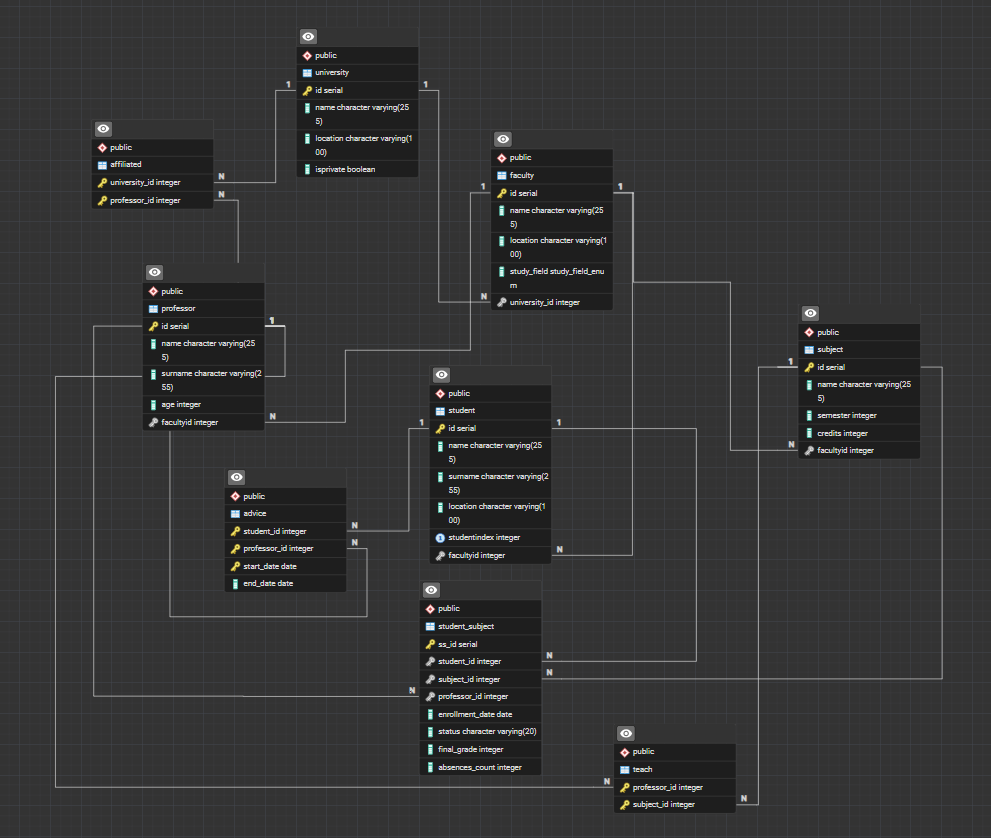
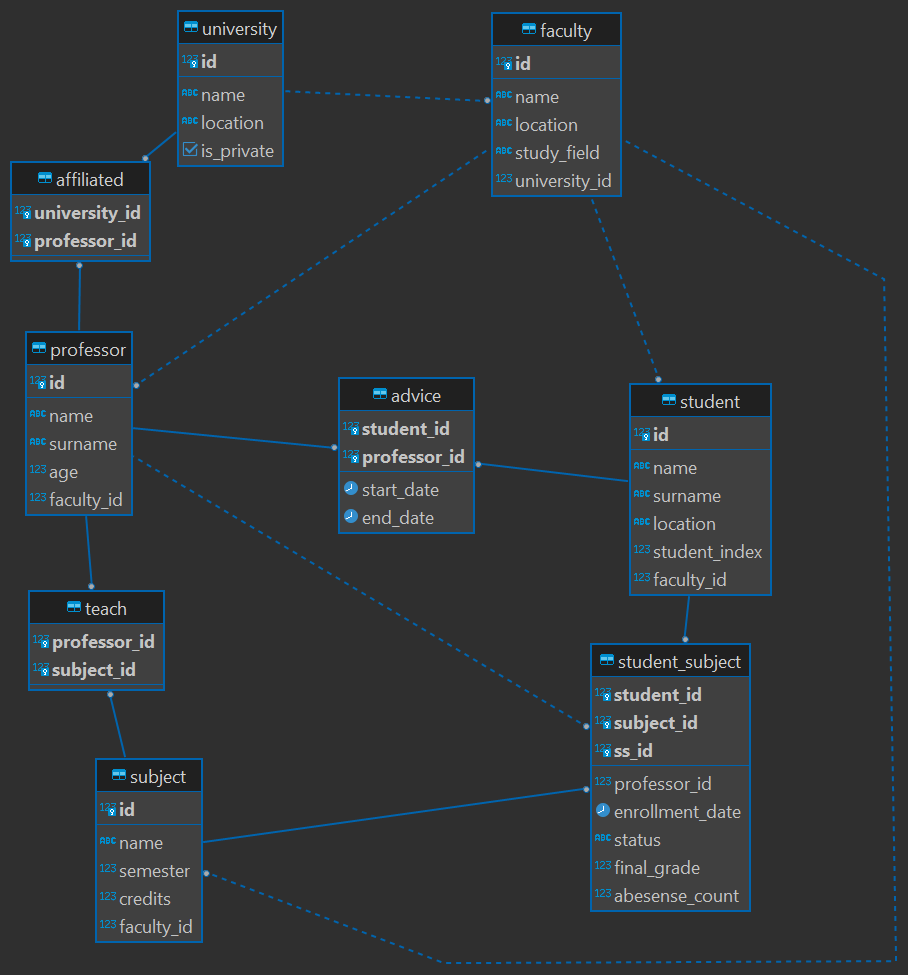
Relational diagram made in DBeaver

AI Usage for Relational Design
Name of AI service/solution that was used: ChatGPT (OpenAI)
Type of service/subscription: Free Tier
Final result: I reviewed my updated conceptual ER model from Phase 1 to correctly map all entities, weak entities, and relationships into a logical relational database schema. The weak entity Student_Subject was correctly materialized with a composite primary key formed by its owner entities' keys plus its discriminator (Student_Id, Subject_Id, Ss_Id), while all M:N relationships (Advises, affiliated_with, Teach) were materialized as bridge tables.
Final Result
Tables
University ( Id, Name, Location, is_private )
Faculty ( Id, University_Id* (University), Name, Location, Study_field )
Professor ( Id, Faculty_Id* (Faculty), Name, Surname, Age )
Student ( Id, Faculty_Id* (Faculty), Name, Surname, Location, Student_Index )
Subject ( Id, Faculty_Id* (Faculty), Name, Semester, Credits )
Student_Subject ( [Student_Id* (Student), Subject_Id* (Subject), Ss_Id], Professor_Id* (Professor), Enrollment_Date, Status, Final_Grade, Absences_Count )
Advice ( [Student_Id* (Student), Professor_Id* (Professor), Start_Date], End_Date )
Affiliated ( [University_Id* (University), Professor_Id* (Professor)] )
Teach ( [Professor_Id* (Professor), Subject_Id* (Subject)] )
DDL script for creating the database schema and objects:
DML script for inserting data in the tables
Relational diagram made in DBeaver
Results in details / description:
Schema Mapping & Normalization Review: All conceptual entities from Phase 1 were mapped to relations. Foreign keys were introdu
AI Usage Log
Schema Mapping & Normalization Review: All entities from Phase 1 were mapped to relations. Foreign keys were introduced to represent 1:N relationships (University_Id in Faculty, as well as Faculty_Id in Professor, Student, and Subject).
Weak Entity Materialization: The weak entity Student_Subject was updated to align with the Phase 1 ER model. Its composite primary key is formed exclusively by its discriminator (Ss_Id) along with the primary keys of its owner entities (Student_Id and Subject_Id). The regular 1:N relationship with Professor (assignTo) is materialized via a foreign key (Professor_Id) in this table and is not part of the primary key.
Relationship Materialization:
Advises: The M:N relationship with attributes (start_date, end_date) was mapped to the Advice table with a composite primary key (Student_Id, Professor_Id, Start_Date).
affiliated_with: The M:N relationship was mapped to the Affiliated bridge table with a composite primary key (University_Id, Professor_Id).
Teach: The M:N relationship was mapped to the Teach bridge table with a composite primary key (Professor_Id, Subject_Id).
Visual Alignment & Tooling: The Phase 2 relational diagram was visually reorganised to strictly mirror the topographical layout of the Phase 1 ER diagram. The diagram was generated using the DBeaver ERD Tool using standard Crow's Foot notation.
Attachments (11)
- schema_creation1.sql (2.1 KB ) - added by 7 months ago.
- data_load1.sql (1.2 KB ) - added by 7 months ago.
- relational_schema.png (99.0 KB ) - added by 3 months ago.
- relational_schema2.png (100.3 KB ) - added by 3 months ago.
- relational_schema3.png (102.8 KB ) - added by 3 months ago.
- schema_creation.sql (3.6 KB ) - added by 4 weeks ago.
- data_load.sql (1.5 KB ) - added by 4 weeks ago.
- data_load.3.sql (1.5 KB ) - added by 3 weeks ago.
- relational_schema4.png (97.3 KB ) - added by 3 weeks ago.
- schema_creation3.sql (3.5 KB ) - added by 13 days ago.
- db_202527z_va_prj_scholaris - public.png (49.2 KB ) - added by 12 days ago.
Download all attachments as: .zip