Use-case 0002 Implementation - Create reservation request
Initiating actor
Room Requester
Other actors
Reservation Approver
Description of the use-case goals
The goal of this use-case is to allow a room requester to create a new reservation request. The reservation may include a room, requested equipment, or both. In this prototype demonstration, the requester creates a reservation for a selected room and time interval.
The prototype follows the instruction that the user should not be expected to remember database identifiers. Instead of manually entering user_id or room_id, the application lists available users and rooms, and the requester selects the appropriate values from the displayed lists.
Scenario
- The Room Requester chooses the option Create reservation request from the main menu.
- The system displays a list of users.
- The Room Requester selects the requester from the list.
- The system asks for the reservation date.
- The Room Requester enters the reservation date.
- The system asks for the start time and end time.
- The Room Requester enters the requested time interval.
- The system asks whether the reservation should include a room.
- The Room Requester chooses to include a room.
- The system asks for minimum capacity, room type, and optional required equipment in the room.
- The system displays available rooms that satisfy the selected criteria.
- The Room Requester selects one of the available rooms from the list.
- The system asks whether additional/general equipment should be requested.
- The Room Requester chooses whether to request additional equipment.
- The system inserts a new record into the project.reservations table with status pending.
- If requested equipment is selected, the system inserts corresponding records into the project.reservation_equipment table.
- The system displays the created reservation details.
Screenshots
The following screenshot shows the selection of the requester and reservation parameters.

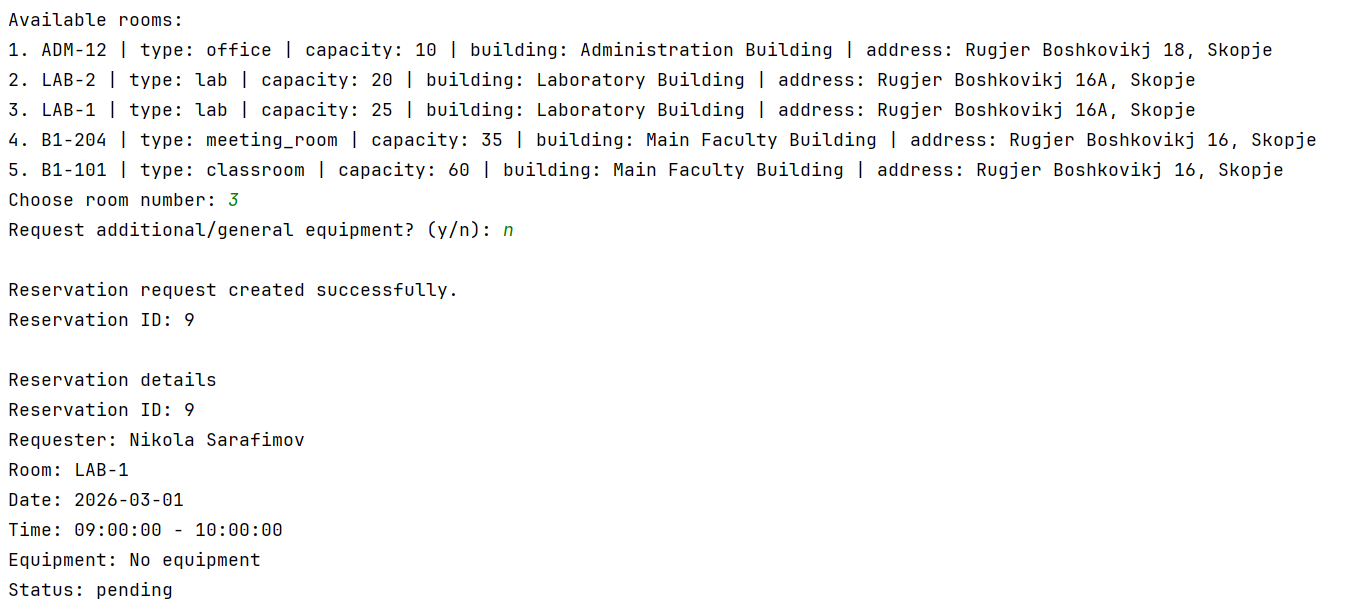
The following screenshot shows the successfully created reservation request.
 In the demonstrated screenshot, the requester creates a room-only reservation. The prototype also supports optional requested equipment through the reservation_equipment table.
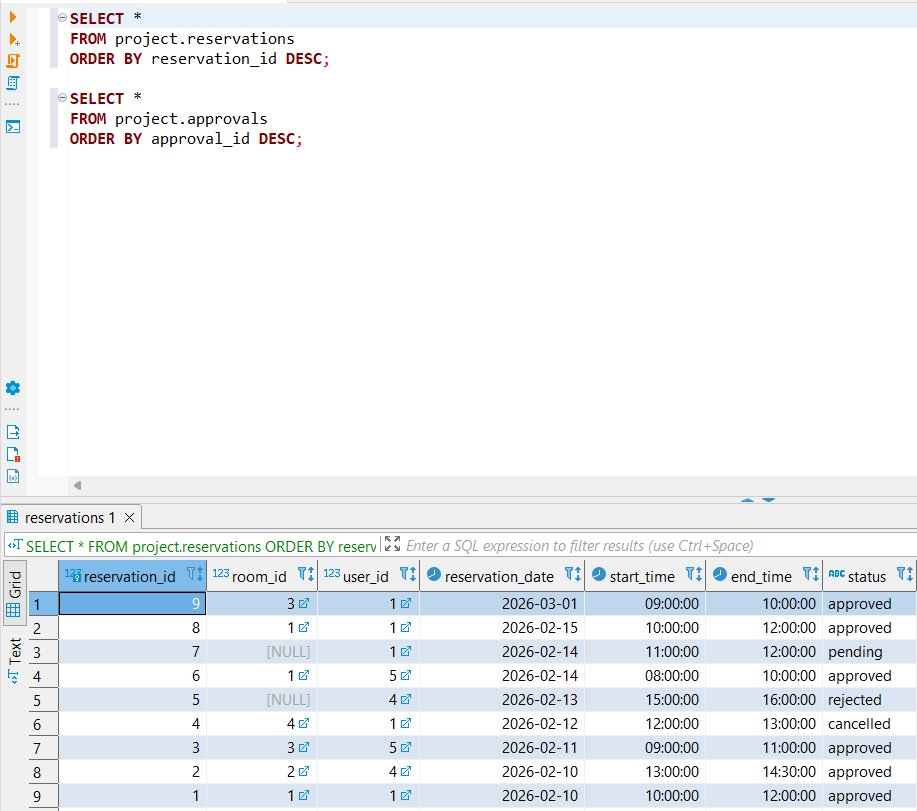
The following screenshot shows database verification in DBeaver after the reservation was created and later approved.

SQL commands used by the system
The system first reads the list of possible requesters. The question mark symbols (?) represent parameters that are filled by the Java application from the user input using prepared statements.
SELECT
user_id,
full_name,
username,
role,
email
FROM project.users
ORDER BY user_id;
The system then searches for available rooms for the selected reservation date and time interval.
SELECT
r.room_id,
r.room_code,
r.capacity,
r.type,
b.name AS building_name,
b.address
FROM project.rooms r
JOIN project.buildings b
ON b.building_id = r.building_id
WHERE r.capacity >= ?
AND (? IS NULL OR r.type = ?)
AND NOT EXISTS (
SELECT 1
FROM project.reservations res
WHERE res.room_id = r.room_id
AND res.reservation_date = ?
AND res.status IN ('pending', 'approved')
AND ? < res.end_time
AND ? > res.start_time
)
ORDER BY r.capacity, r.room_code;
After the requester selects a room, the system inserts the new reservation request.
INSERT INTO project.reservations (
room_id,
user_id,
reservation_date,
start_time,
end_time,
status
)
VALUES (?, ?, ?, ?, ?, 'pending')
RETURNING reservation_id;
If the requester also selects additional equipment, the system inserts records into project.reservation_equipment.
INSERT INTO project.reservation_equipment (
reservation_id,
equipment_id,
requested_quantity
)
VALUES (?, ?, ?);
Database usage explanation
This use-case reads data from the following tables:
- project.users – used to allow the requester to be selected from a list.
- project.rooms – used to display available rooms.
- project.buildings – used to display the building name and address.
- project.reservations – used to check room availability and insert the new reservation.
- project.equipment – used if additional equipment is requested.
- project.reservation_equipment – used if requested equipment is included in the reservation; this table was created in Phase P2 from the requests_equipment M:N relationship in the corrected ER model.
This use-case modifies the database by:
- inserting a new record into project.reservations with initial status pending;
- inserting records into project.reservation_equipment if additional requested equipment is selected.
Result of the implementation
The prototype successfully creates a new reservation request. In the demonstrated test, the system created reservation ID 9 for requester Nikola Sarafimov, room LAB-1, date 2026-03-01, and time interval 09:00–10:00. The reservation was created with status pending, which means it can later be reviewed by an approver.
Attachments (3)
- uc0002_choose_user_room.png (79.9 KB ) - added by 3 months ago.
- uc0002_reservation_created.png (78.7 KB ) - added by 3 months ago.
- dbeaver_reservations_result.png (49.3 KB ) - added by 3 months ago.
Download all attachments as: .zip