Use-case 0003 Implementation - Approve or reject reservation
Initiating actor
Reservation Approver
Other actors
Room Requester
Description of the use-case goals
The goal of this use-case is to allow a reservation approver to review pending reservation requests and record an approval or rejection decision. The system displays pending reservations, allows the approver to select a reservation, and then saves the decision in the database.
This use-case demonstrates update and insert operations in the database. The reservation status is updated, and a new approval record is inserted.
Scenario
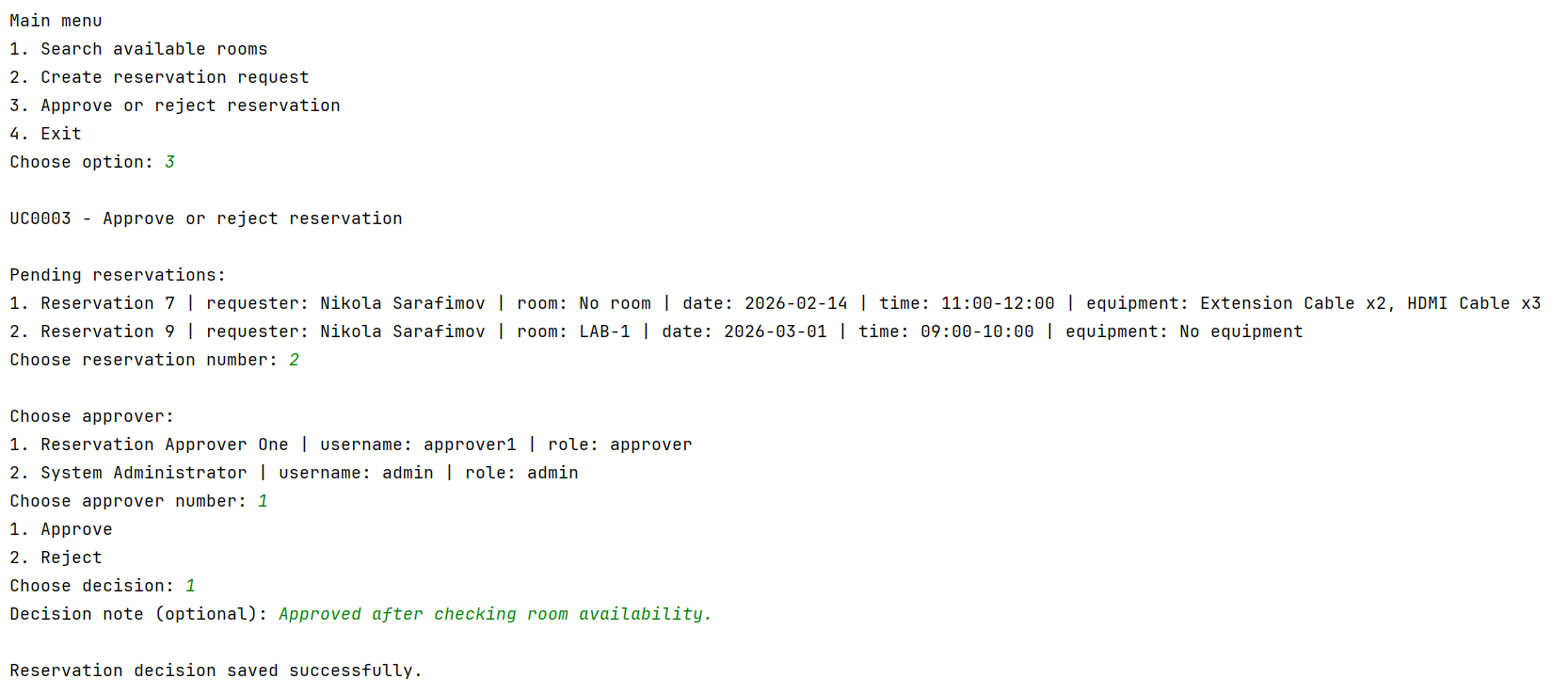
- The Reservation Approver chooses the option Approve or reject reservation from the main menu.
- The system displays a list of all pending reservations.
- The Reservation Approver selects a reservation from the list.
- The system displays a list of users who can approve reservations.
- The Reservation Approver selects the approver from the list.
- The system asks whether the reservation should be approved or rejected.
- The Reservation Approver chooses the decision.
- The system asks for an optional decision note.
- The Reservation Approver enters the note.
- The system updates the status of the selected reservation in the project.reservations table.
- The system inserts a new approval record into the project.approvals table.
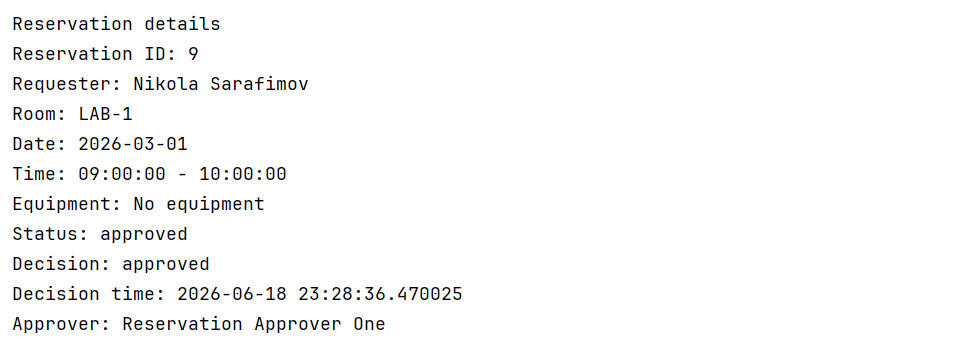
- The system displays the final reservation details, including status, decision, decision time, and approver.
Screenshots
The following screenshot shows the list of pending reservations and the approval input.

The following screenshot shows the final approved reservation details.

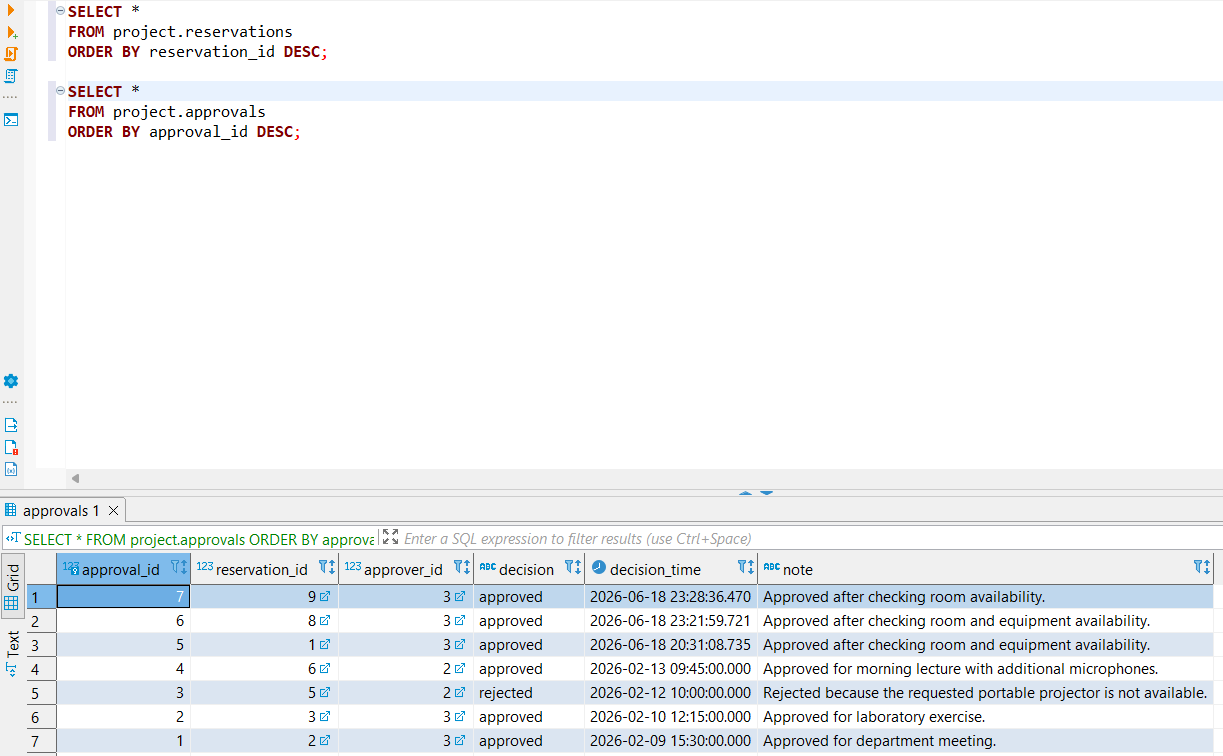
The following screenshot shows database verification in DBeaver for the approval record.

SQL commands used by the system
The question mark symbols (?) represent parameters that are filled by the Java application from the user input using prepared statements.
The system first lists all pending reservations.
SELECT
res.reservation_id,
res.reservation_date,
res.start_time,
res.end_time,
res.status,
u.full_name AS requester_name,
r.room_code,
e.name AS requested_equipment,
req.requested_quantity
FROM project.reservations res
JOIN project.users u
ON u.user_id = res.user_id
LEFT JOIN project.rooms r
ON r.room_id = res.room_id
LEFT JOIN project.reservation_equipment req
ON req.reservation_id = res.reservation_id
LEFT JOIN project.equipment e
ON e.equipment_id = req.equipment_id
WHERE res.status = 'pending'
ORDER BY res.reservation_date, res.start_time, res.reservation_id;
The system then lists the possible approvers.
SELECT
user_id,
full_name,
username,
role
FROM project.users
WHERE role IN ('approver', 'admin')
ORDER BY user_id;
After the approver selects the reservation and the decision, the system updates the reservation status.
UPDATE project.reservations
SET status = ?
WHERE reservation_id = ?
AND status = 'pending';
The system then inserts the approval decision.
INSERT INTO project.approvals (
reservation_id,
approver_id,
decision,
decision_time,
note
)
VALUES (?, ?, ?, CURRENT_TIMESTAMP, ?);
Finally, the system displays the final reservation details.
SELECT
res.reservation_id,
res.reservation_date,
res.start_time,
res.end_time,
res.status,
u.full_name AS requester_name,
r.room_code,
a.decision,
a.decision_time,
a.note,
approver.full_name AS approver_name
FROM project.reservations res
JOIN project.users u
ON u.user_id = res.user_id
LEFT JOIN project.rooms r
ON r.room_id = res.room_id
LEFT JOIN project.approvals a
ON a.reservation_id = res.reservation_id
LEFT JOIN project.users approver
ON approver.user_id = a.approver_id
WHERE res.reservation_id = ?;
Database usage explanation
This use-case reads data from the following tables:
- project.reservations – used to list pending reservations and display the final reservation status.
- project.users – used to display the requester and the approver.
- project.rooms – used to display room information.
- project.reservation_equipment – used to display requested equipment if it exists; this table was created in Phase P2 from the requests_equipment M:N relationship in the corrected ER model.
- project.equipment – used to display equipment names.
- project.approvals – used to display and store the approval decision.
This use-case modifies the database by:
- updating the status of the selected reservation in project.reservations;
- inserting a new approval decision in project.approvals.
Result of the implementation
The prototype successfully approved reservation ID 9. The reservation status was changed to approved, and a corresponding approval record was inserted into the project.approvals table. The approval record contains the approver, decision, decision time, and decision note.
Attachments (3)
- uc0003_pending_reservations.png (76.6 KB ) - added by 4 months ago.
- uc0003_reservation_approved.png (29.8 KB ) - added by 4 months ago.
- dbeaver_approvals_result.png (53.8 KB ) - added by 4 months ago.
Download all attachments as: .zip