Relational Design
Notation
- Primary keys are underlined.
- Foreign keys are marked with * at the end of their name and the referenced entity is written in parentheses.
Tables
University ( Id, Name, Location, isprivate )
Faculty ( Id, University_Id* (University), Name, Location, Study_field )
Professor ( Id, Faculty_Id* (Faculty), Name, Surname, Age )
Student ( Id, Faculty_Id* (Faculty), Name, Surname, Location, Student_Index )
Subject ( Id, Faculty_Id* (Faculty), Name, Semester, Credits )
Student_Subject ( [Ss_Id, Student_Id* (Student), Subject_Id* (Subject)], Professor_Id* (Professor), Final_Grade, Status, Enrollment_Date, Absences_Count )
Advice ( [Student_Id* (Student), Professor_Id* (Professor)], Start_Date, End_Date )
Affiliated ( [University_Id* (University), Professor_Id* (Professor)] )
Teach ( [Professor_Id* (Professor), Subject_Id* (Subject)] )
DDL script for creating the database schema and objects:
DML script for inserting data in the tables
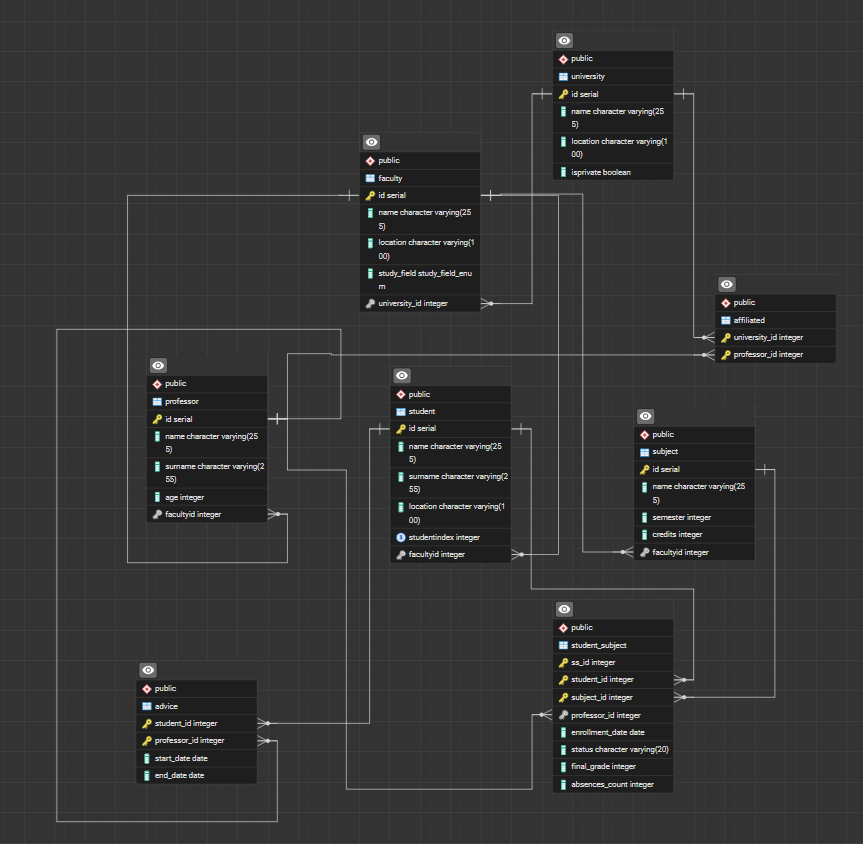
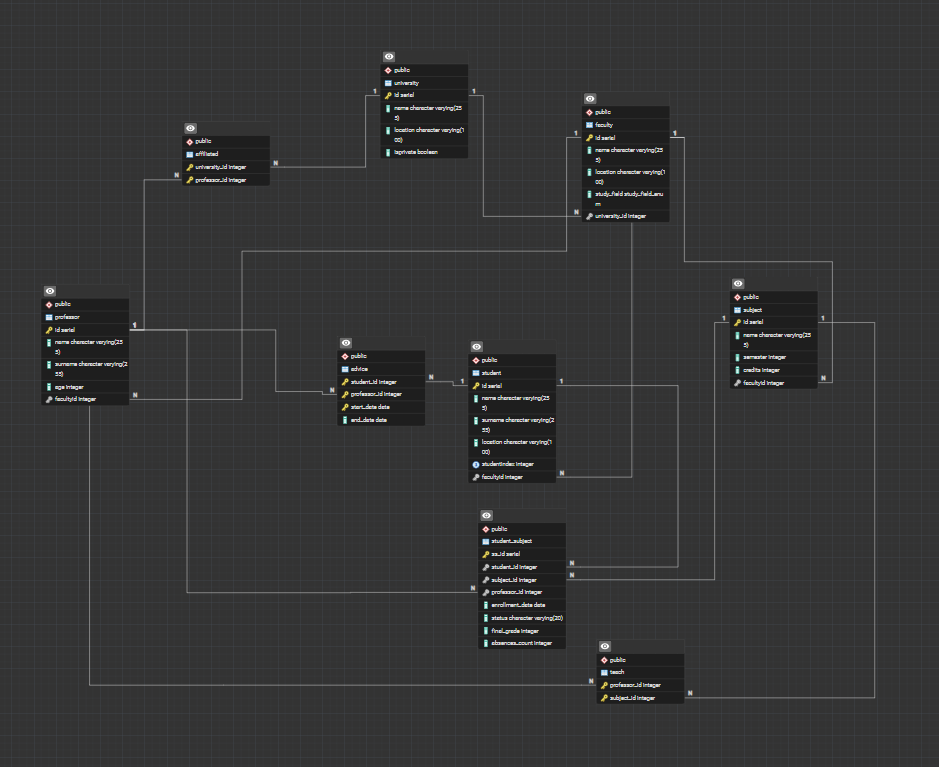
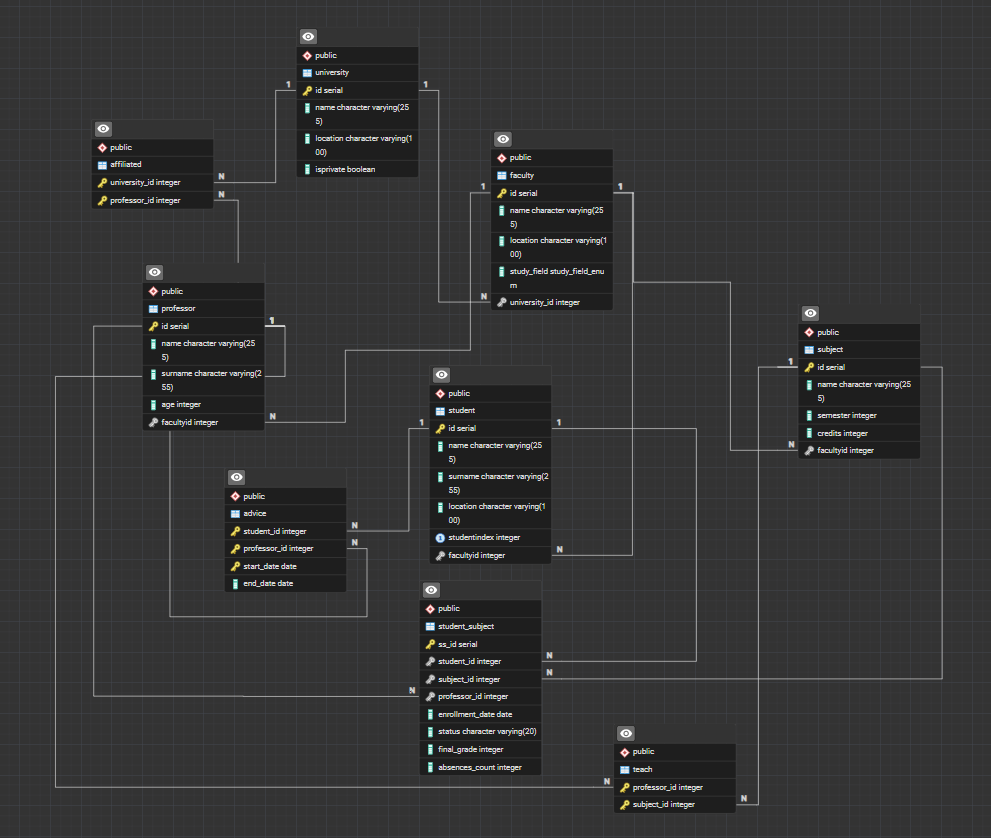
Relational diagram made in DBeaver

AI Usage for Relational Design
Name of AI service/solution that was used: ChatGPT (OpenAI)
Type of service/subscription: Free Tier
Final result: I reviewed my initial core database schema with the AI assistant to identify potential gaps in tracking student-professor interactions and professor-university ties. Based on these discussions, I successfully refined my tables by designing and incorporating the Advice and Affiliated relation schemas.
Final Result
Tables
University ( Id, Name, Location, isprivate )
Faculty ( Id, University_Id* (University), Name, Location, Study_field )
Professor ( Id, Faculty_Id* (Faculty), Name, Surname, Age )
Student ( Id, Faculty_Id* (Faculty), Name, Surname, Location, Student_Index )
Subject ( Id, Faculty_Id* (Faculty), Name, Semester, Credits )
Student_Subject ( [Ss_Id, Student_Id* (Student), Subject_Id* (Subject)], Professor_Id* (Professor), Final_Grade, Status, Enrollment_Date, Absences_Count )
Advice ( [Student_Id* (Student), Professor_Id* (Professor)], Start_Date, End_Date )
Affiliated ( [University_Id* (University), Professor_Id* (Professor)] )
Teach ( [Professor_Id* (Professor), Subject_Id* (Subject)] )
DDL script for creating the database schema and objects:
DML script for inserting data in the tables
Relational diagram made in DBeaver

Results in details / description:
Schema Normalization Review: I provided the AI with my initial 7-table layout (University, Faculty, Professor, Student, Subject, Subject_Professor, and Student_Subject). We reviewed the constraints to ensure proper cascading rules and column data integrity.
Relationship Modeling & Professor Assignment: To handle business requirements for office hours and mentorship, I formulated an Advice entity. Additionally, based on professor feedback regarding ambiguity in grading when multiple professors teach the same course, we removed the legacy Subject_Professor table. The Professor_Id was successfully migrated directly into the Student_Subject enrollment schema. This ensures that for every specific course enrollment, the system explicitly tracks which professor taught the student and is authorized to enter the final grade, eliminating any multi-instructor ambiguity.
Affiliation Tracking: I noticed a missing link where a professor might be affiliated with a specific university outside of just their faculty assignment. The AI assisted me in mapping this out cleanly as an Affiliated bridge table to prevent normalization redundancy.
Documentation Generation: The AI assisted in translating my updated schema into the clean, underlined notation style required by our project's Trac Wiki submission guidelines.
Entire AI usage log:
User: I have created an initial relational schema for my university database tracking universities, faculties, professors, students, and subject enrollments. Can you review my baseline table structure to see if there are any logical gaps for a complete academic management system?
AI: Analyzed your 7 core tables. The structure is highly normalized, but it currently lacks a way to track independent academic mentorship or office hours between a professor and a student outside of a classroom. It also lacks a clear way to track a professor's direct corporate or institutional affiliation to the primary university level if they span multiple departments.
User: Good point. I want to add an office hours/mentorship feature called Advice and a connection table called Affiliated. How should I structure their primary keys and foreign keys so they map cleanly to my existing Student, Professor, and University tables?
AI: Assisted by suggesting a many-to-many design pattern. For Advice, you can use a composite key pairing Student_Id and Professor_Id as foreign keys alongside tracking timestamps. For Affiliated, you can create a direct intersection table pairing University_Id and Professor_Id.
User: Excellent, that fits exactly what I had in mind. Can you help me format my final, updated schema—including these two new tables—into the underlined notation style required for our project documentation?
AI: Structured the final table schema list, explicitly emphasizing the primary keys with formatting underlines and clearly marking the foreign key dependencies and their referencing entities in parentheses.
Attachments (7)
- schema_creation1.sql (2.1 KB ) - added by 4 months ago.
- data_load1.sql (1.2 KB ) - added by 4 months ago.
- relational_schema.png (99.0 KB ) - added by 8 days ago.
- relational_schema2.png (100.3 KB ) - added by 8 days ago.
- relational_schema3.png (102.8 KB ) - added by 8 days ago.
- schema_creation.sql (3.5 KB ) - added by 8 days ago.
- data_load.sql (1.5 KB ) - added by 8 days ago.
Download all attachments as: .zip